5
QUICK-TWIST ADJUSTABLE ANALOG STICK
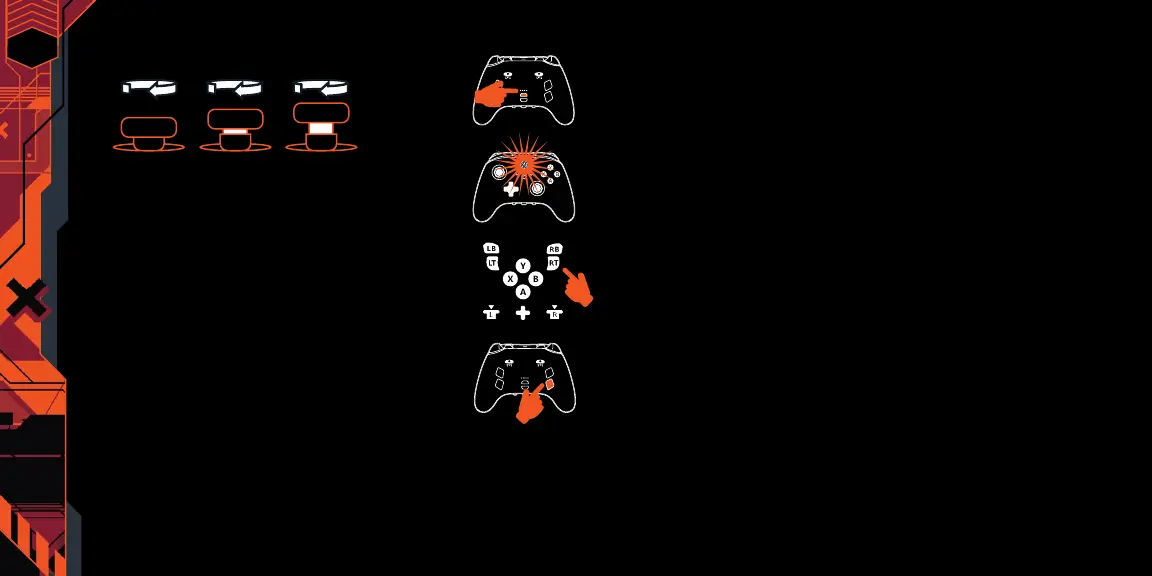
The analog stick height can be adjusted to one of three heights:
To change heights, twist the analog cap clockwise until you feel it
catch the next height notch. If you want to go to the tallest height turn
it a second time. To return to the standard height, turn the analog cap
a third time and the analog stick will drop back down to the standard
height.
POWERING OFF
Hold the Home button for 5 seconds to turn controller o.
ASSIGNING THE ADVANCED GAMING BUTTONS
A. Press the Program Button on the back
of the controller for 3 seconds.
B. The Program Status LED will ash,
signaling the controller is in assign
mode.
C.
Press the button
(A/B/X/Y/LT/RT/
LB/RB/Left Stick Press/Right Stick
Press/D-pad) you wish to assign to an
Advanced Gaming Button.
D. Then press the Advanced Gaming
Button (AGR1/AGR2/AGR3 or AGL1/
AGL2/AGL3) that you wish to perform
that function. The Program Status
LED will stop ashing, signaling
the Advanced Gaming Button has
been set.
E. Repeat for the remaining Advanced
Gaming Buttons.
N
OTE: Advanced Gaming Button assignments will remain in memory
after use.
RESETTING THE ADVANCED GAMING BUTTONS
1. Hold the Program Button down for 2-3 seconds. The Program
Status LED will slowly ash, signaling the controller is in assign
mode.
2. Press the previously assigned Advanced Gaming Button for 5
seconds, and the function will be cleared.
PROFILE SETTINGS
Custom user proles can be set using the PowerA OPS v3 Pro Wireless
Controller for PC & Cloud Gaming app on a PC. In the app you will be
able to set and save up to 3 custom proles; these proles will then
be loaded onto the controller. Each prole will be assigned a dierent
color to notify you which one is selected. Each press of the prole
button will swap to the next prole in order and then cycle back to the
beginning: 1 —> 2 —> 3 —> 1
The Program Status LED will quickly ash 3 times to signal a prole
has been changed and then return to solid.
To clear the proles or change the settings, please use the
PowerA OPS v3 Pro Wireless Controller for PC & Cloud Gaming app.
EN





 To Next Page