19
WARNING!
Before using the tool, read all instructions carefully.
Blade sheath
Charging the battery
NOTE: The battery pack comes partly charged. Charge the
battery pack prior to first use, ideally at least 60 minutes.
• Always pull out the plug of the charger from the mains before
removing or connecting the battery pack to the charger.
• Never charge the battery pack when the ambient temperature
is below 0°C or above 45°C.
• Never recharge a battery pack again immediately after
rapid charging. This could overcharge the battery pack, thus
reducing the lifespan of the battery pack and charger.
• Rest the charger for at least 15 minutes between continuously
charging sessions.
• If no battery pack is inserted into the charger and the charger
is connected to mains, the charging status LED shows red.
NOTE: Always fully charge the two batteries at same time.
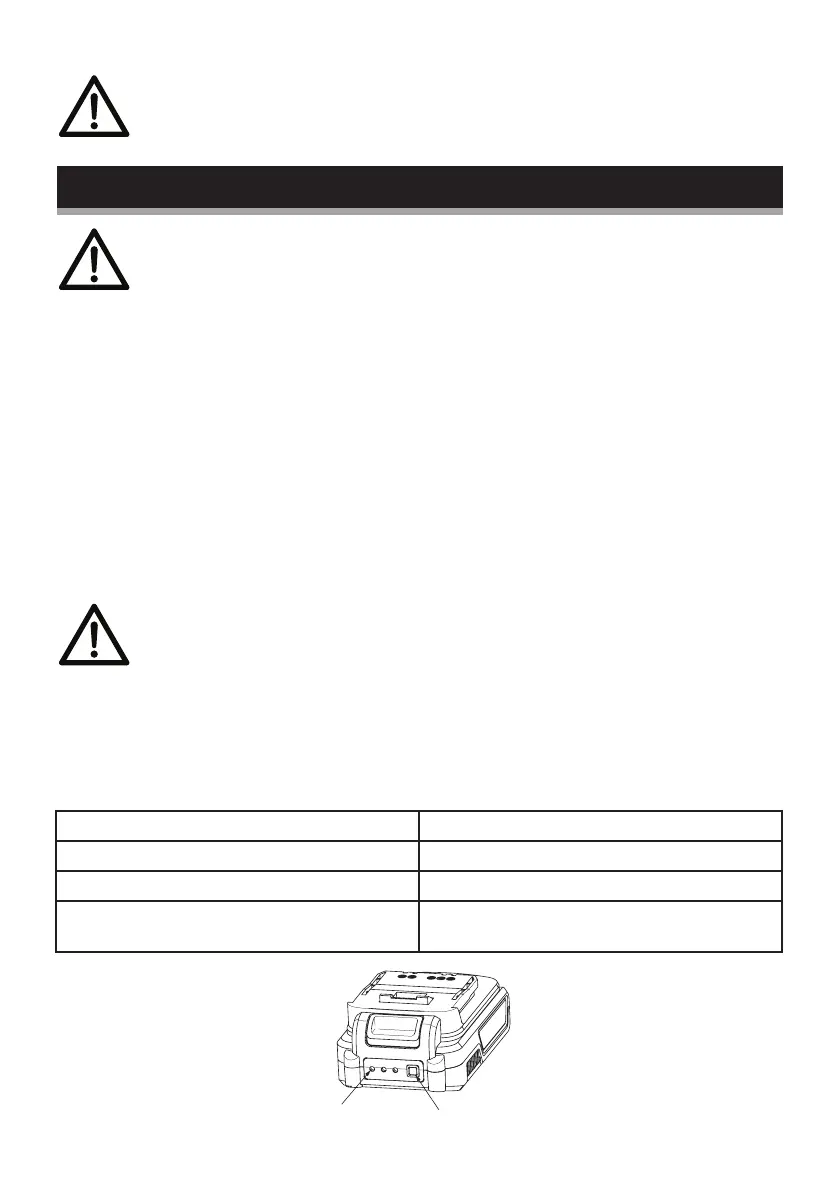
Checking battery capacity
Press the battery capacity level button to check the charging level
of the battery pack. The status/remaining charge will be shown on
the battery charging level indication light.
3 Green LEDs continuously Lit Battery pack fully charged
2 Green LEDs continuously Lit Battery pack 65% charged
1 Green LED continuously Lit Battery pack 35% charged
No LED lit Battery is dead and needs to
be charged
button
LED


 To Next Page