30
Troubleshooting
WARNING! Before performing any repair work, always
ensure that the battery pack has been removed.
WARNING! Always wear heavy-duty gloves when
adjusting or cleaning, especially when handling sharp
objects.
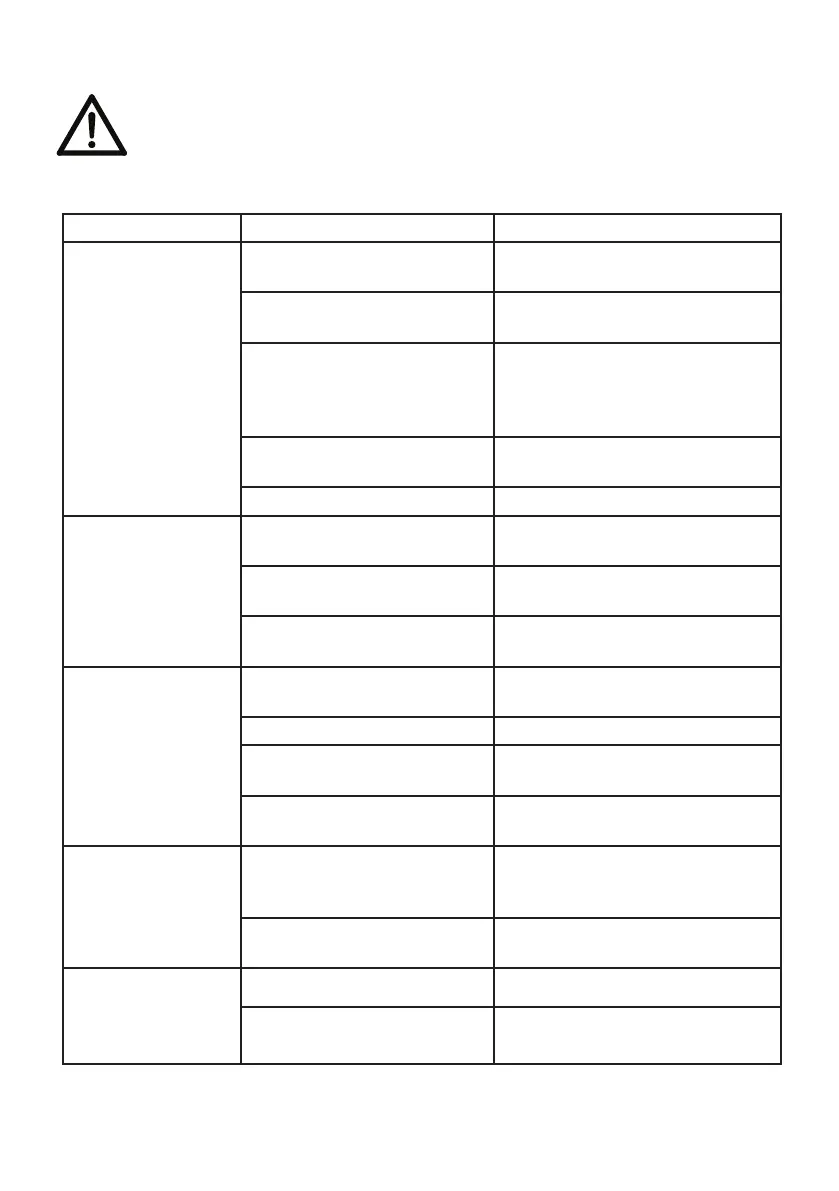
Fault Possible cause Solution
Mower fails to
start
Safety key is not
inserted
Insert safety key
Battery is not correctly
inserted
Remove battery and
reinsert
Mower standing in high
grass
Start motor on shorter
grass or already mowed
area, change cutting height
if necessary
The mower housing is
clogged
Clean housing so blade can
move freely
Battery has no power Check and recharge battery
Mower stops
working/loses
power
Cutting height is
incorrect
Adjust cutting height
Cutting blade is worn or
damaged
Replace with new blade
from dealer service centre
Battery performance
decreasing
Check battery performance
and charge if necessary
Grass bag is not
filled sufficiently
Cutting height is too
Low
Adjust and increase cutting
height
The lawn/grass is wet Allow lawn to dry
Underside of mower
deck is clogged
Clean underside of mower
deck
Cutting blade is worn or
damaged
Replace by contacting
customer service centre
Mower vibrating
at higher speed
Cutting blade is
unbalanced
Balance blade by grinding
each cutting edge until
equal
Blade is loose/
incorrectly fitted
Tighten blade bolt
Mower cuts
unevenly
The blade is damaged Sharpen blade or replace
Blade is assembled
incorrectly
Re-assemble blade
correctly


 To Next Page