PCCO90X
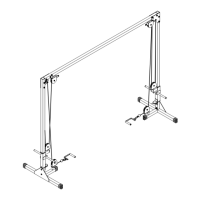
STEP 2
BE CAREFUL TO ASSEMBLE ALL COMPONENTS
IN THE SEQUENCE THAT THEY ARE PRESENTED.
NOTE:
finger tighten all hardware in this step. DO NOT wrench tighten
until the last step. some components may be PRE-ASSEMBLED.
nylon lock nuts will not fully screw onto bolts, must wrench tighten.
2A. first attach a vertical frame (A) to each base frame (B)
using a total of:
2 - (#2) M12X70mm hex head bolt
2 - (#8) M12 washer
2 - (#5) M12 nylon lock nut
2B. second attach a l-bracket (C) to each vertical frame (A)
and then to each base frame (B) using a total of:
2 - (#1) M12X75mm hex head bolt
2 - (#5) M12 nylon lock nut
2C. insert a end cap into each top opening of vertical
frame (A) using a total of:
2 - (#9) 50X50mm end cap
2D. slide an assembled weight frame (D) onto each
vertical frame (A).
2E. attach a pulley holder (I) to left support bracket (G)
and right support bracket (F) using a total of:
2 - (#7) 1/2” nylon lock nut
14


 To Next Page