PCCO90X
STEP 3
BE CAREFUL TO ASSEMBLE ALL COMPONENTS
IN THE SEQUENCE THAT THEY ARE PRESENTED.
NOTE:
finger tighten all hardware in this step. DO NOT wrench tighten
until the last step. some components may be PRE-ASSEMBLED.
nylon lock nuts will not fully screw onto bolts, must wrench tighten.
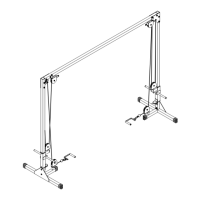
3A. attach cross beam (J) to the vertical frame (A) on the
left side using left support bracket (G) and a
connecting bracket (E) using a total of:
4 - (#1) M12X75mm hex head bolt
4 - (#5) M12 nylon lock nut
3B. attach cross beam (J) to the vertical frame (A) on the
right side using right support bracket (F) and a
connecting bracket (E) using a total of:
4 - (#1) M12X75mm hex head bolt
4 - (#5) M12 nylon lock nut
16


 To Next Page