EasyManua.ls Logo

Powermania Turbo M208E - User Manual

Default Icon
25 pages
Print Icon
To Next Page IconTo Next Page
Loading...
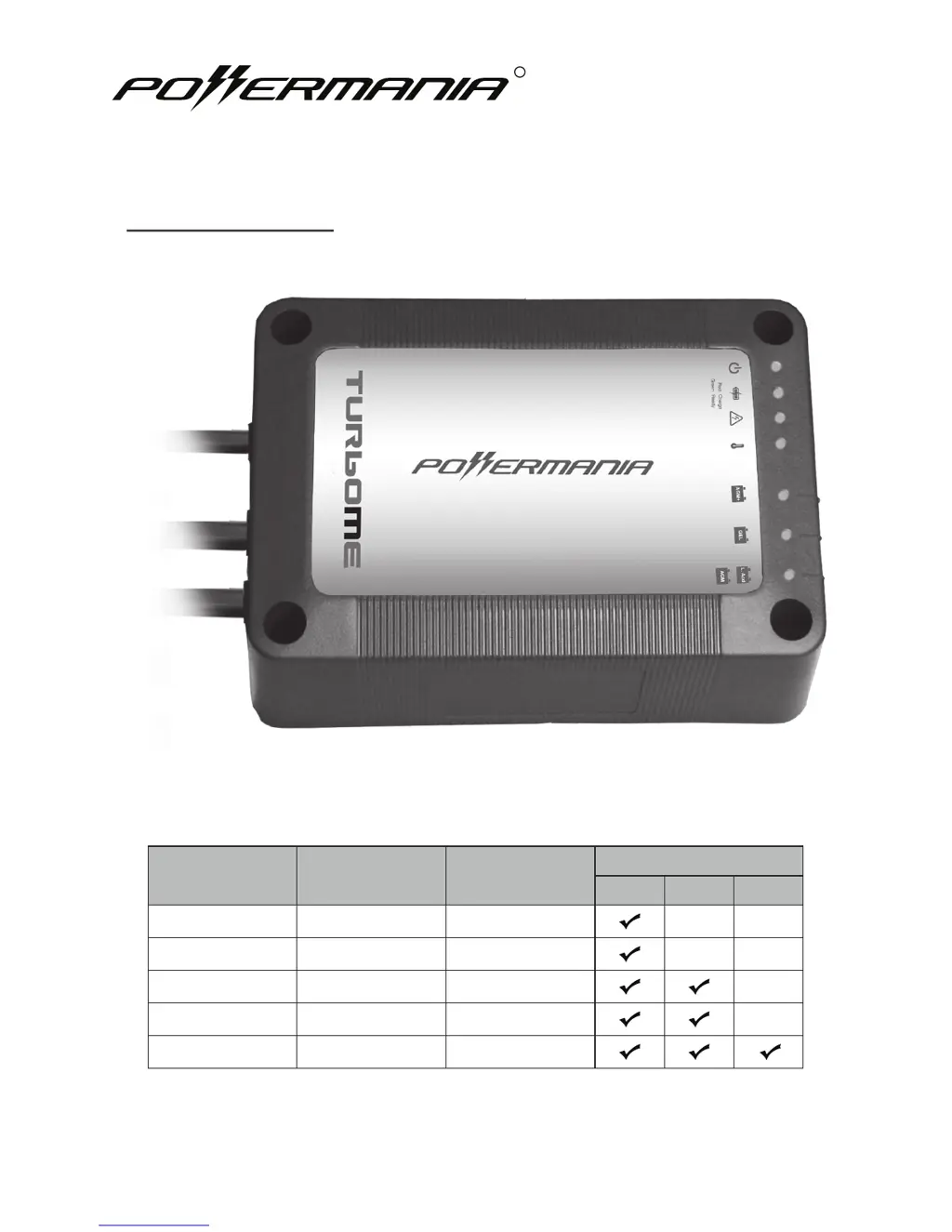
Model
# 12V Output
Bank
Max. Output
Battery System (DC)
12V 24V 36V
Turbo M106E 1 6 Amps
Turbo M108E 1 8 Amps
Turbo M208E 2 8 Amps
Turbo M212E 2 12 Amps
Turbo M312E 3 12 Amps
Turbo ME series battery charger
Operation Manual

Questions and Answers

Summary

Important Safety Notices

Battery Type Compatibility

Charger is for Lead Acid, AGM, GEL types only. Using others may cause damage or injury.

Explosive Gas Hazard

Warning about explosive gases from lead-acid batteries requires ventilation and ignition avoidance.

AC Power Cord Restrictions

Do not use 2-pin adapters or modify the factory AC power cord to prevent serious injury.

Proper Grounding Required

Connect only to a properly grounded AC outlet protected by a GFCI breaker.

Disconnect Power Before DC Wiring

Always unplug AC power before making DC wiring connections to prevent electric shock.

Introduction

Product Overview

Describes the Turbo ME charger as waterproof, corrosion-resistant, and ideal for harsh environments.

Personal Safety Precautions

General Safety Guidelines

Covers working near batteries, handling acid, eye protection, and avoiding ignition sources.

Precautions Prior to Charge Battery

Pre-Charge Preparations

Ensures correct battery type, cable integrity, and device status before starting the charging process.

Safety Precautions

Ventilation and Terminal Cleaning

Ensures adequate ventilation and safe practices for cleaning battery terminals.

Watering and Extension Cords

Guidance on adding distilled water and using approved extension cords safely.

GFCI Outlet Requirement

Reiterates the need for connecting to a GFCI protected AC outlet for safety.

Box Contents

Included Items List

Lists the charger, AC/DC cables, operation manual, and installation screws included in the package.

Specifications

Model Specific Data

Details model-specific data like output current, voltage, weight, dimensions, and battery capacity.

General Specifications

Technical Details and Compliances

Lists nominal input/output voltage, battery types, operational temp, cable lengths, and compliances.

Features and Protections

Details LED functions, special features like Adaptive Loading, and safety protections.

Special Features

Adaptive Loading Function

Dynamically adjusts output to charge batteries faster, prioritizing lower charged batteries.

3-Stage Smart Charge Process

Maximizes battery potential and life through Bulk, Absorption, and Float charging stages.

Feature Details

Charge Stage Explanations

Details the Bulk, Absorption, and Float stages of the 3-Stage Smart Charge process.

Battery Type Selector Operation

Allows selection for Flooded Lead-Acid, AGM, High Power AGM, and GEL battery types.

Installation

Mounting and Ventilation Guidelines

Provides instructions and diagrams for mounting the charger securely with proper ventilation.

Battery Type Selection

How to Select Charge Mode

Step-by-step guide on how to switch the battery selector to the correct charge mode.

Selector Screw Safety Warning

Warning regarding the length of screws used to secure the battery selector to prevent damage.

DC Wiring Connections

Connection Safety Guidelines

Emphasizes connecting all DC output cables to battery terminals for safety.

Wiring Diagram Legend

Explains symbols and wire colors used in the DC connection diagrams.

Multi-Output Wiring Recommendation

Advises connecting the first output set to the main house battery for multi-output models.

DC Wiring Diagrams

Connection 1 A: 1-Bank to Single 12 V Battery

Diagram showing how to connect a 1-bank charger (M106E/M108E) to a single 12V battery.

DC Wiring Diagrams

Connection 1 B: 1-Bank to Serial 6 V Batteries

Diagram for connecting a 1-bank charger to two serial-connected 6V batteries.

DC Wiring Diagrams

Connection 1 C: Two 1-Bank to Single 12 V Battery (Parallel)

Diagram for connecting two 1-bank chargers in parallel to a single 12V battery.

DC Wiring Diagrams

Connection 2 A: 2-Bank to Single 12 V Battery

Diagram showing a 2-bank charger (M208E/M212E) connected to a single 12V battery.

DC Wiring Diagrams

Connection 2 B: 2-Bank to Two 12 V Batteries

Diagram for connecting a 2-bank charger to two separate 12V batteries.

Series and Parallel Battery Options

Notes on connecting batteries in series (24/36V) or parallel for increased capacity.

Operating the Charger

Operating Steps

Step-by-step guide on installing, selecting type, plugging in, and starting the charger.

Battery Voltage Settings

Table showing voltage settings for Flooded/AGM, GEL, and AGM+ charge modes.

Power and Charge Status LEDs

Explains the function of the Power and Charge Status LED indicators.

LED Indicator Descriptions

Warning Indicators Explained

Details ORANGE indicators for Over-Voltage and Overheat warnings.

Charge Mode Indicators Explained

Explains GREEN indicators for AGM+, GEL, and Flooded/AGM charge modes.

Troubleshooting

Power Indicator Not On

Troubleshooting for the GREEN Power LED not illuminating, checking AC input and DC output.

Overheat Indicator Orange

Addresses ORANGE Overheat LED by checking airflow and ambient temperature.

Over-Voltage Indicator Orange

Solutions for ORANGE Over-Voltage LED, checking wiring and battery voltage.

Maintaining and Servicing

Charger Maintenance Tips

Recommendations for cleaning terminals and checking electrolyte levels for optimal performance.

Warranty and Service Information

Details the 2-year limited warranty, coverage conditions, and exclusions.

Contact Information and Support

Provides company address, phone number, fax, and email for inquiries.

Product Registration

Online Registration Procedure

Instructions to register the product online at www.powermaniausa.com for warranty or support.

Powermania Turbo M208E Specifications

General IconGeneral
BrandPowermania
ModelTurbo M208E
CategoryBattery Charger
LanguageEnglish

Related product manuals