EasyManua.ls Logo

Powermania Turbo M340V2 - User Manual

Default Icon
25 pages
Print Icon
To Next Page IconTo Next Page
Loading...
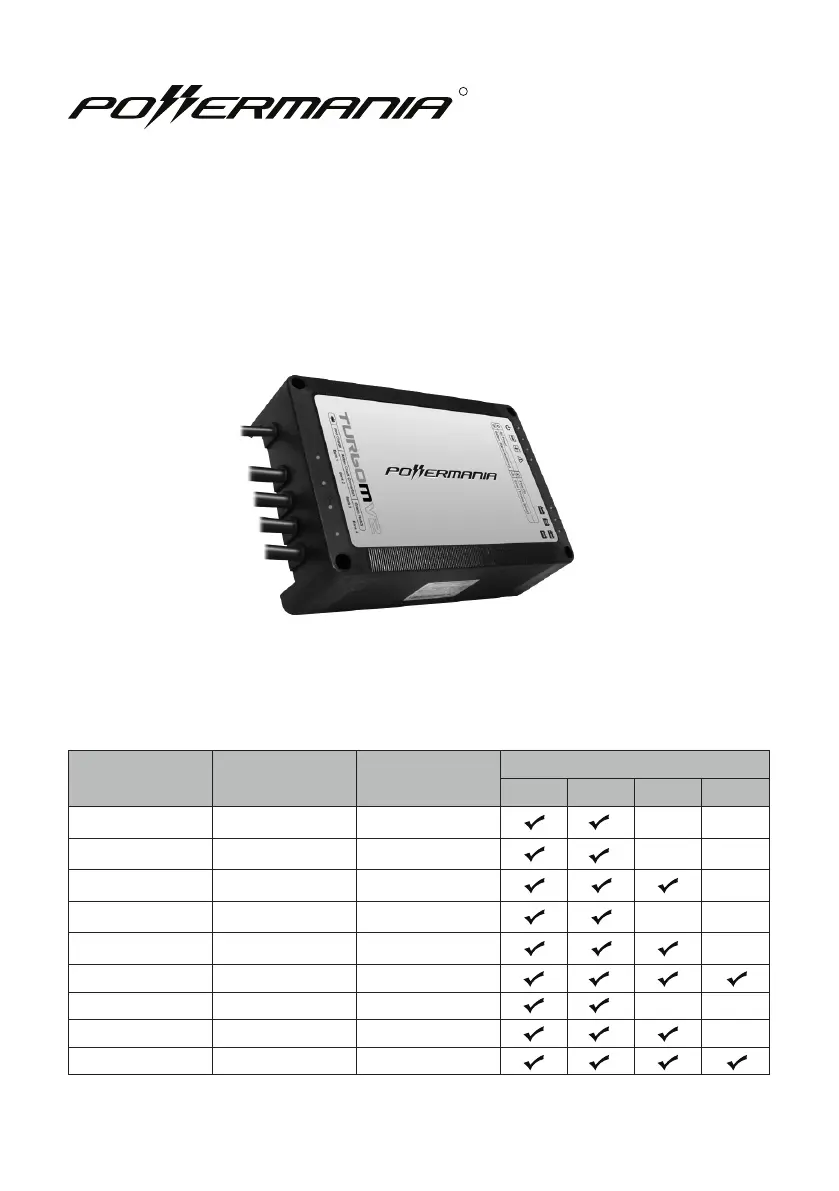
Model # 12V Output Max. Output
Battery System (DC)
12V 24V 36V 48V
Turbo M212V2 2 12 Amps
Turbo M220V2 2 20 Amps
Turbo M320V2 3 20 Amps
Turbo M230V2 2 30 Amps
Turbo M330V2 3 30 Amps
Turbo M430V2 4 30 Amps
Turbo M240V2 2 40 Amps
Turbo M340V2 3 40 Amps
Turbo M440V2 4 40 Amps
Turbo MV2 series battery charger
Operation Manual
R

Questions and Answers

Summary

Turbo MV2 Series Battery Charger

Important Safety Notices

Battery Type Warning

Warnings on battery type, explosive gases, AC adapters, grounding, and DC wiring.

Explosive Gases Warning

Batteries emit explosive gases; follow safety instructions carefully.

AC Adapter and Cord Safety

Avoid 2-pin adapters and do not modify the factory AC power cord.

Grounding and Wiring Safety

Connect to grounded outlets and unplug AC before DC connections.

Introduction and Safety Precautions

Personal Safety Precautions

Safety measures for working near batteries, including ventilation and protective gear.

Precautions Prior to Charging Battery

Guidelines before charging: temperature, battery type, cable checks, and device power.

Package Contents

Box Contents

Lists all items included in the charger package.

Feature Highlights

Adaptive Loading

Dynamically adjusts charger output to prioritize depleted batteries for faster charging.

3-Stage Smart Charge

Charges battery in three stages: Bulk, Absorption, and Monitor/Float for optimal performance.

Installation Guide

Installing the Charger

Step-by-step guide for mounting the charger on a vehicle or watercraft.

Installation Drawing

Diagrams showing proper mounting orientation, clearance, and hardware.

Select Battery Type

Battery Selector Positions

Explains the three Battery Selector positions for Flooded Lead-Acid, AGM, and LiFePO4 batteries.

Switching Charge Modes

Instructions on how to change the battery selector to the desired charge mode.

DC Wiring Connection

Connect the DC Cables

Guidelines for connecting DC cables to batteries, emphasizing polarity and full connectivity.

Wiring Configurations

Diagrams for various wiring configurations: serial, parallel, and multi-output battery connections.

Operating Instructions

Operating the Charger

Steps for operating the charger: setting selection, AC connection, and initial test cycle.

LED Indicator Description

Explanation of LED icons and their descriptions for Power, Monitor, Float, Error, and modes.

Troubleshooting

Troubleshooting Guide

Table of common problems, their causes, and recommended solutions for the charger.

Battery Isolation Test

Procedure to identify if charger errors stem from the charger itself or a defective battery.

Maintaining the Charger

Recommendations for cleaning terminals, checking electrolyte levels, and long-term maintenance.

Other Information

Fuse Replacement Instruction

Step-by-step instructions for safely replacing fuses in the charger.

Warranty and Service Information

Details on the 2-year limited warranty, coverage period calculation, and excluded conditions.

Contact Information

Powermania Inc. contact details: address, phone, fax, and email for support.

Optional Accessories

List of available optional accessories with part numbers and descriptions.

Product Registration

Online Registration

Fields and instructions for registering the product online at the Powermania website.

Mail-in Registration Details

Company address and instructions for completing the product registration via mail.

Powermania Turbo M340V2 Specifications

General IconGeneral
Input Voltage100-240V AC
Input Frequency50/60 Hz
Number of Banks3
Output Voltage12V
Output Current40A
Operating Temperature-20°C to 40°C
CoolingFan-cooled
Weight4.5 kg
CompatibilityLead-acid
Protection FeaturesReverse Polarity

Related product manuals