EasyManua.ls Logo

Powermania Turbo M430V2 - User Manual

Default Icon
25 pages
Print Icon
To Next Page IconTo Next Page
Loading...
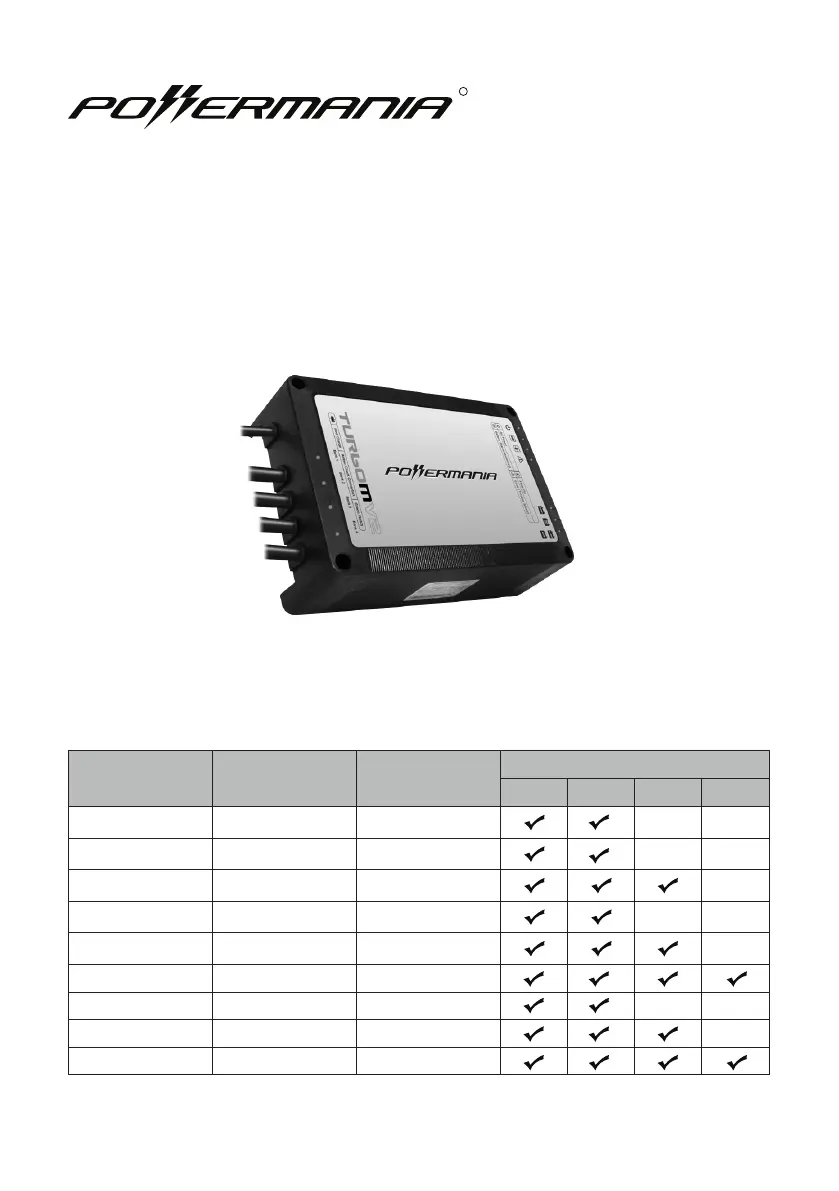
Model # 12V Output Max. Output
Battery System (DC)
12V 24V 36V 48V
Turbo M212V2 2 12 Amps
Turbo M220V2 2 20 Amps
Turbo M320V2 3 20 Amps
Turbo M230V2 2 30 Amps
Turbo M330V2 3 30 Amps
Turbo M430V2 4 30 Amps
Turbo M240V2 2 40 Amps
Turbo M340V2 3 40 Amps
Turbo M440V2 4 40 Amps
Turbo MV2 series battery charger
Operation Manual
R

Questions and Answers

  • J
    James WilliamsAug 13, 2025
    Why is the Error LED on my Powermania Turbo M430V2 Battery Charger on?
    • A
      Anthony Roberts DDSAug 13, 2025
      If the Error LED is on your Powermania Battery Charger, it could be due to a few reasons. First, the charger might be detecting that the battery voltage exceeds a safe range. To fix this, check and correct the battery wiring, ensuring each output is connected to a 12V battery. Wait at least 30 seconds before plugging the AC power in again. If the issue persists, a Battery Isolation Test is recommended. Another cause could be that the charger or the surrounding temperature is too high. In this case, remove any obstructions around the charger to improve airflow. If it's in direct sunlight, move it to a shaded area. Once the temperature drops, the charger should automatically restart.
  • L
    Logan SchroederAug 16, 2025
    What to do if Charge Status / Connection Check LED displays amber on Powermania Battery Charger?
    • S
      Sherry RichardsonAug 16, 2025
      An amber Charge Status/Connection Check LED on your Powermania Battery Charger indicates a few potential issues: * One or more outputs are not properly connected to a 12V battery. Ensure the DC output is correctly connected. * A fuse failure may have occurred. Check the output cables for blown fuses and replace them if necessary. * Faulty terminal connections could be the cause. Clean the battery terminals and tighten all wiring connections. * Reverse polarity on the DC wiring connections can trigger this. Verify that the polarities match and replace any damaged fuses on the output cables. * The battery itself might be defective. Perform a battery test and replace any damaged batteries.
  • B
    Brandon HolmesAug 20, 2025
    How to fix Powermania Battery Charger when no LED is on?
    • C
      Christopher NealAug 20, 2025
      If no LED is illuminated on your Powermania Battery Charger, the most likely cause is a lack of AC input. First, check the AC input connection to ensure it's secure. Then, try plugging the charger into a different AC outlet to rule out a problem with the original outlet.
  • M
    Ms. Nancy BradleyAug 25, 2025
    What to do if Charge Status is stuck in Red (Charging) for too long on Powermania Battery Charger?
    • T
      turneremilyAug 25, 2025
      If the Charge Status on your Powermania Battery Charger remains red (indicating charging) for an extended period, turn off or disconnect all devices connected to the batteries. A Battery Isolation Test is recommended.
  • R
    richard21Aug 27, 2025
    Why is the power indicator not on for my Powermania Battery Charger?
    • E
      Edward AdamsAug 27, 2025
      The power indicator might not be on due to a few reasons. First, there may be no AC input; ensure the AC input connection is properly connected and that AC power is present. Second, a short circuit at the DC output could be the cause. Check and correct the battery wiring connections, referring to the wiring connection charts, and replace the fuse if necessary.
  • J
    James HurstAug 31, 2025
    What to do if the Charge Status / Connection Check LED displays amber on my Powermania Turbo M430V2 Battery Charger?
    • M
      Maria SullivanAug 31, 2025
      If the Charge Status / Connection Check LED is amber, several issues could be the cause. It could be that the output cable isn't properly connected to a 12V battery; ensure it's correctly connected, referring to the wiring connection charts. Another cause may be a fuse failure, so check for blown fuses on the output cables and replace any damaged fuses. Faulty terminal connections could also be the reason; clean the battery terminals and tighten all wiring connections. In addition, reverse polarity on DC wiring connections can cause this issue, so make sure the connections have matching polarity and replace any damaged fuses. Finally, a damaged battery could be the reason, so perform a battery test and replace damaged batteries if needed.
  • W
    William RyanSep 4, 2025
    What to do if the Over-Voltage warning indicator is on (amber) on my Powermania Turbo M430V2?
    • J
      juanpowellSep 4, 2025
      If the Over-Voltage warning indicator is on (amber), it means the battery voltage exceeds the safe range. Check and correct the battery wiring connections, referring to the wiring connection charts, and ensure each output is connected to one 12V battery. Wait at least 30 seconds before plugging in AC power again. If the Over-Voltage LED continues to be on even with correct wiring connections, unplug the charger’s AC power input and stop using the charger to avoid possible damage to the battery and/or connected devices.
  • S
    Samantha TrujilloSep 7, 2025
    How to fix an overheat warning on my Powermania Battery Charger?
    • A
      Andrew AllenSep 8, 2025
      If the overheat warning indicator LED is on (amber), it means the ambient temperature exceeds the safe range. Remove any objects obstructing airflow around the charger. If the charger was operated under direct sunlight, move it away from direct sunlight exposure. The charger will wait for the temperature to come down, then automatically start again.

Summary

Important Notice

Introduction

Personal Safety Precautions

Essential personal safety measures when handling lead-acid batteries and using the charger.

Precautions Prior to Charging Battery

Critical steps and checks to perform before initiating a battery charging process.

Box Contents

Specifications

Feature Highlights

Adaptive Loading

Dynamically adjusts charger output to charge multiple batteries efficiently.

3-Stage Smart Charge

Explains the three charging stages: Bulk, Absorption, and Monitor/Float for optimal charging.

Installation

Installing the Charger

Step-by-step guide for mounting the battery charger securely in a vehicle or watercraft.

Installation Drawing

Visual diagrams illustrating charger mounting options and hardware placement.

Select Battery Type

Selecting Battery Type

How to set the charger for different battery chemistries like Lead-Acid, AGM, and LiFePO4.

DC Wiring Connection

Connect the DC Cables

Instructions for correctly connecting DC output cables to 12V batteries for safe operation.

Operating Instructions

Operating the Charger

Step-by-step guide on how to start and manage the battery charging process.

LED Indicator Description

Explanation of the meaning of each LED indicator on the charger for status monitoring.

Troubleshooting

Battery Isolation Test

Procedure to diagnose if charging issues stem from the charger or the connected batteries.

Maintaining the Charger

Recommended maintenance practices to ensure reliable charger performance and battery health.

Other Information

Fuse Replacement Instruction

Detailed steps for safely replacing blown fuses in the battery charger.

Warranty and Service Information

Details on the charger's limited warranty coverage, exclusions, and service inquiry process.

Contact Information

Contact details for Powermania, Inc. for support, inquiries, and service.

Optional Accessories

List of available accessories for enhancing the functionality of the Turbo MV2 charger.

Powermania Turbo M430V2 Specifications

General IconGeneral
Input Voltage100-240 VAC
Input Frequency50/60 Hz
Output Current30 A
Number of Banks4
CoolingFan-cooled
Compatible Battery TypesAGM, Gel
Charging PortRing Terminals
Weight7.05 lbs (3.2 kg)

Related product manuals