EasyManua.ls Logo

Powermania Turbo M220V2 - User Manual

Default Icon
25 pages
Print Icon
To Next Page IconTo Next Page
Loading...
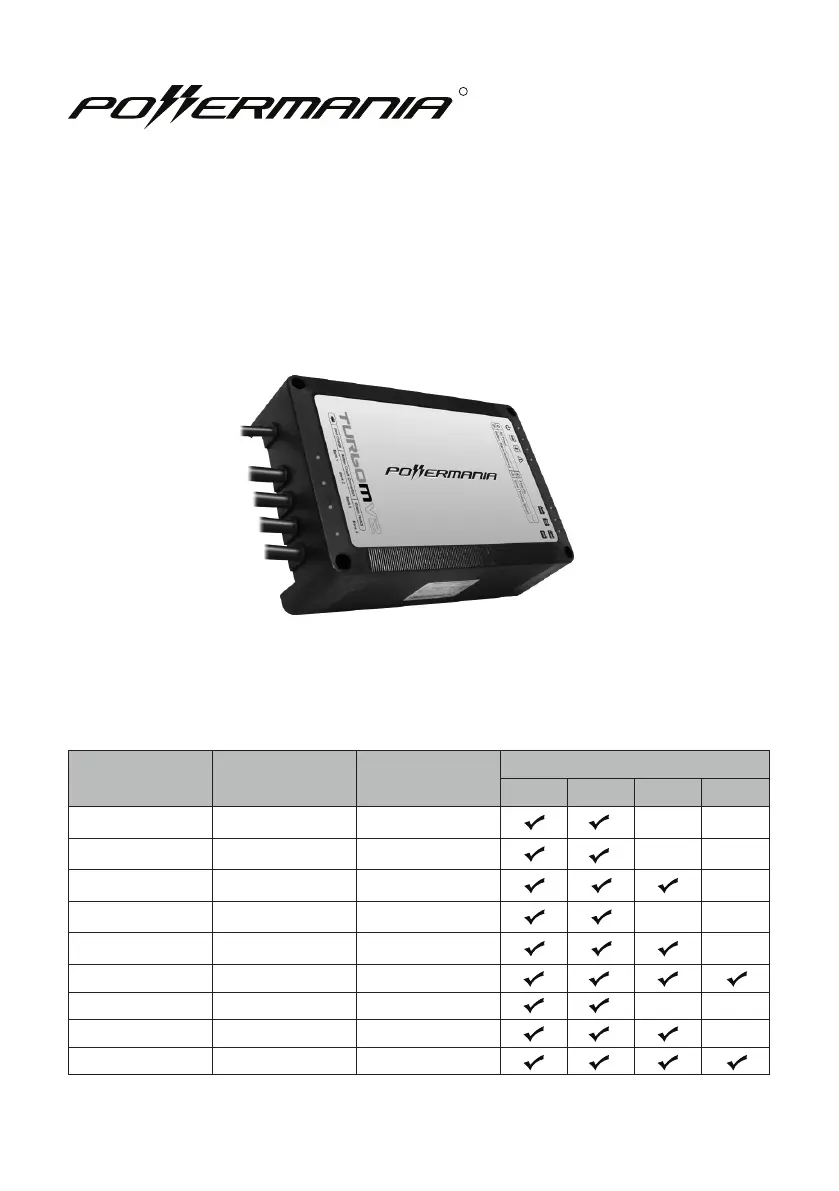
Model # 12V Output Max. Output
Battery System (DC)
12V 24V 36V 48V
Turbo M212V2 2 12 Amps
Turbo M220V2 2 20 Amps
Turbo M320V2 3 20 Amps
Turbo M230V2 2 30 Amps
Turbo M330V2 3 30 Amps
Turbo M430V2 4 30 Amps
Turbo M240V2 2 40 Amps
Turbo M340V2 3 40 Amps
Turbo M440V2 4 40 Amps
Turbo MV2 series battery charger
Operation Manual
R

Questions and Answers

Summary

Important Safety Notices

Battery Type and Gas Safety

Charger is for Lead Acid types only; be aware of explosive gases.

Electrical Safety and Wiring

Connect to grounded outlets, avoid 2-pin adapters, unplug before wiring.

Operational Safety Guidelines

Personal Safety During Battery Work

Guidelines for personal safety, including ventilation, eye protection, and acid handling.

Pre-Charge Safety Checks

Steps before charging: temperature, dry cells, cable/LED condition, and device power.

Battery Environment Safety

Ventilation and Fume Handling

Ensures good ventilation, proper handling of fumes, and terminal cleaning precautions.

Box Contents

Included Items

Lists the components provided with the charger, such as cables and manuals.

Technical Specifications Overview

Model-Specific Data Table

Table detailing specifications like Manufacturer P/N, Max. Input Current, and Dimensions by model.

Detailed Product Specifications

General Input;Output Parameters

Covers input voltage, frequency, output voltage, and battery type settings.

LED Indicator Functions

Explains the meaning and status of top and bottom LED indicators.

Safety and Protection Features

Lists built-in safety protections like Ignition, Overheat, and Reverse Polarity.

Compliance and Standards

Details the certifications and standards met by the charger, e.g., FCC, IP65.

Feature Highlight: Adaptive Loading

Adaptive Loading Technology Explained

Describes how the charger dynamically adjusts output for efficient multi-battery charging.

Feature Highlight: 3-Stage Smart Charge

3-Stage Smart Charge Process

Explains the Bulk, Absorption, and Monitor/Float stages for optimal battery charging.

Installation and Mounting

Charger Mounting Guidelines

Instructions for selecting location, ensuring ventilation, and securing the charger.

DC Cable Extension and Modifications

Information on cable extension kits and warnings against modifying factory cables.

Mounting Surface and Footing Options

Guidance on mounting surfaces and using Raiser or Flange Footing.

Installation Diagram Reference

Mounting and Footing Diagrams

Visuals for charger mounting and optional flange footing installation.

Battery Type Selection

Configuring the Battery Selector Switch

Steps to adjust the selector for different battery types like Lead-Acid, AGM, and LiFePO4.

DC Wiring and Connection

General DC Connection Rules

All DC outputs must connect to a 12V battery; never leave outputs unconnected.

Connector Legend

Diagram defining positive (red), negative (black) wires, and AC power cord.

Dual Output Battery Configurations

Serial and Parallel 12 V Connections

Wiring diagrams for connecting dual output chargers to serial/parallel 12V batteries.

24 V System and Parallel Connections

Dual Output Wiring for 24 V Systems

Dual output wiring for 24V systems and parallel 12V battery setups.

Triple and Quad Output Wiring

Connecting Multiple 12 V Batteries

Diagrams for connecting triple or quad output chargers to multiple 12V batteries.

Operating the Charger

Charger Operation Sequence

Step-by-step guide from installation to charging completion and monitoring.

Understanding LED Indicators

Detailed explanation of each LED indicator and its meaning during operation.

Troubleshooting Guide

Common Problems and Solutions

Lists issues like 'No LED On' and 'Error LED On' with their causes and fixes.

Battery Isolation Test

Procedure to Diagnose Battery;Charger Errors

Procedure to diagnose if charger or battery is causing an error.

Routine Charger Maintenance

Terminal and Wiring Care

Recommended cleaning for battery terminals and charger output ring terminals.

Other Information and Maintenance

Fuse Replacement Instructions

Detailed steps for replacing AGC-1 and ATU fuses, with model-specific ratings.

Warranty and Service Information

Warranty Coverage and Exclusions

Information on the 2-year limited warranty, coverage period, and exclusions.

Contact and Accessories

Contact and Support Information

Provides company contact details for inquiries and service.

Optional Accessories List

Lists available accessories with part numbers, such as extension kits and footings.

Powermania Turbo M220V2 Specifications

General IconGeneral
Input Voltage100-240V AC
Output Voltage12V
Output Current2A
Battery TypeLi-ion
Operating Temperature0°C to 40°C
Protection FeaturesOver-Voltage

Related product manuals