5
CRANK ARM LENGTH
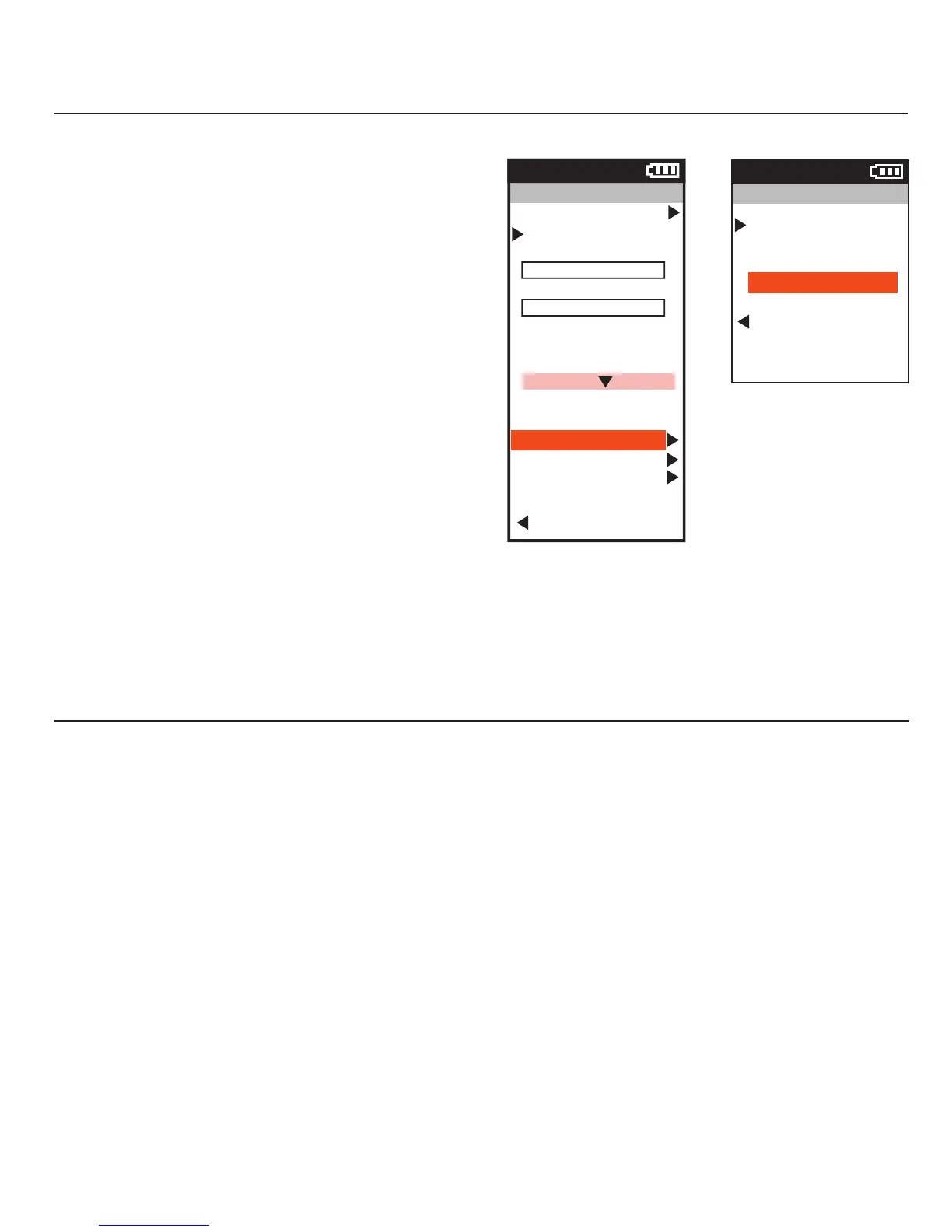
Crank arm length must be set prior to use in order to display and
collect the correct power output. To set crank arm length enter the
sensor menu on your display unit and input the crank arm length that
the pedals are attached to. Pedals are set to 172.5mm by default.
INDEXING PROCESS
Each time the pedals are initially installed there is a one time index-
ing process that occurs during the first few minutes of pedaling (basi-
cally the pedals are finding where the pedal axel has been positioned
in each crank arm). During this time the Power and Pedal Balance
output will not appear accurate, typically reading low. There are two
versions of this process--the long version and the short version. The
long version occurs when you install the pedals and immediately
begin to ride the bike. The “finding” of the index will typically take
between 3 and 5 minutes of continued pedaling to complete. The
short version of this process, referred to as “fast find” occurs when
you manually zero the pedal calibration offset after installation and
pairing but prior to riding. The Fast Find typically takes a minute or
less. Again, the pedals go this process only once after each install.
Power Sensor
9:34
A
Activate Sensor
Start Pairing
Name
Power2
Sensor ID
2484
Circumference, mm
2096
Auto Zero
On/Off
Battery
---
Crank Length
Delete Sensor
Calibration
Back to Bike
9:34A
Sensor status
---
Crank Length, mm
172.5
Back to Sensor
Crank Length
CHAPTER 4: SETTING CRANK ARM LENGTH
CALIBRATION AND MANUAL ZERO
Each PowerTap P1 pedal is dynamically calibrated from the factory to the highest standard. Calibration values cannot be changed by the
user. However, it is important to periodically zero the offset manually.
Before performing a manual zero unclip from the pedals and make sure there is nothing contacting either pedal. Navigate to the sensor
screen on the Joule GPS+ or other head unit and select Calibration. Initially, numbers will display related to the previous zeroing of the
calibration offset. With Manual Zero selected Press the ENTER button to zero the offset.
TEMPERATURE COMPENSATION
The PowerTap P1 pedals have active temperature compensation to avoid drifting power and inaccurate data as the environmental conditions
around you change. Each pedal has temperature sensors at the point of force measurement that automatically accommodate for changes in
temperature up or down. This ensures that you get uninterrupted, accurate data every time you ride.
CHAPTER 5: CALIBRATION AND MANUAL ZERO


 To Next Page