Powerware
®
5125 (9910 P33) Quick Start for IBM
®
Applications : 164950139 B
4
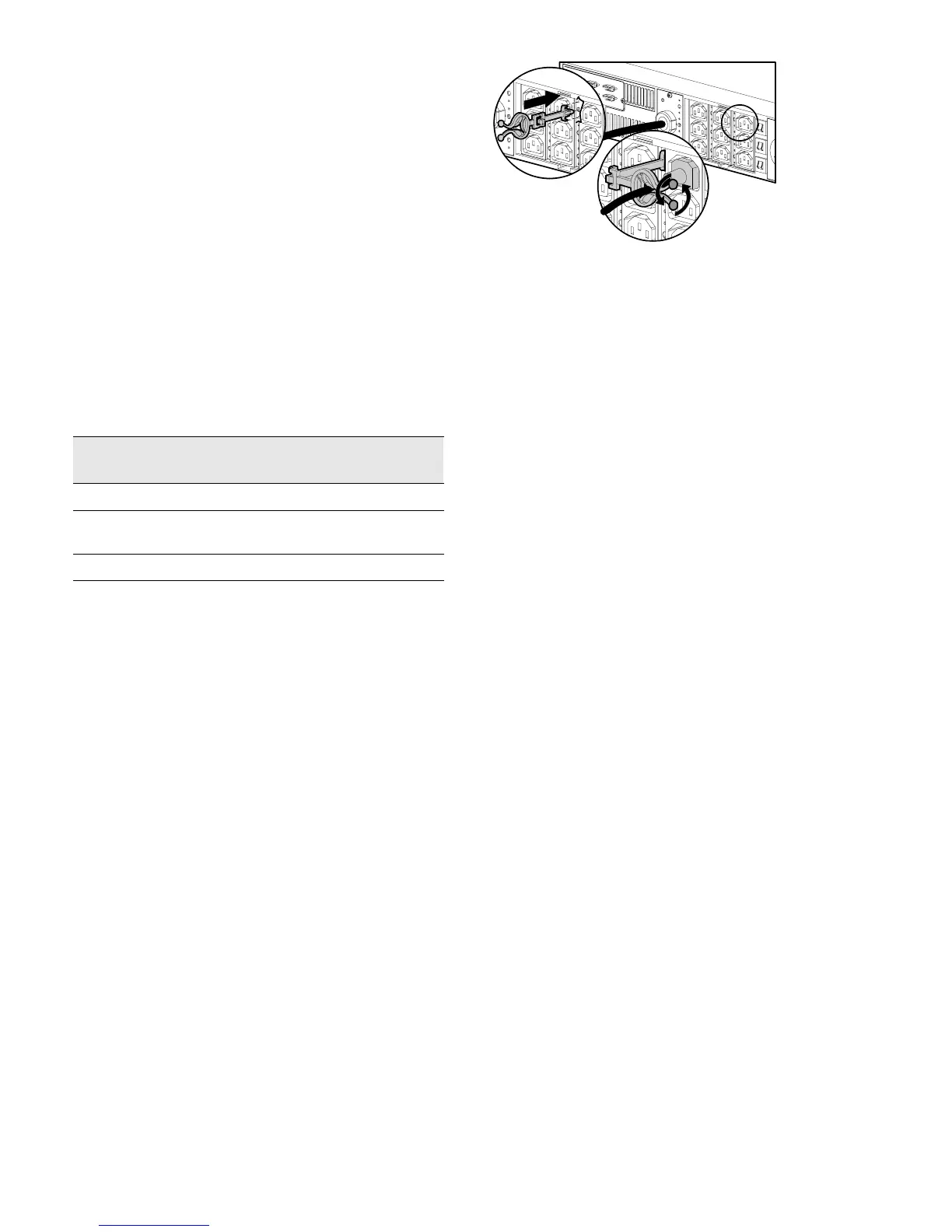
8. Insert the supplied cord retention clips by each
output receptacle that will be used.
9. Plug the equipment to be protected into the
appropriate UPS output receptacles.
DO NOT protect laser printers with the UPS because
of the exceptionally high power requirements of the
heating elements.
10. Bend and twist the cord retention clips around the
equipment power cords to secure the cord
connections.
11. To complete startup, refer to Powerware 5125
Installation Guide for IBM Applications.
Step 3. Communication Options
Qty. Powerware
Part Number
Description
1 05146745-31 Powerware Software Suite CD
3 124102022-002 UPS to Server Communication Cables
(DB-9 to DB-9, 6 ft/1.8m)
1 164201359
Multi-Server Card User’s Guide
The following communication options are available with the
UPS:
: One to three servers serially connected to the P33 UPS
: More than three servers serially connected to the P33
UPS
: Network (WebServer) with the P33 UPS as a node
For additional information, go to
www.oem.powerware.com/ibm-ups/pdf/p33details.pdf.
Service and Support
In the United States and Canada, call 1-800-IBMSERV (1-800-426-7378). In Europe, the Middle East, and Africa (EMEA); Latin
America; or Asia-Pacific, call the
IBM office that services your account.


 To Next Page