03/06/2012 Confidential and Proprietary Information
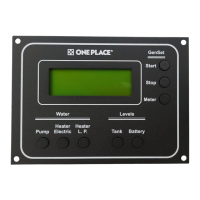
One Place Monitor Panel
4. GenSet Display and Function:
Meter Button - Touching the Meter Button simply displays the status of the Generator above, without performing any
functions. The display will show the status of the Generator, and Hour Meter.
Start Button - (Note: Generator status must be Stopped.)
a) Pressing and holding the Start button will operate the Generator Starter; Display = Starting.
b) Touching the Start button will activate the Auto-Start function, and the Panel will attempt to start
the Generator automatically; Display = Auto-Start.
(If the Auto-Start functions fails to start the Generator; Display = Will Not Start.)
Stop Button-
a) Pressing and holding Stop button will operate the Generator Stop Relay; Display = Stopping.
If the Generator is Running this will Stop the Generator.
If the Generator is Stopped this will prime the fuel system.
b) Touching the Stop button will activate the Auto-Stop function, and the Panel will attempt to stop
the Generator automatically; Display = Auto-Stop .
(If the Auto-Stop function fails to Stop the Generator; Display = Will Not Stop.)
(See Generator Manual for Operation or Troubleshooting Guide)
G e n e r a t o r
S t o p p e d
1 5 4 5 . 3 H ou r s
G e n e r a t o r
R u n n i n g
1 5 4 5 . 3 H o u rs


 To Next Page