Owner’s Manual: Display Console 17
Display Console
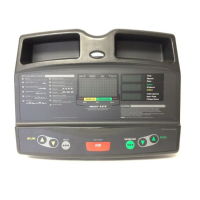
Center display: Initially shows the Precor
banner. It changes to the program profile. A
blinking column in the profile indicates
your position. The height of the column
indicates the incline level.
SmartRate display: LEDs light in this column
when the SmartRate feature is activated.
Follow the LEDs to monitor your heart rate
and maintain it in your target zone.
Keypad: Use the keypad to:
• Select a program
• Answer prompts prior to starting a
program
• Adjust the incline or speed
For more information, refer to Keypad.
QUICKSTART: Press QUICKSTART
to begin your workout immediately. It
lets you bypass the setup prompts.
Heart Rate display: If a heart rate is
detected, this area displays your heart rate.
Lower display: Four sets of numbers show
information about your session. Use the
SELECT keys to choose what information
to display.
SELECT keys: Each key lets you
move through the information in each
column, choosing what you want to
display during your session.
Red STOP button: Press to
pause a workout or return to
the banner.
LEDs: Light and clarify what workout
statistics appear on the display.
User 1—6: Press a user ID (1—6) at
the Precor banner to personalize your
workout session. Key workout
information is stored between
sessions.
Number keys: During a workout, use the
number keys to quickly change the speed or
incline, then press the corresponding INCLINE
or SPEED keys to initiate the change. When you
begin a program, you can use these keys to
specify new information.
M9.3xi_Owners Manual.book Page 17 Wednesday, December 14, 2005 1:10 PM


 To Next Page