Page 15
For technical questions, please call 1-888-866-5797.
70476
SAFETYOPERATIONMAINTENANCE SETUP
Components and Controls (continued)
OFF/STORAGE
GA SOLINE
PR OPANE
NG
LPG / NG
Inlet
Fuel
Selector
Switch
Ground
Terminal
120 VAC
20 A GFCI
Receptacles
(5-20R)
Low Oil
Alarm
Digital
Display
Engine
Stop / Start
Switch
Engine / Battery
Switch
Automatic
Idle Down
Switch
120 / 240 VAC
50 A Receptacle
(14-50R)
120 / 240 VAC
30 A Receptacle
(L14-30R)
120 VAC 30 A
Receptacle
(L5-30R)
AC Breaker
42 A 120 / 240 V
AC Breaker
30 A 120 / 240 V
AC Breaker
30 A 120 V
AC Breaker
20 A 120 V
AC Breaker
20 A 120 V
CO Sensor
Light
Battery
Charging
Port
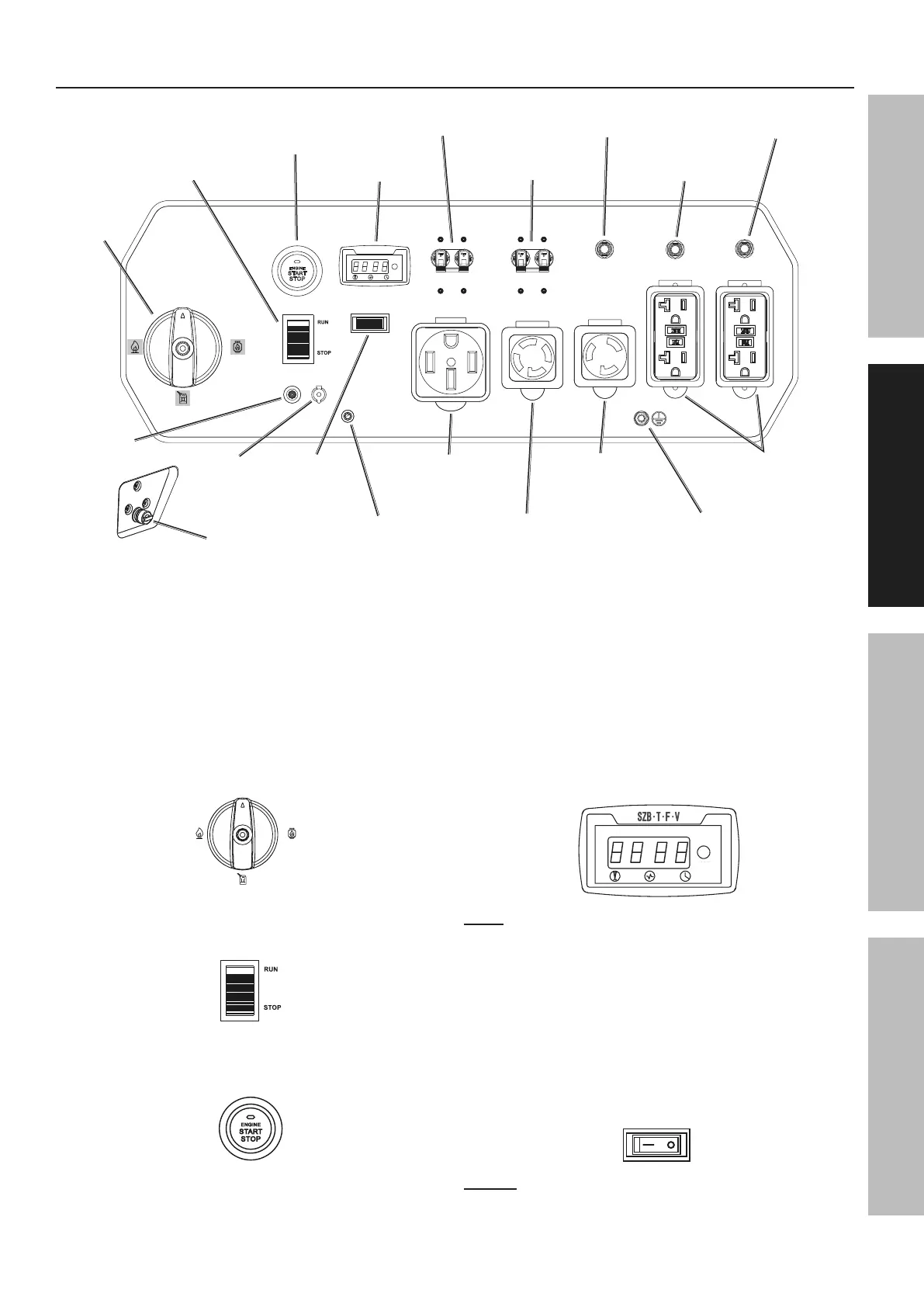
Control Panel
The following are descriptions of the controls
on the Control Panel. Your Generator has
sockets to power your products with circuit
breakers to protect the voltage flow.
1. Fuel Selector Switch: Used to select from three
fuel types - Gasoline, LPG / Propane, or Natural Gas.
Storage position shuts off flow of all fuel types.
OFF/STORAG E
GASOLI NE
PROP AN E
NG
2. Engine / Battery Switch: Push to RUN position to
enable starting remotely, electrically, or manually.
3. Engine Stop / Start Switch: Used to
start and stop the Engine.
4. Digital Display: Press the Mode Button to
cycle through the Display’s functions:
• Voltage
(Displays U + voltage reading. Example: "U240")
• Frequency
(Displays F + frequency reading. Ex.: "F60")
• Current session runtime
• Total (accumulated) runtime
MODE
Note: Every 50 hours, a blinking maintenance
reminder will appear on the screen (P050, P100,
P150, etc.) See Page 28 for maintenance
schedule. To clear a maintenance reminder, press
and hold the Mode Button for 5 seconds.
5. Automatic Idle Down Switch: Used to turn the
Engine Idle function ON or OFF. In ON position
Engine speed (and frequency) is reduced when no
load is detected. Engine runs at full speed (and
frequency) when load above 75 W is applied.
ON OFF
Notice: Turn Automatic Idle Switch OFF
when connected load is less than 300 W.


 To Next Page