16
DRIVER-BREAKER MOUNT CONVERSION
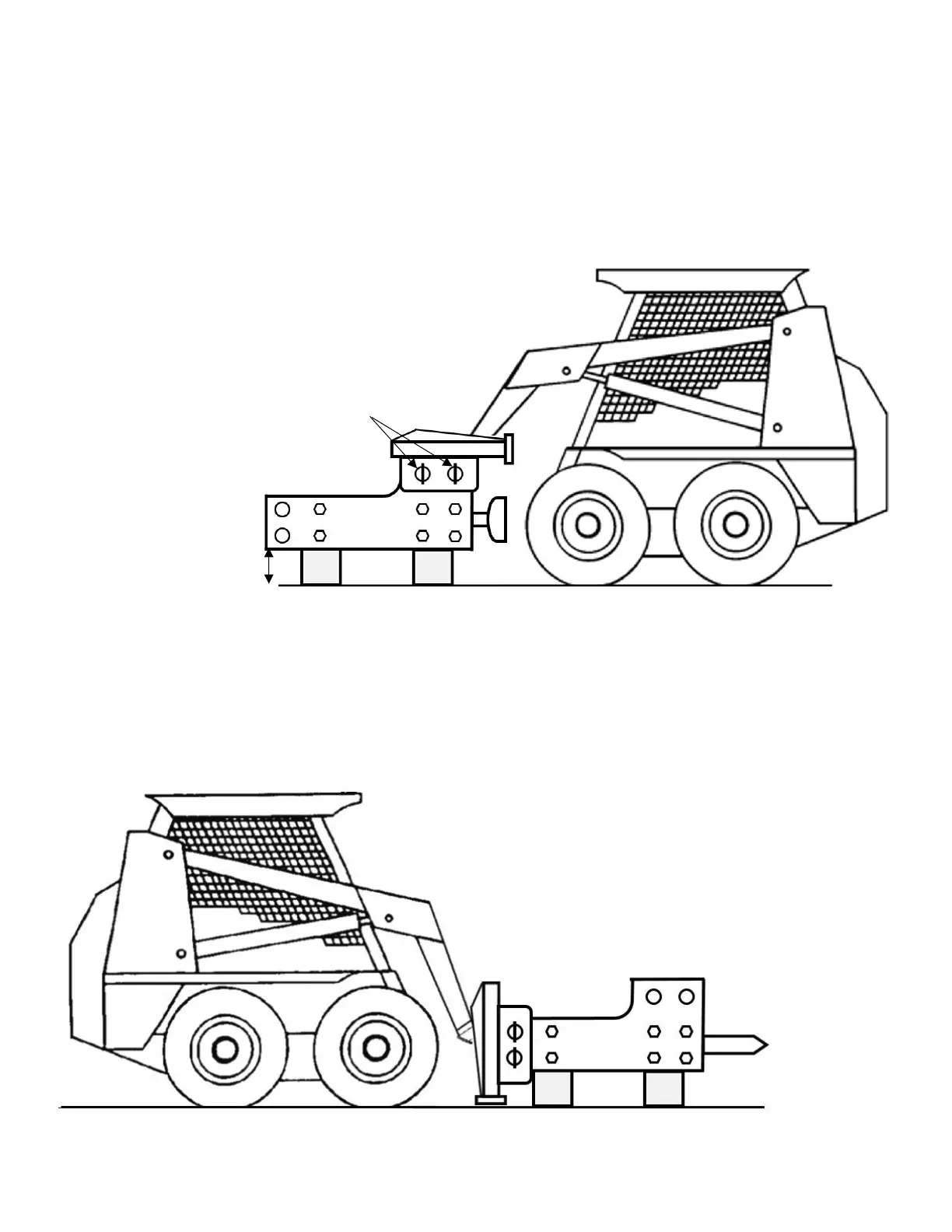
The Combo Driver-Breaker configuration has the flexibility to become a concrete breaker as well as a post driver. With
additional mounting locations, the mounting bracket can be moved to the top to allow this unit to be used as a concrete
breaker. Follow the steps below to convert your Combo unit from a Post Driver to a Concrete Breaker.
1. Secure a flat pad of solid concrete for the work area.
2. Support the Driver-Breaker approximately 12” off the
ground.
3. Either disconnect the hose holder from the mount plate
or disconnect both hoses from the Driver-Breaker.
4. Remove the large, silver-handled pins to detach the
mount plate from the Driver-Breaker.
5. Use the skid steer to raise the mount plate off the main
assembly, and reposition the skid steer on the other end
of the Driver-Breaker.
6. Carefully align the pin holes in the mount plate with the
bushing holes on the top end of the Driver-Breaker.
7. Insert the silver-handled pins into the mount plate and
through the side plate bushing holes on top of the Driver-
Breaker.
8. Reconnect the hose holder or hoses (whichever was
disconnected in step 3).
9. Replace the post driver pad with a chisel to complete the
conversion. (See “Disassembly and Assembly of Driver
Head/Breaker Chisel” on page 15)



 To Next Page