4
2.1 Rear Panel Connections and Controls
2 Hookup
2.1 Rear Panel Connections and Controls
2.1.1 Inputs
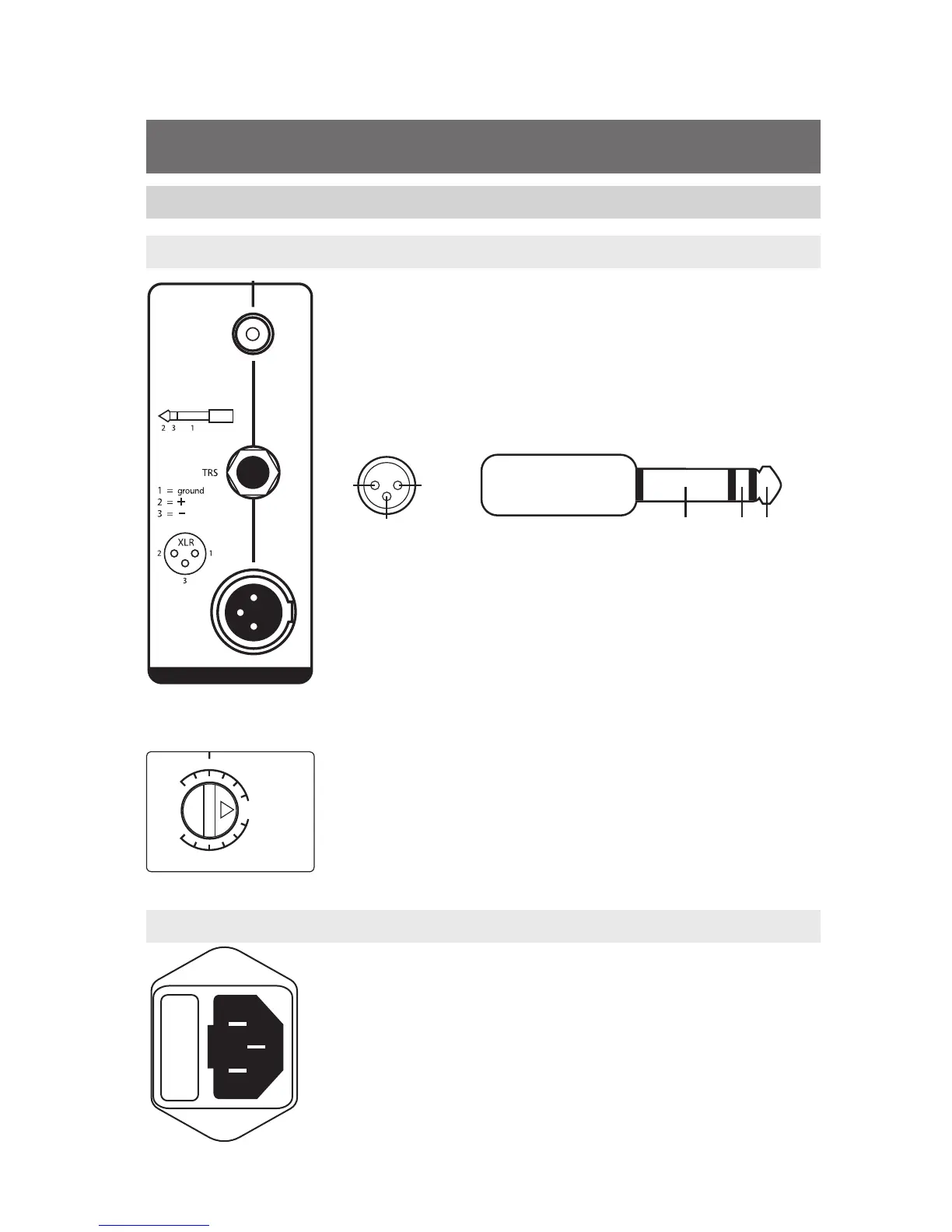
Line-level Inputs. The Eris E44/E66 provides a choice of three
inputs: two balanced (XLR and ¼” TRS) and one unbalanced
(RCA). These inputs accept a line-level signal from your audio
source and feed that signal to the monitor’s built-in power
amplifiers. These inputs are provided to allow for flexible
connectivity and not for connecting multiple sources to your
speakers simultaneously. Please connect only one source to
your Eris E44/E66.
Power User Tip: If your audio source provides balanced
XLR or ¼” TRS (tip-ring-sleeve) outputs, use one of the
corresponding balanced Eris inputs, since balanced cables
are resistant to induced noise from radio-frequency or
electromagnetic interference (RFI or EMI). If the audio source
has unbalanced ¼” TS (tip-sleeve) outputs, use a ¼”-to-RCA
adapter or adapter cable. Always use the shortest cable
possible to minimize the risk of induced RFI or EMI noise.
Input Gain: Sets the level of the input signal before it is
amplified.
2.1.2 Power
IEC Power Connection: Your Eris E44/E66 accepts a standard
IEC power cord.
Warning: Do not remove the center grounding prong or use a
ground-lift adapter, as this could result in electric shock.











 To Next Page