EasyManua.ls Logo

Prestan PP-AEDT-101 - User Manual

Prestan PP-AEDT-101
13 pages
Print Icon
To Next Page IconTo Next Page
Loading...
Prestan professional
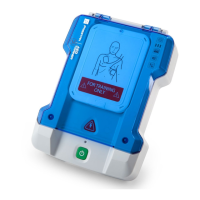
AED TRAINER
USE AND CARE INSTRUCTIONAL SHEET
Models PP-AEDT-101 —> Prestan Professional AED Trainer with
English/Spanish Module, 4 'C' batteries, one set of adult training pads,
one set of extra connector pins, an Instruction Sheet and a nylon carrying
case.
Models PP-AEDT-401 —> Prestan Professional AED Trainer Four Pack with
English/Spanish Modules, 16 'C' batteries, four sets of adult training pads,
four sets of extra connector pins, an Instruction Sheet and a nylon
carrying case.
START HERE
Use this instruction sheet as your first source for information about the Prestan Professional AED
Trainer and Accessories.
Warning: The Prestan Professional AED Trainer is intended for the expressed purpose and use of
CPR/AED Instructors. It is NOT an Automated External Defibrillator (AED) and will not deliver a
shock. It should NEVER be kept in the same area with AEDs to avoid confusion.
If you have any problems with the care and use of the Prestan Professional AED Trainer refer to
the troubleshooting section, contact your Prestan distributor or call Prestan at 1-800-434-7989
THANK YOU for buying the Prestan Professional AED Trainer!
If you have any questions about the Prestan Professional AED Trainer, or if you would like to order
additional AED Trainers, manikins or any accessories, please contact your distributor of Prestan’s
Professional Training Products.
For information on Prestan’s Profession Training Products Distributors, please contact Prestan Products
at 1-800-434-7989. Monday Friday, 9:00 a.m. to 5:00 p.m. EST or visit Prestan website at
www.prestanproducts.com.

Other manuals for Prestan PP-AEDT-101

Questions and Answers

  • V
    victoriamayoSep 8, 2025
    Why does my Prestan Fitness Equipment suddenly shut down or have distorted voice prompts?
    • T
      Teresa MilesSep 8, 2025
      If your Prestan Fitness Equipment device suddenly shuts down or the voice prompts are distorted, it likely means the batteries are very low or almost dead. Install new batteries to resolve this issue.
  • D
    Daniel PerezSep 7, 2025
    Why won't the pad stick to the manikin on my Prestan PP-AEDT-101 Fitness Equipment?
    • D
      Diana GarrettSep 7, 2025
      If the pad will not stick to the manikin, it's likely that the adhesive is worn out. Replace the pads, as they typically last for 50-60 uses.
  • R
    Robin McclainAug 22, 2025
    Why Prestan PP-AEDT-101 unit does not turn on?
    • M
      Miss Whitney Mccarthy DDSAug 22, 2025
      The Prestan Fitness Equipment might not turn on due to several reasons: the module may be missing or not fully inserted (insert or re-insert the module properly); the batteries may not be properly installed (re-orient the batteries properly); or the batteries are dead or missing (replace the batteries).
  • A
    Ann WarrenSep 4, 2025
    How to fit the module into the slot of Prestan PP-AEDT-101?
    • G
      gonzalezjuliaSep 4, 2025
      To fit the module into the slot of your Prestan Fitness Equipment, rotate the module 180 degrees.
  • R
    Richard RyanSep 3, 2025
    Why Prestan Fitness Equipment device proceeds to analyzing before both pads have been placed on the manikin?
    • J
      Jamie BurnettSep 3, 2025
      If your Prestan Fitness Equipment proceeds to analyzing before both pads have been placed on the manikin, re-position the pad in the case to lay completely flat so it is not touching the side walls, as the pads are not properly positioned in the case.
  • J
    jasoncannonSep 1, 2025
    What to do if Prestan Fitness Equipment both pads attached to Manikin but device will not advance to Analysis?
    • P
      Peter StrongSep 2, 2025
      If both pads are attached to the manikin, but your Prestan Fitness Equipment will not advance to analysis, the pad may be inserted upside down in the cable connector (flip the pad around and secure with the black pad pin) or the adhesive may be worn out (replace the pad).
  • J
    Jared ZunigaAug 31, 2025
    Why Prestan PP-AEDT-101 Fitness Equipment play button on remote will not turn on device?
    • A
      Anthony WilsonAug 31, 2025
      The play button on the remote does not turn on the Prestan Fitness Equipment. Use the On/Off button to turn on the device, then use the remote.
  • J
    Julie HartAug 30, 2025
    What to do if Prestan PP-AEDT-101 Fitness Equipment pad pulls out from pad connector?
    • J
      Jessica Tran DDSAug 30, 2025
      If the pad pulls out from the pad connector on your Prestan Fitness Equipment, check for a missing black pad pin and install a new one.
  • J
    John RiosAug 28, 2025
    What to do if Prestan Fitness Equipment suddenly shuts down or has distorted voice prompts?
    • C
      Claudia SmithAug 29, 2025
      If your Prestan Fitness Equipment suddenly shuts down or exhibits distorted voice prompts, install new batteries, as the current batteries are likely very low or almost dead.
  • J
    Joel RobertsAug 27, 2025
    What to do if Prestan PP-AEDT-101 Fitness Equipment prompts 'Replace Batteries'?
    • S
      Sara MirandaAug 27, 2025
      If your Prestan Fitness Equipment prompts 'Replace Batteries', replace the batteries within 10 hours, as the device will run for 10 or more hours with low batteries.

Summary

START HERE

Product Model Information

Details contents for Prestan Professional AED Trainer models PP-AEDT-101 and PP-AEDT-401.

Important Safety Warning

Warns against misuse and confusion with real AEDs, emphasizing it does not deliver a shock.

Support and Troubleshooting Contact

Provides contact information for issues, questions, and ordering additional products.

FEATURES OF THE PRESTAN PROFESSIONAL AED TRAINER

Performance and Scenario Features

Highlights voice prompts, manikin detection, training scenarios, metronome, and shock delivery modes.

Physical Controls and Design

Details the flip-up lid, illuminated shock button, on/off button, and overall control panel.

Training Pads and Connectivity

Describes the protective pad case, high-performance pads, and unique pad connector.

Operational Attributes

Covers long battery life and water/splash resistance for enhanced usability.

CONTENTS

Package Contents Overview

Details items included in the PP-AED-100 (single) and PP-AED-400 (four pack) models.

Reporting Missing Items

Instructions for contacting the distributor if any parts are missing from the package.

PARTS IDENTIFICATION

Front Unit Components

Labels the main components on the front of the AED Trainer unit.

ASSEMBLY, SETUP AND USE

Unpacking and Initial Setup Steps

Steps for unpacking the trainer, its module, and connector pins from the shipping container.

Pad Assembly and Cable Connection

Guide for assembling training pads and removing connector pins from cables.

Pad Insertion and Orientation

Instructions on correctly inserting pads into cable connectors, ensuring proper alignment.

Pad Liner Removal and Case Preparation

Steps for removing the clear plastic liner from the AED pads and preparing the pad case.

Applying Pads to Case and Cable Storage

Instructions for adhering pads to the inside of the pad case and coiling/storing cables.

CONTROL PANEL

Control Panel Overview

Identifies buttons on the control panel: Language, Indicator Lights, Scenario, Volume, Pause.

Language Selection Button

Explains how to use the button to toggle between English and Spanish language modes.

Indicator Lights Functionality

Describes the meaning of red/yellow lights for scenario selection and shock delivery modes.

Scenario Selection Button

Details how to select one of five training scenarios using the button and indicator lights.

Volume and Pause;Play Buttons

Explains adjusting volume levels and pausing/resuming training scenarios.

Automatic;Semi-Automatic Modes

Mode Configuration

Instructions on how to change the trainer between Semi-Automatic and Automatic shock modes.

Mode Indicators

Explains how to identify the current mode (Semi-Automatic or Automatic) via indicator lights.

CLEANING INSTRUCTIONS

Cleaning Procedure

Guidelines for cleaning the AED Trainer with a damp cloth, avoiding submersion in water.

PROFESSIONAL AED TRAINER REMOTE

Remote Control Functions

Details the functions of the optional remote control, including volume, language, and scenario.

Remote Battery Information

Specifies battery requirements for the PP-AEDT-100-R and PP-AEDT-400-R remotes.

Trouble Shooting Guide

Module and Power Issues

Addresses problems with module insertion and the unit not turning on, with solutions.

Pad and Lid Difficulties

Solutions for issues with peeling pad liners, pad detachment, and lid closure.

Device Analysis and Remote Problems

Troubleshooting for premature analysis and remote control malfunctions.

Battery and Remote Button Issues

Addresses device prompts for battery replacement and remote button non-responsiveness.

Warranty Information

One Year Limited Warranty Coverage

Details the manufacturer's limited warranty for defects in workmanship or materials.

Warranty Period and Responsibilities

Specifies the one-year warranty period and the manufacturer's repair/replacement obligations.

Limitations and Exclusions

Outlines circumstances negating the warranty and limitations on implied warranties and damages.

Obtaining Warranty Service

Provides contact information for warranty service and mentions state-specific rights.

Prestan PP-AEDT-101 Specifications

General IconGeneral
Audio InstructionsYes
Product TypeAED Trainer
Power SourceBattery Powered
LanguagesEnglish
IncludedAED Trainer, Adult/Child Training Pads
TypeAutomated External Defibrillator (AED) Trainer