EasyManua.ls Logo

Prestige IQ - Page 12

Prestige IQ
44 pages
Print Icon
To Next Page IconTo Next Page
To Previous Page IconTo Previous Page
Loading...
03-11-2009
03-11-2009
11-03-2009
11-03-2009
or
Day
03-11-2009
03-11-2009
11-03-2009
11-03-2009
or
Month
11-03-2009
11-03-2009
Year
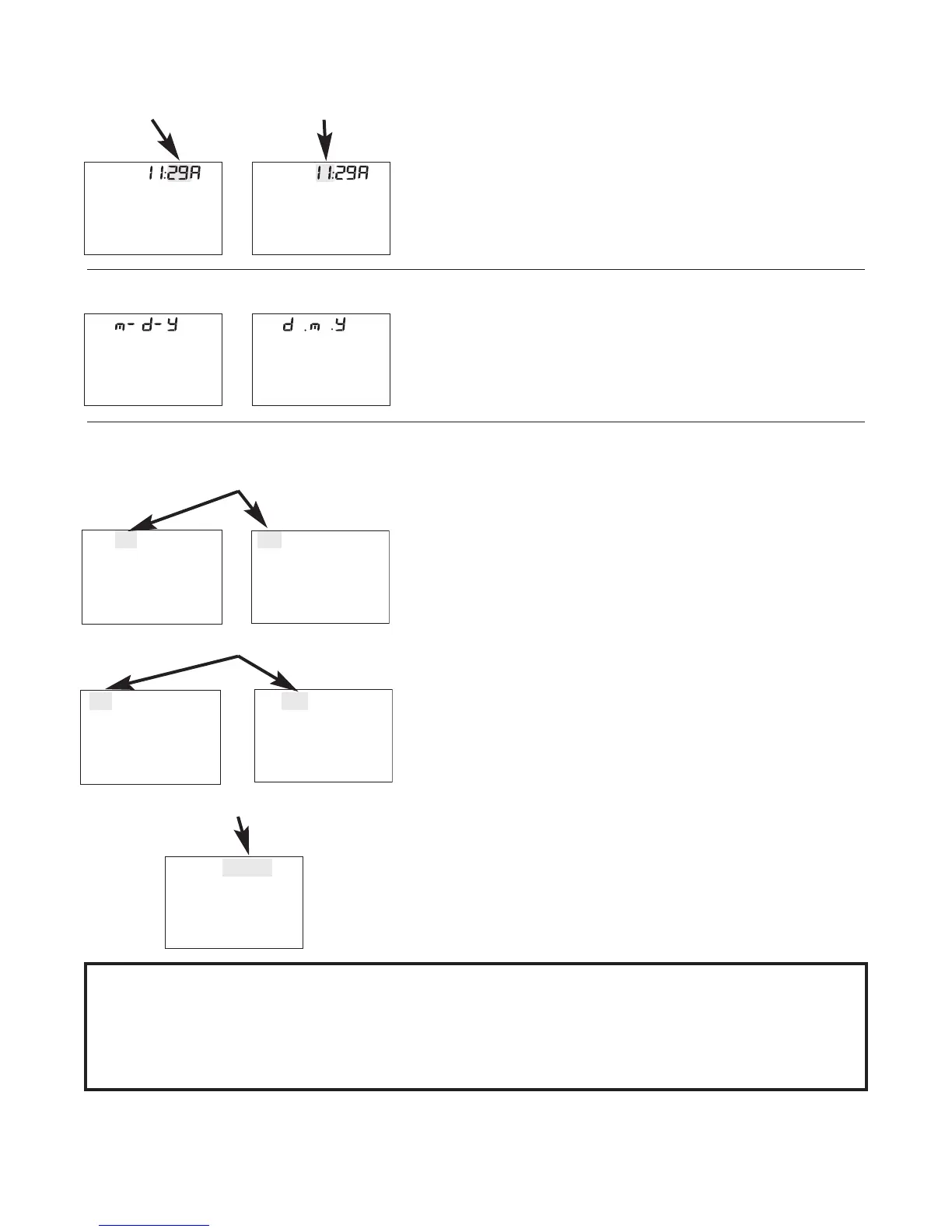
3. Set Time. Press
U
U
p
p
/
/
D
D
o
o
w
w
n
n
Button to
change the flashing number.
Press
S
S
e
e
l
l
e
e
c
c
t
t
(S) to set.
4. Set Date Format. Press
U
U
p
p
/
/
D
D
o
o
w
w
n
n
Button to
switch between m-d-y and
d.m.y. Press
S
S
e
e
l
l
e
e
c
c
t
t
(S) to set.
5. Set Date. Press
U
U
p
p
/
/
D
D
o
o
w
w
n
n
Button to
change the flashing number.
Press
S
S
e
e
l
l
e
e
c
c
t
t
(S) to set. Turn
Meter off. Meter is now ready
to use for testing.
N
N
O
O
T
T
E
E
:
:
C
C
h
h
e
e
c
c
k
k
T
T
i
i
m
m
e
e
a
a
n
n
d
d
D
D
a
a
t
t
e
e
a
a
f
f
t
t
e
e
r
r
e
e
a
a
c
c
h
h
b
b
a
a
t
t
t
t
e
e
r
r
y
y
c
c
h
h
a
a
n
n
g
g
e
e
.
.
R
R
e
e
s
s
e
e
t
t
i
i
f
f
n
n
e
e
c
c
e
e
s
s
s
s
a
a
r
r
y
y
.
.
A
A
l
l
l
l
o
o
t
t
h
h
e
e
r
r
M
M
e
e
t
t
e
e
r
r
O
O
p
p
t
t
i
i
o
o
n
n
s
s
r
r
e
e
m
m
a
a
i
i
n
n
i
i
n
n
M
M
e
e
m
m
o
o
r
r
y
y
a
a
s
s
s
s
e
e
l
l
e
e
c
c
t
t
e
e
d
d
.
.
Minutes Hours
or
10