Morning Average
Test results recorded in Log Book, along with Morning
Average value provide a Diabetes Healthcare
Professional with an overall picture of diabetes control.
They may use all of this information to determine the
right treatment plan for you. Morning Average value is
calculated using time period (days) chosen when
setting this Option
(See Sec. 1, Set Meter Options).
N
N
O
O
T
T
E
E
:
:
M
M
e
e
m
m
o
o
r
r
y
y
m
m
u
u
s
s
t
t
c
c
o
o
n
n
t
t
a
a
i
i
n
n
a
a
t
t
l
l
e
e
a
a
s
s
t
t
o
o
n
n
e
e
r
r
e
e
s
s
u
u
l
l
t
t
s
s
t
t
o
o
r
r
e
e
d
d
f
f
r
r
o
o
m
m
4
4
:
:
0
0
0
0
-
-
9
9
:
:
5
5
9
9
A
A
M
M
t
t
o
o
d
d
i
i
s
s
p
p
l
l
a
a
y
y
a
a
M
M
o
o
r
r
n
n
i
i
n
n
g
g
A
A
v
v
e
e
r
r
a
a
g
g
e
e
v
v
a
a
l
l
u
u
e
e
.
.
I
I
f
f
t
t
h
h
e
e
r
r
e
e
i
i
s
s
n
n
o
o
M
M
o
o
r
r
n
n
i
i
n
n
g
g
A
A
v
v
e
e
r
r
a
a
g
g
e
e
v
v
a
a
l
l
u
u
e
e
,
,
M
M
e
e
t
t
e
e
r
r
d
d
i
i
s
s
p
p
l
l
a
a
y
y
s
s
t
t
h
h
r
r
e
e
e
e
d
d
a
a
s
s
h
h
e
e
s
s
.
.
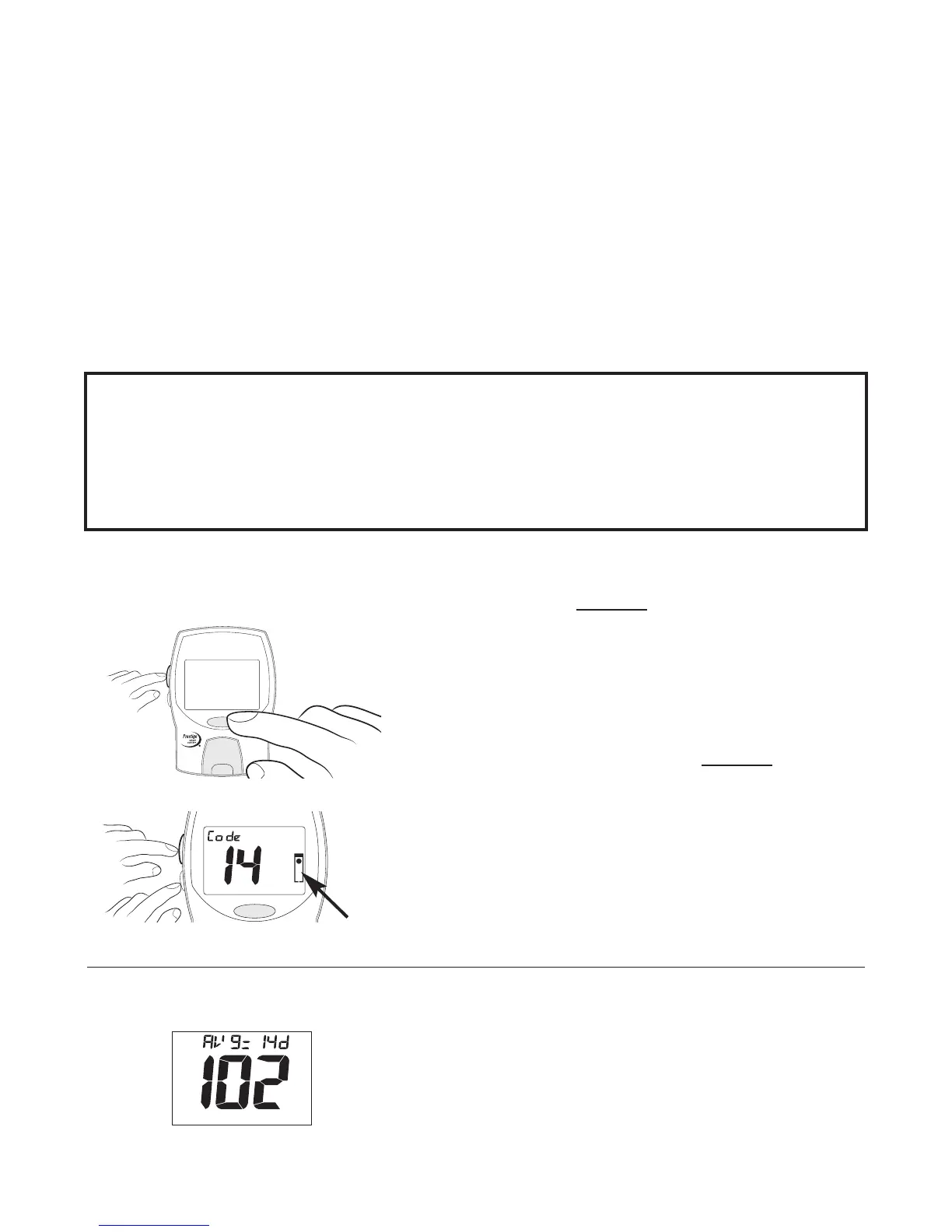
To display Morning Average:
1. With Meter Off.
Press and hold the center of
U
U
p
p
/
/
D
D
o
o
w
w
n
n
Button with one
hand. Press and release
P
P
o
o
w
w
e
e
r
r
Button with other
hand. Continue to
hold
U
U
p
p
/
/
D
D
o
o
w
w
n
n
Button until Code
number displays, then press
and release
S
S
e
e
l
l
e
e
c
c
t
t
(
(
S
S
)
)
Button
twice with other hand.
2. Display Morning Average.
After five seconds, release
U
U
p
p
/
/
D
D
o
o
w
w
n
n
Button. Morning
Average value is displayed.
(See Sec. 1, Set Meter Options).
25
Flashing


 To Next Page