EasyManua.ls Logo

Prestige IQ - Troubleshooting and Display Messages

Prestige IQ
44 pages
Print Icon
To Next Page IconTo Next Page
To Previous Page IconTo Previous Page
Loading...
Section 9 Display Messages
Display: What It Means: What to Do:
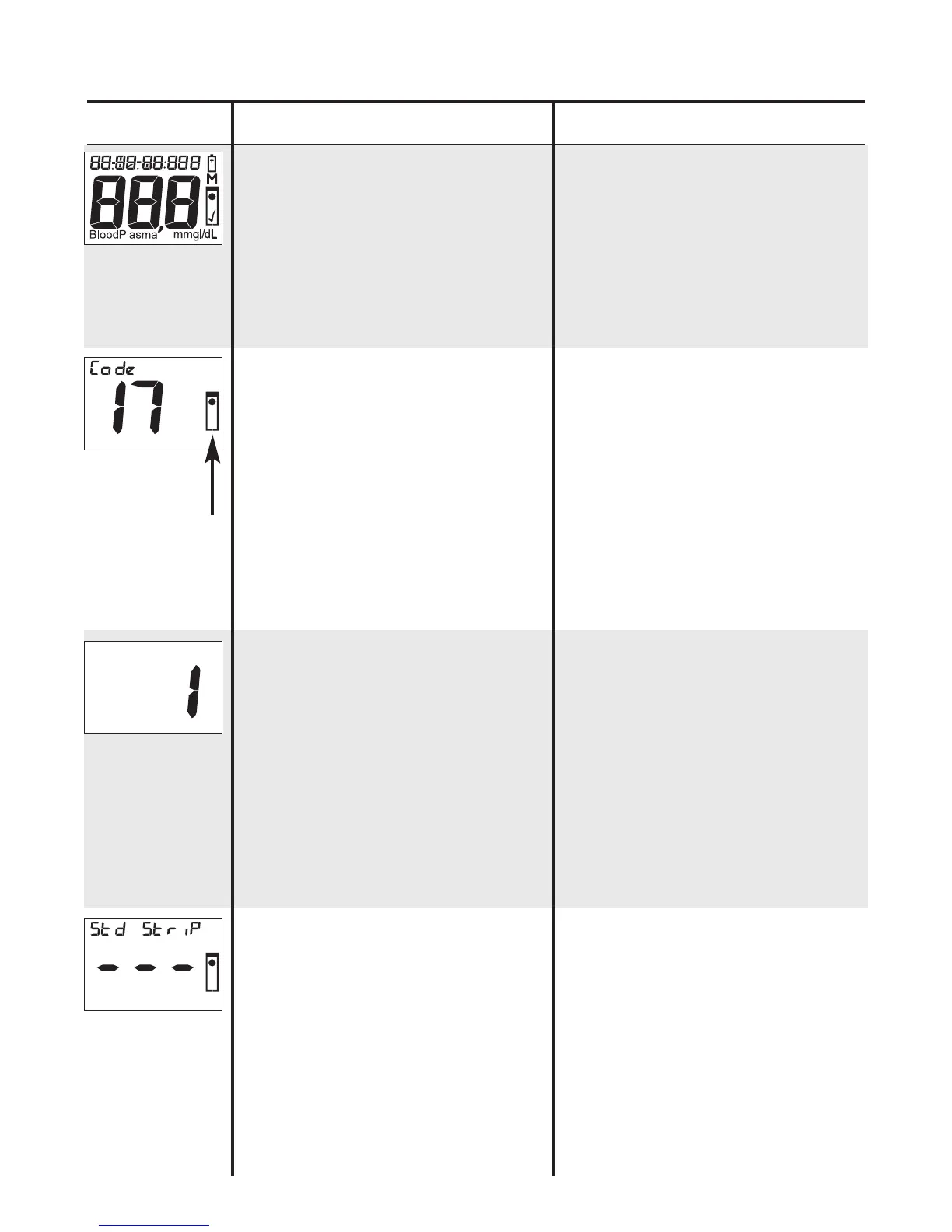
Self Check Display,
Meter is doing an
internal function
check.
“Insert Strip”
symbol flashes
when it is ready for
Test Strip.
When testing has
begun, Meter
counts seconds.
Test normally takes
up to 50 seconds.
Dashes flash across
Display during a
Standard Strip test.
If any part of
number or symbols
in Display are
missing, call for
assistance.
If symbol remains
in Display after
Strip is inserted,
turn Meter off,
discard Strip, and
clean Meter
(see
Sec. 7)
. Repeat test.
If numbers do not
count up after Strip
is inserted, turn
Meter off, discard
Strip, and clean
Meter
(see Sec. 7).
Repeat test.
If result does not
appear in Display
after 10 seconds,
call for assistance.
30
“Insert
Strip”
symbol
flashes.
Number
counts up
from “1”
during test.