EasyManua.ls Logo

Prestige IQ - Page 35

Prestige IQ
44 pages
Print Icon
To Next Page IconTo Next Page
To Previous Page IconTo Previous Page
Loading...
33
Section 9 Display Messages
(
(
c
c
o
o
n
n
t
t
i
i
n
n
u
u
e
e
d
d
)
)
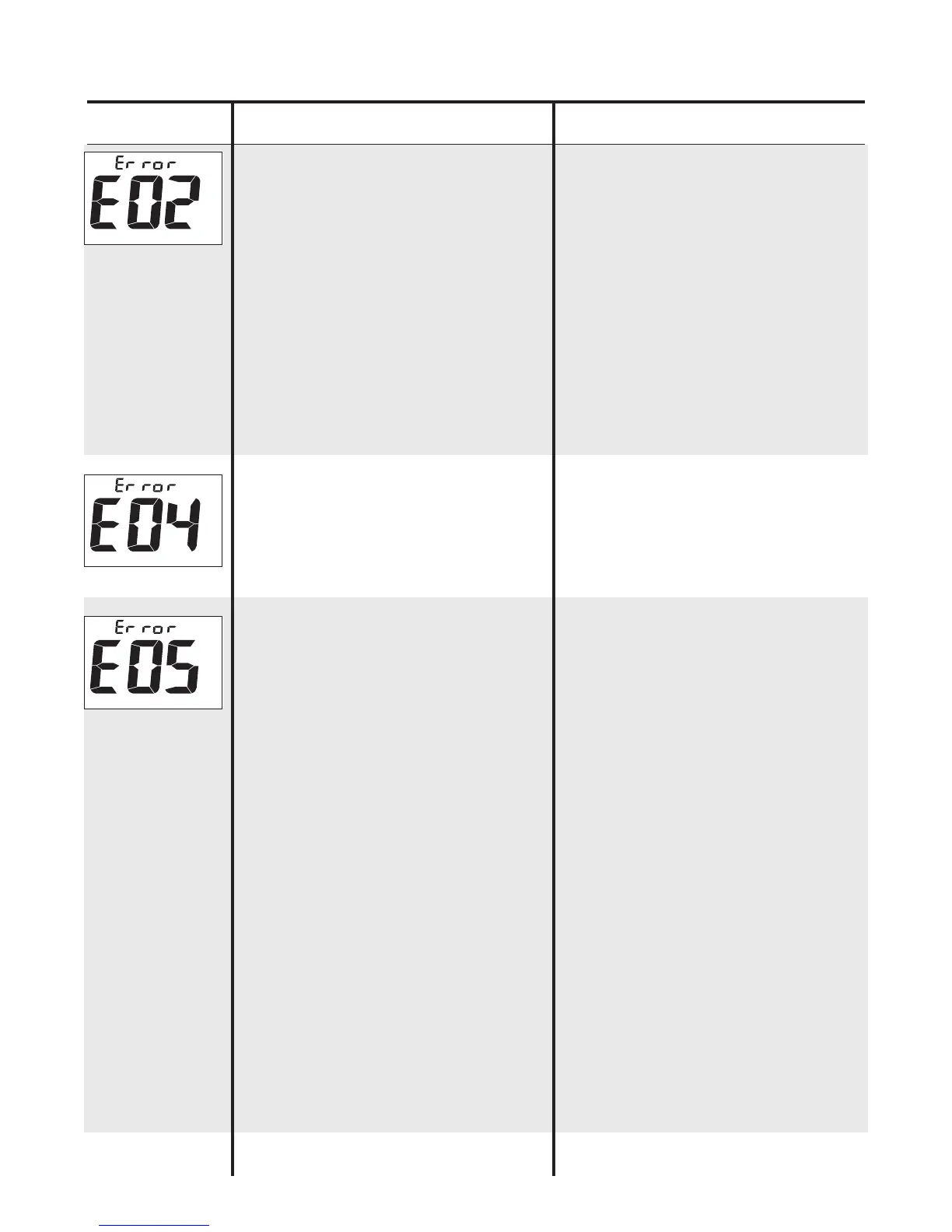
Display: What It Means: What to Do:
Meter does not
detect blood or
Control on Test
Strip.
Meter will not
operate.
1. Not enough
blood or Control
on Test Strip.
2. Strip may be
defective.
3. Strip was not
inserted properly.
4. Result is 25 mg/dL
(1.4 mmol/L) or
lower.
Discard Strip.
Repeat test with
new Strip. Check
Color Spot. If error
message persists,
call for assistance.
Call for assistance.
Meter must be
replaced.
Remove Strip and
check Color Spot.
Turn Meter off.
Discard Strip.
Clean Meter
(see
Sec. 7)
. Repeat test
with new Strip. If
error message
persists, call your
Diabetes
Professional
immediately!