12. eReader Prestigio
With the eReader Prestigio, you can easily and quickly download and read
eBooks on your tablet.
- On the home screen or list menu, tap eReader Prestigio.
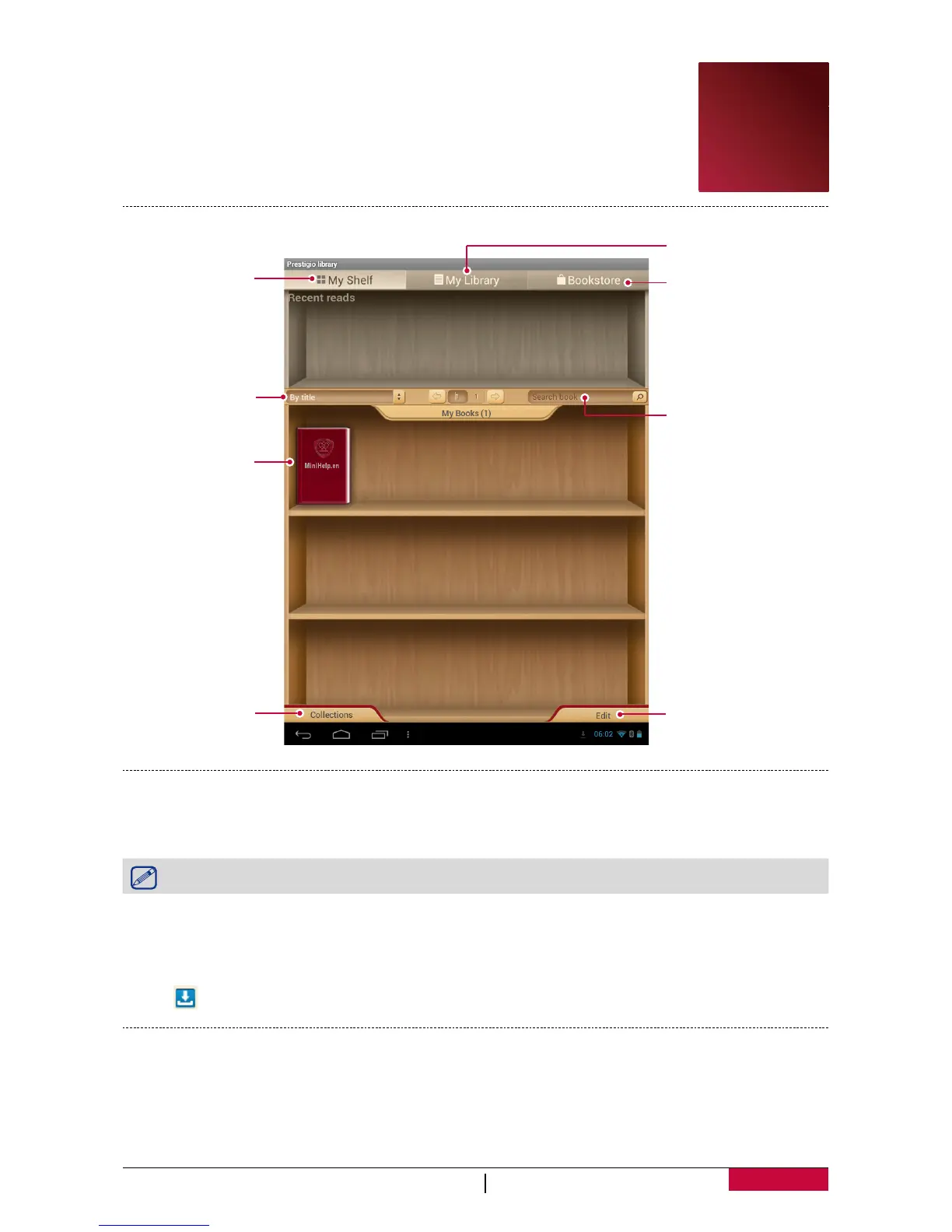
Your eReader at a glance
eBooks.
Search eBooks by
keyword.
Go to Bookstore.
Find eBooks in
your library.
Edit your bookshelf.
Change different
search item.
Edit your
collections.
View your
bookshelf.
Download an eBook
You can download eBooks by using eReader Prestigio. Some eBooks are free to download, and
some eBooks need a payment.
You will be asked to confirm method of payment when you purchase a paid eBook.
1. On the home screen or list menu, tap eReader Prestigio.
2. Tap Bookstore tab.
3. Select your language, and then find your desired eBook.
4. Tap to download the eBook.
Read an eBook
1. On the home screen or list menu, tap eReader Prestigio.
2. Tap My shelf or My library tab.
3. Find your desired eBook.
4. Tap the eBook to read it.
12















 To Next Page