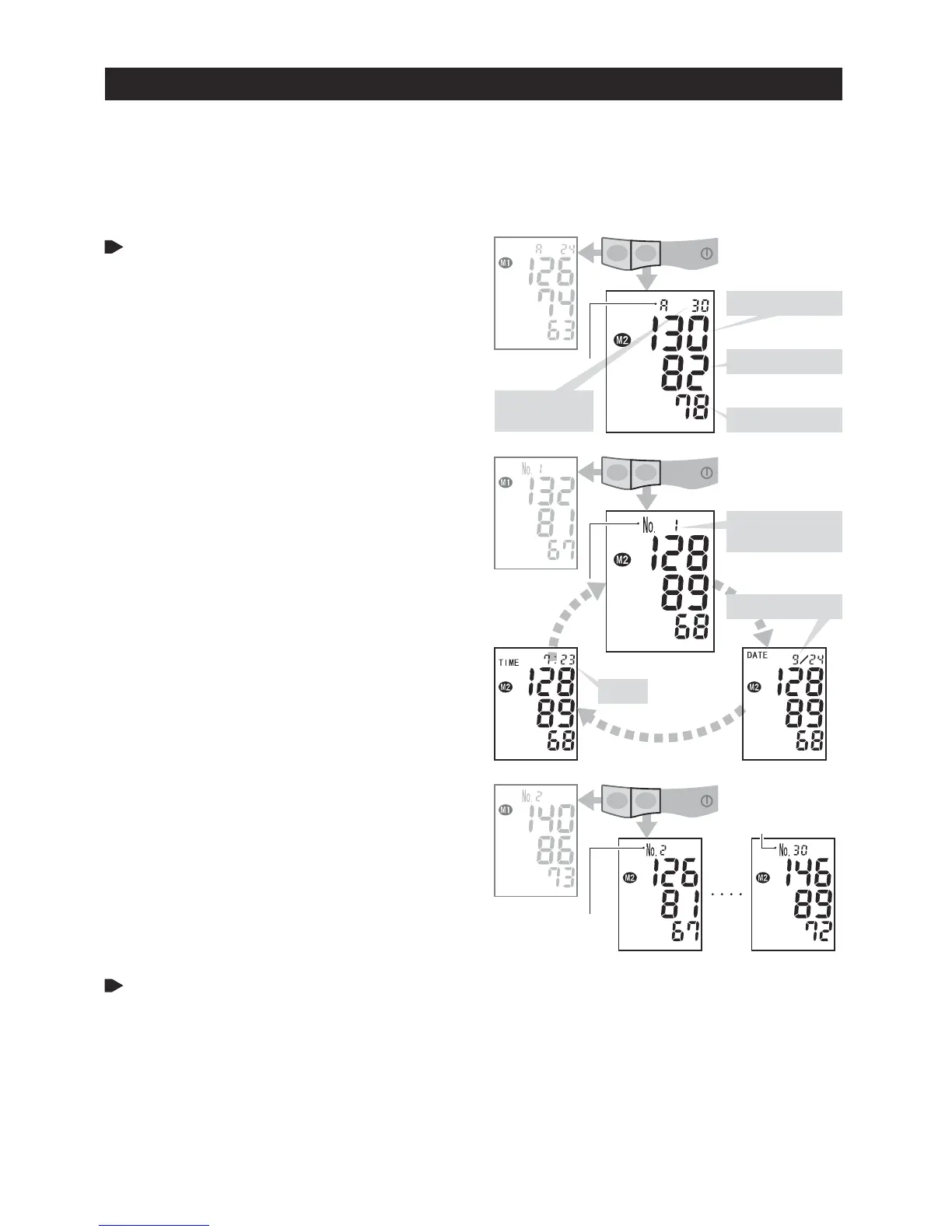
DATE month/day
TIME
2nd LATEST
DATA
OLDEST DATA
LATEST DATA
RECALLING STORED DATA
Press memory M1 button or memory
M2 button to see stored data.
The average of the stored result in
the selected bank is displayed.
The latest result stored is displayed when there
is only a single result. The clock displays
when there are no results stored.
The indication at the top of the display
alternately changes from memory data number
to date to time .
The memory data is displayed for approximately
30 seconds. Approximately 30 seconds after
memory button is released, the apparatus will
turn off.
Press memory button to move to
next data.
The memory data number 1 is the latest
among the stored data in the selected memory
bank.
Every depression of memory button
switches among the memory data.
As memory button is pressed, the memory
data number increases; the bigger the number,
the older the result.
Press START button to turn off the
unit.
MEMORY FUNCTION
1.
2.
3.
4.
5.
1.
2.
3.
Measured result is stored in either M1 or M2. Each of two memory banks can hold up to 30 results and their
running average.
When the number of measurements exceeds 30,
the oldest data will be deleted to record new data.
Use separate memory banks to track results of you and a friend or family member, or use one memory bank
to store morning results and the other to store evening results. .
NUMBER OF
STORED DATA
DELETING STORED DATA
Show the individual result to be erased or the average of a memory bank to clear
all the memory bank data.
Press and hold down either one of memory buttons: M1 button to erase specified data
in memory bank M1, and M2 button to erase specified data in memory bank M2.
The displayed data starts flashing.
Hold down the button until nothing but the memory bank number is displayed.
AVERAGE
SYSTOLIC mmHg
DIASTOLIC mmHg
PULSE RATE BPM
MEMORY DATA
NUMBER
-9-


 To Next Page