
 Need help?
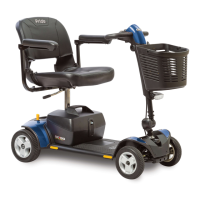
Do you have a question about the Pride Mobility GO-GO ELITE TRAVELLER Plus and is the answer not in the manual?
Explains the meaning of warning, mandatory, and prohibited symbols used in the manual.
Guidance on the format and procedure for using the technical troubleshooting guide.
Steps for retesting the scooter system after replacing a component.
Diagnoses and resolves issues related to overcharged batteries.
Troubleshoots and identifies issues with the scooter's brake system.
Addresses faults detected in the throttle position or potentiometer.
Diagnoses faulty throttle pot, speed pot, or associated wiring.
Troubleshoots motor not functioning or being disconnected.
Identifies potential controller problems like overheating or tripping.
This document is a technical troubleshooting guide for the Go-Go Elite Traveller Plus scooter, specifically designed for models utilizing the PG Drives S-Drive controller. The S-Drive controller is a digital system that continuously monitors the scooter's electrical components and generates "beep codes" to indicate faults or issues within the system. This guide is structured to assist technicians and users in diagnosing and resolving common problems encountered with the scooter.
The guide is divided into three main sections, each addressing a specific category of symptoms. The first section, "Key Inserted Into Key Switch - No Signs of Power," deals with scenarios where the scooter exhibits no power at all when the key is inserted. This includes symptoms such as a blank battery condition meter, a non-functional horn, and the scooter's inability to drive. The diagnostic approach for this section focuses on identifying interruptions in the power supply. The troubleshooting steps involve checking the main circuit breaker, measuring voltage at various connectors within the battery box, and assessing the resistance of battery harnesses and fuses. It provides detailed instructions for using a multimeter to test components like the circuit breaker, battery box harness with fuseable link, and the console. The guide emphasizes safety warnings related to handling batteries, including wearing goggles and gloves, and cautions against charging frozen batteries. It also highlights the importance of correctly connecting battery harnesses to prevent personal injury or damage to the power chair.
The second section, "Key Inserted Into The Key Switch - Power On But Scooter Does Not Move," addresses situations where the scooter powers on (the battery condition meter shows power, and the horn works) but fails to move or produce a beep code. This indicates an interruption in power between the key switch and the S-Drive controller. The troubleshooting process for this section involves measuring resistance at various connectors to pinpoint where the power flow is being disrupted. Steps include checking resistance across pins on the battery box connector, the console connector, and the front-to-rear harness connectors. The guide provides specific resistance values to look for and directs the user to replace components like the battery box harness, console, or front-to-rear harness if the measurements are outside the specified range.
The third and most extensive section, "Beep Code Diagnosis," is dedicated to interpreting and resolving issues indicated by the S-Drive controller's beep codes. The guide explains that the beep codes begin with ten fast beeps, followed by a series of slower beeps that represent the actual fault code. To repeat a beep code, the user must remove and reinsert the key. This section covers several specific beep codes:
Throughout the guide, the troubleshooting procedures are presented as numbered lists of instructions, often including tests with a multimeter. The results of these tests direct the user to either replace a component and retest the system, proceed to the next step, or advance to a later step in the section. The guide emphasizes a "System Retest" procedure after any component replacement, which involves removing and reinserting the key, reconnecting harnesses, reinstalling battery boxes, and checking for normal scooter operation. If a new problem arises, the user is directed to the relevant procedure in the guide.
The document also includes several diagrams and figures to aid in component identification and measurement points. These include a "Troubleshooting Key" diagram that labels main components and connectors, a "Battery Box Disassembly/Assembly" diagram, and various figures illustrating connector pinouts and measurement locations for multimeters. A "Go-Go Elite Traveller Plus 2-D Wiring" diagram and a "Go-Go Elite Traveller Plus Wiring" diagram provide comprehensive views of the scooter's electrical connections. A table summarizing all beep codes, their impact on the scooter, and diagnostic notes is also provided for quick reference. The guide is designed to be user-friendly for technicians, providing clear, step-by-step instructions to systematically diagnose and repair issues with the Go-Go Elite Traveller Plus scooter.
 General
| Maximum Speed | 4.5 mph |
|---|---|
| Battery Size | 12V 35AH |
| Weight Capacity | 300 lbs |
| Seat Depth | 16 inches |
| Battery Type | 12V |
| Ground Clearance | 2.5 inches |
| Battery Weight (each) | 25 lbs |
| Braking System | Electromagnetic |
| Charger Type | Off-board |


 To Next Page