10 Travel Scooter Series
II. YOUR TRAVEL SCOOTER
Manual Freewheel Levers - Jazzy ZTS
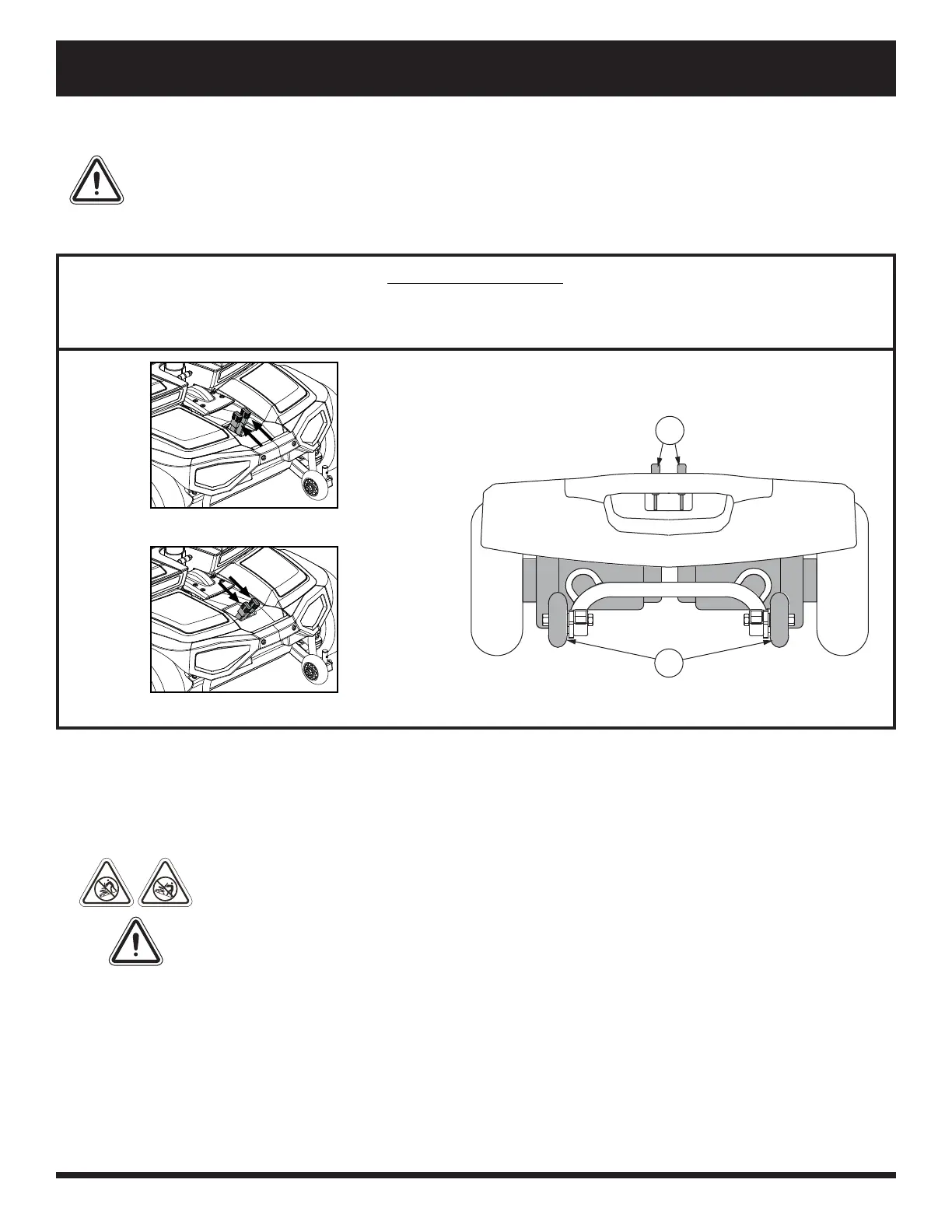
For your convenience, your travel scooter has a manual freewheel lever on each motor. Manual freewheel levers
enable you to disable the drive system in order to maneuver the Travel Scooter manually. See fi gure 8.
WARNIN G! Do not use t he Tra ve l Sc oot er w hile the drive m ot ors a re dise nga ge d! Do
not disenga ge t he drive m ot ors w he n t he t ravel scoot e r is on a n incline or decline ,
as the unit c ould roll on it s ow n! Only e nga ge t he freew he e l m ode w hen on a leve l
surfa c e.
WARNIN G! I t is im por tant t o remembe r t hat w he n your Trave l Sc oot er is in freew he e l
mode, t he braking syste m is dise nga ge d.
NOTE: It is strongly recommended that you do not charge your batteries while in freewheel mode.
NOTE: You must turn off the power before disabling the drive systems; otherwise, you may get an error code
on the scooter. To clear this code, turn off the scooter and place the travel scooter in drive mode. Then turn on
the scooter. The error message should be cleared. If not, contact an authorized Provider.
IDENTIFICATION KEY
1. Manual Freewheel Levers
2. Anti-tip Wheels
Figure 8. Rear Components - Jazzy ZTS
Freewheel Mode (Drive Disengaged)
Drive Mode (Drive Engaged)
1
2
WARNIN G! When your Tra ve l Sc oot er is in freew he e l m ode , t he braking syste m is dise nga ge d.
Dise nga ge t he drive m ot ors only on a level surfa ce.
Ensure t he key is re m ove d from t he key sw it ch.
St and to t he side of t he sc oot er to enga ge or disenga ge freew he e l m ode . N eve r sit on a
sc oot er to do this.
After you have fi nishe d pushing your Trave l Sc oot er, a lw ays re turn it t o t he drive m ode t o
loc k t he brake s.


 To Next Page