10 MV600
LCD SCREEN AND CONTROL PANEL SETTINGS
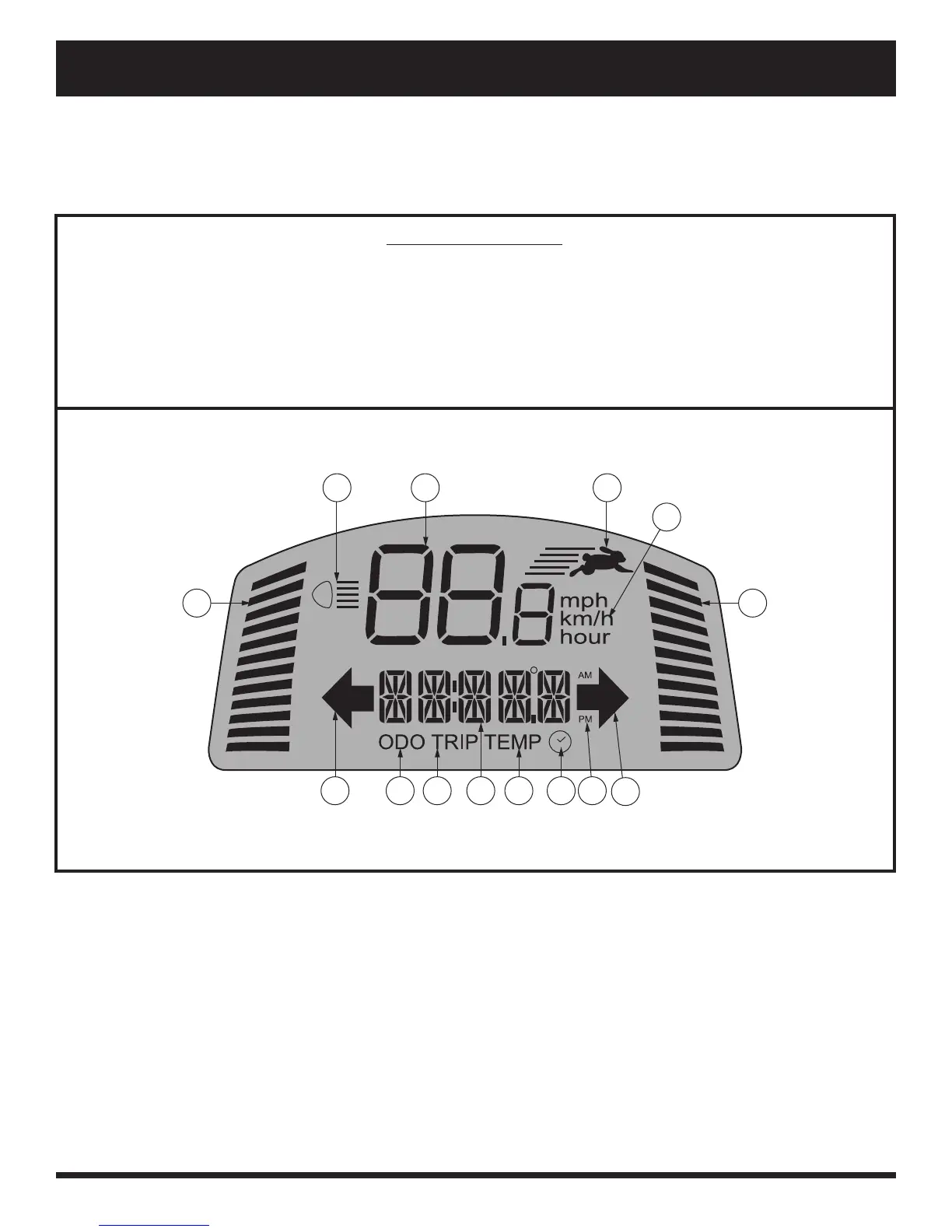
The LCD control panel offers easily intuited feedback information via the LCD screen. See fi gure 5. The LCD
screen is also used during the set-up (activation) of the various control panel settings. See chart 1.
II. YOUR VEHICLE
IDENTIFICATION KEY
Figure 5. LCD Screen
1. BATTERY CONDITION INDICATOR
2. LIGHTS INDICATOR
3. SPEED/ERROR CODE/VOLUME
4. HI-LOW INDICATOR
5. UNIT INDICATOR
6. MAXIMUM SPEED INDICATOR
7. RIGHT TURN INDICATOR
8. AM/PM
9. CLOCK
10. TEMPERATURE
11. DISTANCE/TIME/TEMP/ERROR MESSAGE
12. TRIPOMETER
13. ODOMETER
14. LEFT TURN INDICATOR
10121314 11
9
7
8
6
5
4
32
1
NOTE: To program control panel settings, Hi-Low Indicator must be switched off, and Maximum Speed
Indicator must be set to full.


 To Next Page