MV600 11
II. YOUR VEHICLE
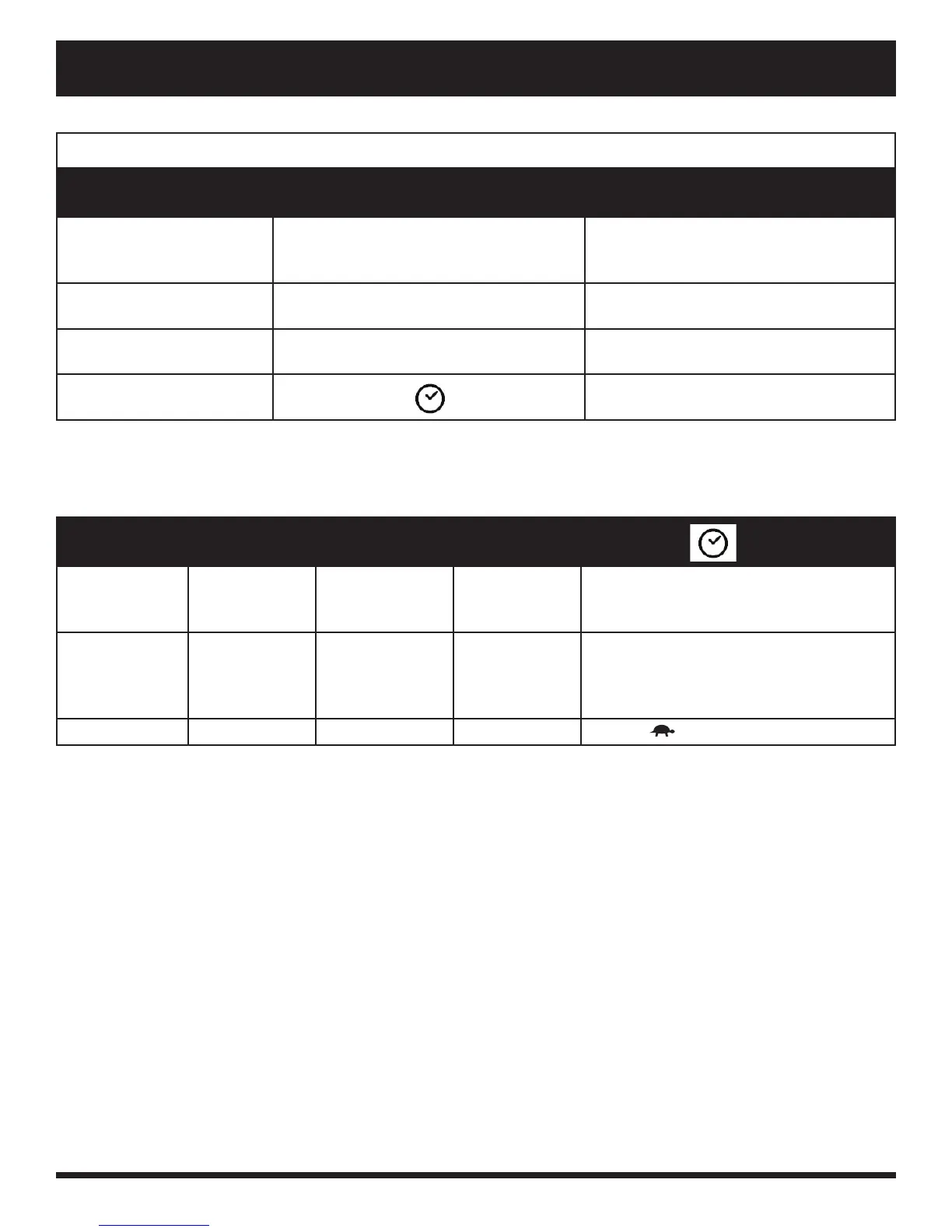
SETTING INFORMATION CHART
SETTING CODE INFORMATION
Odometer
ODO
Measures mph, km/h, and hours of use.
Also displays total distance traveled
over life of vehicle. (Cannot be reset.)
Tripometer
TRIP
Displays trip distance traveled. (Can be
reset to “0”.)
Temperature
TEMP
Displays current temperature in °F or
°C.
Clock Displays time in 12-hour (AM/PM) or
24-hour.
ODO TRIP
TEMP
Operation
Press Mode Press MODE
for 2 seconds
then release
Press Mode Press MODE (hour digits fl ash)
Selection
Use SET to
select option
Press and hold
SET until
option resets to
0.0
Use SET to
choose °F or
°C
Use SET to change hours. Alternate
pressing MODE and SET to change
minutes and AM/PM.
Exit
Press MODE Press MODE Press MODE Press
Chart 1. LCD Control Panel Information
Chart 2. LCD Control Panel Information
Battery Charging Mode
During battery charging, the console will display the clock and the battery condition indicator.
Battery Condition Indicator
When the key is turned to the “on” position, this LED indicator gives an approximate reading of battery strength.
When the vehicle’s battery voltage reaches a low enough level, a warning beep will sound once, indicating the
batteries need charging. The warning beep will not sound again until the vehicle is restarted or the throttle control
lever is pressed.
Maximum Speed Indicator LED
The maximum speed indicator displays the maximum speed selected with the speed adjustment buttons. The more
bars that are lit, the faster the speed. The maximum vehicle speed will be determined by the HIGH-LOW setting,
which limits the maximum speed to half when set to LOW. The actual travel speed will be shown in the speed
display on the LCD screen.
Press MODE until the setting you want to change appears on the LED screen. Press and hold SET then follow
the steps corresponding to your setting in chart 2.


 To Next Page