NP5 Prisma Network Player User Guide 11
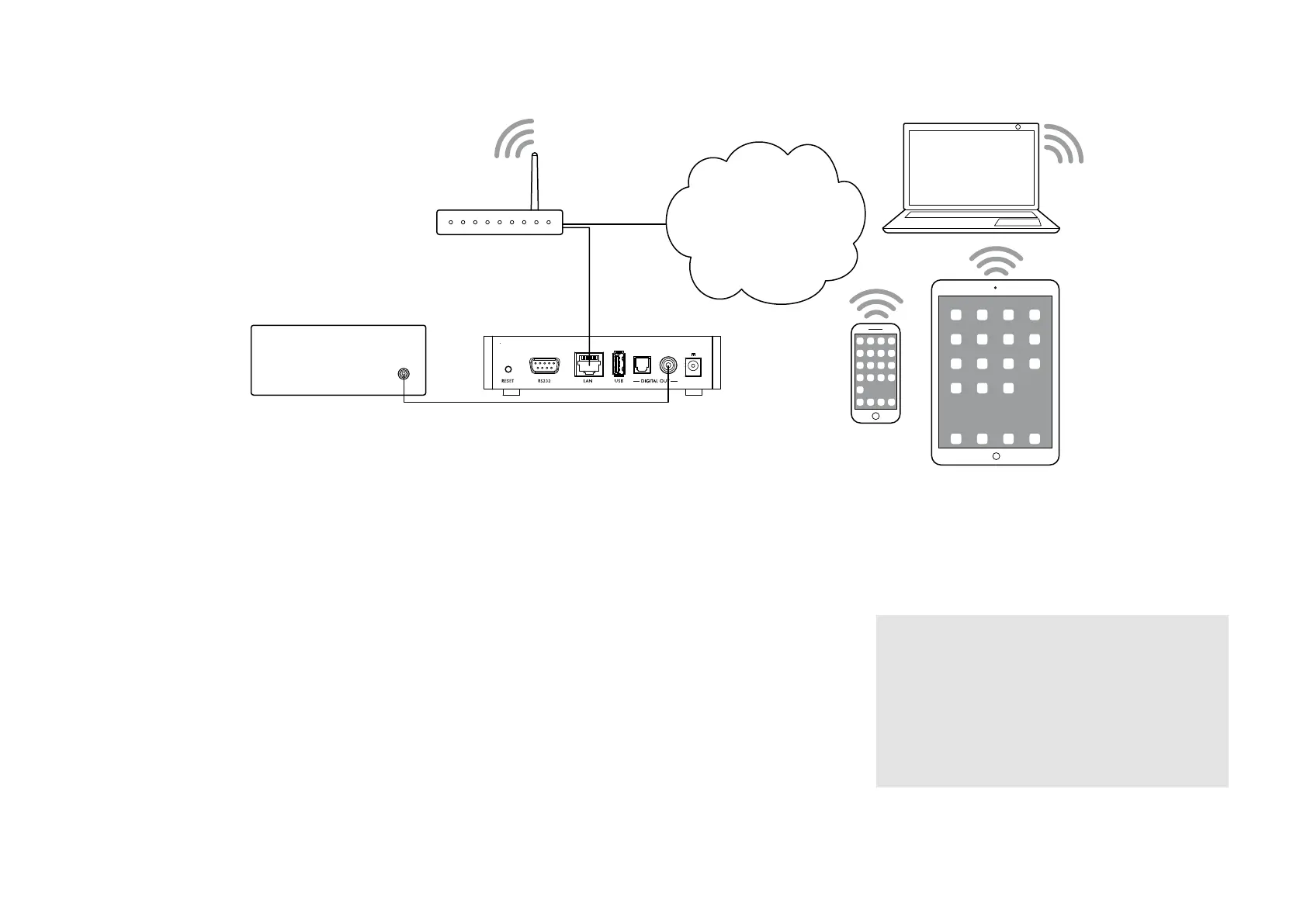
Preamplifier
NP5
Router
Internet music
services
Ethernet
cable
PC/Mac
STREAMING MUSIC FROM A PHONE, TABLET, OR PC
The NP5 Prisma can use Chromecast built-in to connect
directly to a music service that supports Chromecast, such
as Spotify, Deezer, Tidal, or TuneIn Radio. The music is
streamed direct to the NP5 Prisma; once set up you can
use your phone to make calls, or play other audio.
With a phone, tablet, or Mac/PC you can also play the
audio wirelessly to the NP5 Prisma, using Bluetooth or
AirPlay (iOS only), so the sound from any apps you run
on your device will be played through the NP5 Prisma.
Although you can stream music over Wi-Fi, for best results
connect the NP5 Prisma to your home router via an
Ethernet cable. If necessary, use the Google Home app to
configure the network settings on your NP5 Prisma.
To stream using Chromecast built-in
The NP5 Prisma has Chromecast built-in, which means
you can stream (cast) music over your network directly to
the NP5 Prisma from any Chromecast supported music
service, using the music service’s app on your desktop or
mobile device as a controller.
Click the Cast button within your music service’s app
and select the NP5 Prisma in the device list.
To stream using AirPlay
Use AirPlay to send audio over the network from your
Apple device to the NP5 Prisma. AirPlay is only available
on Apple devices.
To stream using Bluetooth
Use Bluetooth to send audio directly to the NP5 Prisma
from your Bluetooth device using Bluetooth connection.
You don’t need a network to stream using Bluetooth.
l
To stream using Spotify Connect
The NP5 Prisma supports Spotify Connect, which means
you can stream music directly to the NP5 Prisma from the
Spotify music service over your network, using the Spotify
app on your desktop or mobile device as a controller.
Here are Spotify’s instructions:
Listen out loud with Spotify Connect
1. Connect the NP5 Prisma to your Wi-Fi network.
2. Open up the Spotify app on your phone, tablet or
laptop using the same Wi-Fi network.
3. Play a song and select Devices Available.
4. Select the NP5 Prisma and start listening.


 To Next Page