NP5 Prisma Network Player User Guide 15
ADDITIONAL INFORMATION
These instructions help you get the best possible
performance from your NP5 Prisma.
RS232 Link setup
Your NP5 Prisma can be linked to another Primare
product using the RS232 Link function to add Prisma
capabilities to it. It will allow you to control the input,
volume, and standby on the linked device using the
Prisma app.
The procedure is as follows:
Connect the RS232 cable provided with your NP5
Prisma to your NP5 Prisma and other Primare product.
Open the Prisma app, choose the Settings tab, and go
to General settings.
Select RS232 link.
Set the appropriate Baud rate for the Primare device
you want to link to your NP5 Prisma.
Select 115200 for 15, 25, and 35 Series models, and
4800 for all other models.
Make sure that the linked Startup volume and
Maximum volume
match your linked product.
Set the Auto-on and Auto-off settings as required.
We recommend enabling both settings.
When you have selected the appropriate settings press
the Connect button.
The Link status should now change to Connected and
you can use the Prisma app to control the volume, step
between inputs, and switch between on and standby.
l
l
l
l
l
l
l
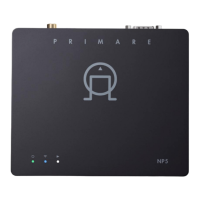
Top panel LED indicators
The table below explains the meaning of the top panel
indicators:
Factory reset
You can do a factory reset from the Prisma app, or from
the General settings menu; see
General settings
, page 12.
Spotify Connect
The Spotify Software is subject to third party licenses
found here:
https://www.spotify.com/connect/third-party-licenses
Colours * Power/Source Network Playing
White Chromecast, AirPlay and
UPnP/DLNA
N/A Playing
Green flash N/A Connected by cable.
Configure network **
N/A
Green Spotify Connect Connected by cable. N/A
Blue flash N/A Set up Wi-Fi ** N/A
Blue Bluetooth Connected by Wi-Fi N/A
Red flash Countdown to factory reset
Red Factory reset/firmware update in progress
* Indicators are dimmed while in standby.
** Set up or configure the network using the Google Home app; see Connect to a network, page 8.
Legal attributions
Apple, iPad, iPad Air, iPad Pro, iPhone and AirPlay are
trademarks of Apple Inc., registered in the U.S. and other
countries.
The Bluetooth® word mark and logos are registered
trademarks owned by Bluetooth SIG, Inc.
Chromecast built-in is a trademark of Google LLC.
SPOTIFY is a registered trademark of Spotify AB.


 To Next Page