Before using the remote control you need to
insert the two AAA batteries supplied with the
C23.
•
Gently slide open the cover on the back of
the remote control:
•
Insert the two batteries, observing the
polarity printed on the bottom of battery
compartment:
•
Slide back the cover until it clips into place:
Note: Replace only with alkaline
batteries type AAA, LR03, or
equivalent.
When disposing of old batteries please be
considerate to the environment.
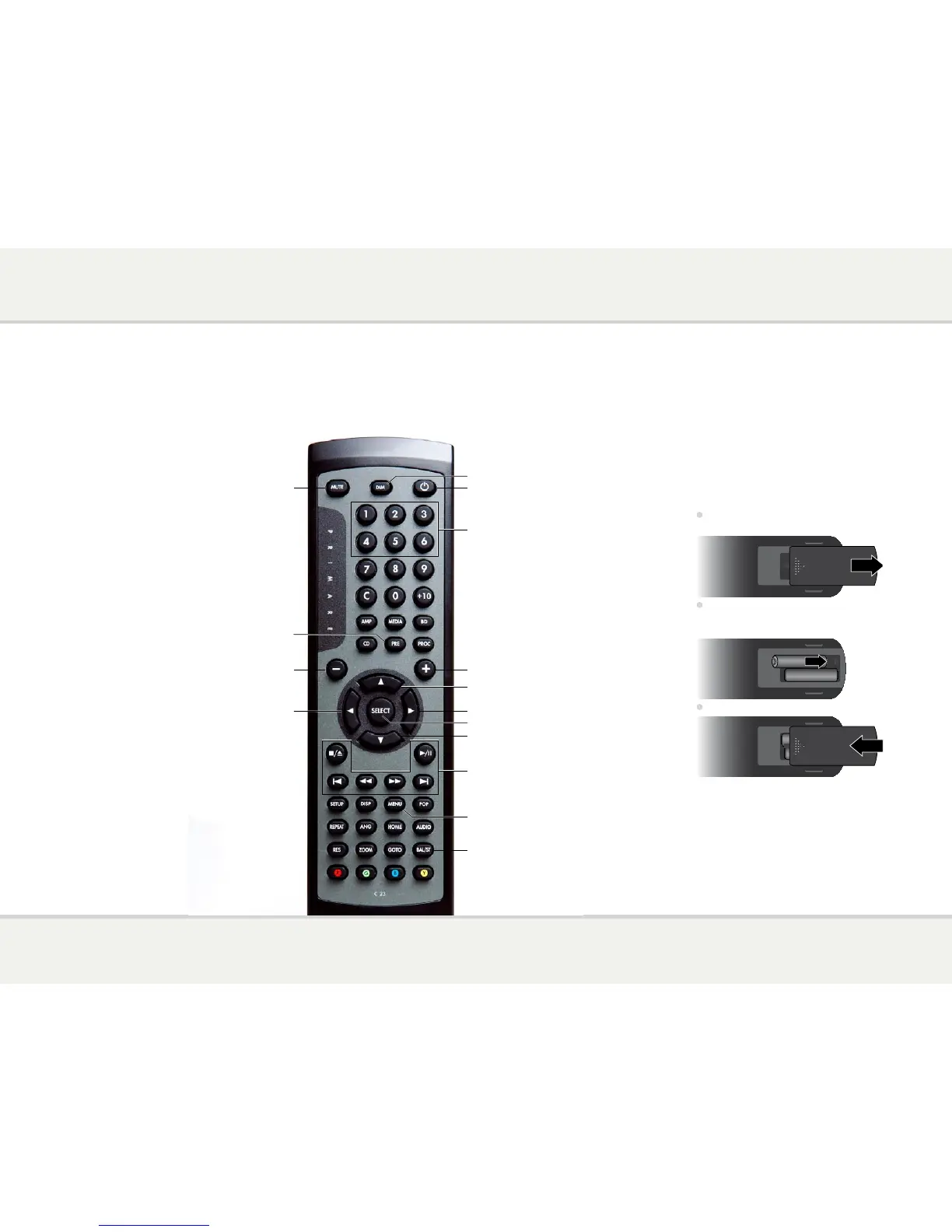
Switch on/off
Move balance right
Select previous input or
move up on settings menu
Select next input or
move down on settings menu
Increase the volume
Control the CD player
Change the balance
Press briefly to mute the sound
Press and hold to display the settings menu
Edit item on settings menu
Move balance left
Change the display brightness
Decrease the volume
Press briefly to
mute the sound
Select PRE32 mode
Select an input
This page explains how to
use the C23 remote control
to operate the PRE32, and
how to fit the batteries into
the remote control.



 To Next Page