Technical specification
Power amplifiers
Output power
5 x 120W, 8Ω
Output power 1kHz, one channel driven
8Ω 150W THD+N <1%,
4Ω 300W THD+N <1%,
AP AUX0025 Filter
Output power 1kHz, all channels driven
120W 4/8Ω THD+N <0.1%
AP AUX0025 Filter
THD
<0.01% 20Hz-20kHz 1W 8R, AP AES17
Filter
Signal-to-noise
80dBr, AP AES17 filter, ref 2.828Vrms.
Frequency response
20Hz-20kHz -0.2dB, 1W 8Ω
Analogue audio
Analogue inputs
8 RCA.
Analogue outputs
Front (left and right)
Center, Sub, Surr (left and right)
Surr back (left and right)
Analogue record output
1 RCA (left and right)
Analog zone2 output
1 RCA (left and right)
Frequency response
10Hz-100kHz, 1dB
THD
<0.005%, 20Hz-20kHz
Signal to noise ratio
-110dB
Input impedance
47kΩ
Output impedance
47Ω
Control
1 IR Input, 3 12V outputs (triggers),
1 RS232
Digital audio
Digital inputs
3 RCA, 3 TOS-Link.
Digital outputs
1 RCA, 1 TOS-Link
Frequency response
20Hz-20kHz ±0.2dB
THD and noise
0.005% @1kHz (AES17 filter)
Video
10 bit digital video conversion system
supporting NTSC/PAL, Component,
S-Video and Composite, with OSD.
Video inputs
3 HDMI, 3 Component, 3 S-Video,
4 Composite.
Video output
1 HDMI, 1 Component,
1 S-Video, 1 Composite
Video Zone 2 output
1 S-Video,1 Composite
Processing
Modes
Stereo, Bypass, Party,
Dolby Prologic IIx Music,
Dolby Prologic IIx Movie,
DTS NEO:6 MUSIC, DTS NEO:6 CINEMA
Decoding formats
Dolby Digital, Dolby Digital EX,
Dolby Prologic II, Dolby Prologic IIx,
DTS, DTS ES, DTS Neo:6, DTS 96/24,
MULTI/2 CH PCM/LPCM
Sampling rates
32kHz, 44.1kHz, 48kHz, 88.2kHz, 96kHz,
192kHz (AES/EBU)
General
Power consumption
Operating: 800W at 1K, 8Ω ,120W all
channels driven. Standby: <5W
Size
430 x 385 x 180mm (WxDxH)
Weight
15kg
Additional information
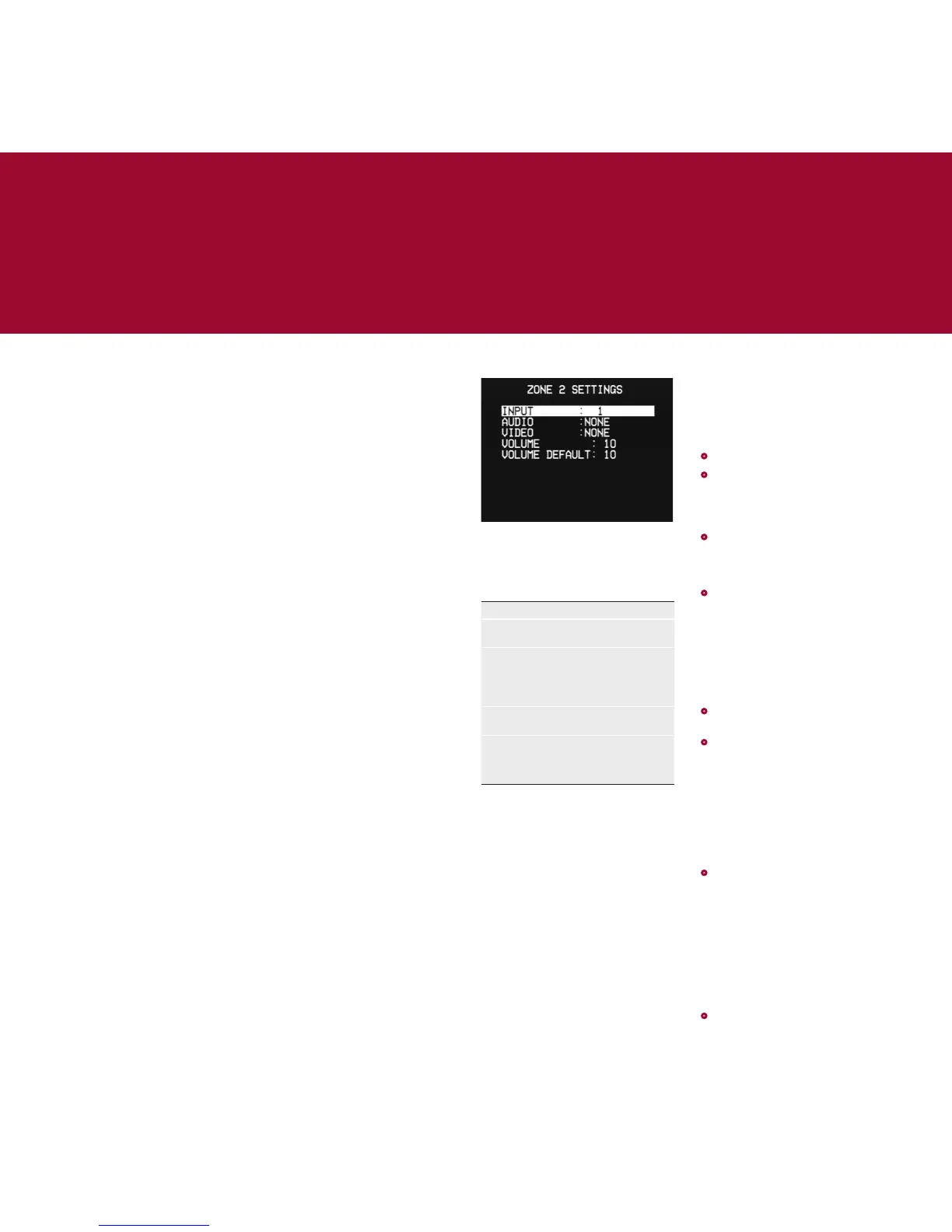
Using a second zone
For each input the ZONE 2 SETTINGS
menu allows you to specify an
analogue audio input and an S-Video or
composite video input to be output to
the Zone 2 outputs.
Option Description
INPUT Select one of the 15 inputs to
be configured.
AUDIO
VIDEO
Allows you to specify an
analogue audio input and an
S-Video or composite video
input to be output to the
Zone 2 outputs.
VOLUME Allows you to set the current
Zone 2 volume (0 to 99).
VOLUME
DEFAULT
Determines the default Zone
2 volume (0 to 99) when
the SPA22 is turned on from
standby.
Note: Analogue inputs 9 and 10 cannot
simultaneously be used for the main
and Zone 2 sources.
RS232
The RS232 connector allows your dealer
to upgrade the firmware on your SPA22,
or control the SPA22 as part of a multi-
room system. Do not connect anything
to this socket unless instructed by your
dealer.
Saving installer settings
Once you have configured the SPA22
you can save the settings in a
password-protected file, and then
recall them at any time to restore the
SPA22 to your custom configuration.
•
Select MEMORY from the MAIN MENU.
•
Select SAVE INSTALLER SETTINGS from
the MAIN MENU.
The first time you will be prompted to
set a password.
•
Highlight NEW PASSWORD and press
SELECT, enter the password using
the number keys (or A, V, <, and >) on
the remote, then press @.
•
Highlight CONFIRM NEW and press
SELECT, confirm the password using
the number keys (or A, V, <, and >) on
the remote, then press @.
The screen will confirm NEW PASSWORD
HAS BEEN STORED.
Now save the current settings as
follows:
•
Highlight SAVE INSTALLER SETTINGS
and press SELECT.
•
Press SELECT and enter the password
you have just defined.
The screen will confirm INSTALLER
SETTINGS HAVE BEEN SAVED.
Recalling installer settings
You can recall the installer settings at
any time:
•
On the MEMORY menu select RECALL
INST SETTINGS.
The SPA22 will restart with the new
configuration.
Performing a factory reset
If you want to restore the settings to
their default factory values you can
perform a factory reset as follows:
•
On the MEMORY menu select RECALL
FACTORY SETTINGS.


 To Next Page