EasyManua.ls Logo

Prime LS100 - User Manual

Prime LS100
10 pages
Print Icon
To Next Page IconTo Next Page
Loading...
1
LTE Tracker
Prime LS100 User Manual
Revision: 1.00
Document Title
Prime LS100 User manual
Version
1.00
Finale Date
2020-03-26
Status
Released
Document Control ID
TRACKER Prime LS100

Questions and Answers

Summary

Introduction to LTE Tracker

Prime LS100 Product Overview

Device Appearance and Design

Visual details and diagrams of the Prime LS100 device and its base station.

Buttons and Interface Functions

Details the functions of the various buttons and interfaces on the Prime LS100.

LED Indicator Status

Explains the different LED lights and their corresponding states and events.

Getting Started with Prime LS100

Included Parts List

Lists and describes the components included with the Prime LS100 device.

Built-in Battery Information

Provides information on the device's built-in battery capacity and usage guidelines.

Powering with the AC Adapter

Explains the role of the AC adapter for powering and charging the Prime LS100.

Device Power Management

Instructions on how to turn the Prime LS100 device on and off.

Operating Frequency Bands

Troubleshooting and Safety

Troubleshooting Common Issues

Provides solutions for common issues encountered with the Prime LS100 device.

Safety Guidelines and FCC Caution

Outlines important safety precautions, including FCC compliance and usage restrictions.

Overview

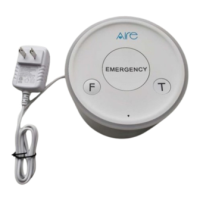
The Prime LS100 is a powerful LTE Tracker designed as emergency call equipment, operating on LTE B4/B13 with superior receiving sensitivity. Its primary function is real-time or scheduled location tracking, managed by a backend server or specified terminals. The device utilizes an embedded wireless tracking protocol to communicate with the backend server via the LTE network, sending emergency reports. This design facilitates easy setup of tracking platforms for service providers.

Key Features and Specifications:

  • Tracking Capabilities: Real-time or scheduled location tracking via LTE B4/B13.
  • Emergency Functionality: Designed for emergency calls and reporting.
  • Wireless Connectivity:
    • LTE: Supports Band 2, Band 4, Band 5, Band 12, and Band 13.
    • Wi-Fi: Activates in alerting state to report MAC addresses, operating at 2412MHz-2462MHz.
    • BLE (Bluetooth Low Energy): Activates to scan third-party BLE data or Beacon broadcasts based on custom settings or protocols, operating at 2412MHz-2472MHz.
    • RF 433MHz: A supervised short-range RF communication link between the unit and the Base Station, used to determine if they are out of range with each other, operating at 433.92MHz.
  • Power:
    • Adapter: The device is designed to be continuously plugged into a power supply socket via an AC adapter (Model: TPA-157A050200UW01, Input: 100-240V-50/60Hz 0.4A, Output: 2000mA).
    • Built-in Battery: Features an 850mAh Lithium polymer battery, primarily for backup when the adapter is unplugged. It is crucial to ensure the adapter is plugged in when the device is first used.
  • Physical Interface:
    • Buttons:
      • Reset Key: Powers off the Prime LS100 (when adapter is unplugged).
      • Function Key (SOS mode): Activates SOS mode.
      • Feature Key: Plays a list of audios.
      • TEST Key: Activates test mode.
    • LED Indicators:
      • Function Key LED: Solid when pressed.
      • Feature Key LED: Solid when pressed.
      • Test Key LED: Solid when pressed.
      • Breath Light: Displays a "Breath effect" during a long press of the Test Key.
  • Dimensions: Approximately 110mm in diameter and 85mm in height.

Usage Features:

  • Power On: Simply plug in the power adapter.
  • Power Off: Unplug the power adapter and then press the Reset button. Note that the device cannot be powered off if the adapter is plugged in.
  • Emergency Activation: The Function Key is dedicated to SOS mode, allowing for quick emergency alerts.
  • Audio Playback: The Feature Key enables playback of pre-configured audio lists.
  • Testing: A dedicated TEST Key facilitates diagnostic checks.

Maintenance Features & Troubleshooting:

  • Troubleshooting Network Issues:
    • If messages are not reported to the backend server via the mobile network, check if the APN (Access Point Name) is correct and can access the internet directly.
    • Verify that the IP address or port of the backend server is correct and an identified address on the internet.
  • Troubleshooting Power Issues:
    • If the device cannot be powered off (when the adapter is unplugged), ensure the power key function is enabled via AT+GTFKS command.
    • If the battery cannot be charged (e.g., after prolonged disuse and locking), an external power source (3.6V to 4.2V DC) may be needed to activate the battery, or contact customer support.
  • Safety Information:
    • Disassembly: Do not disassemble the device.
    • Environment: Avoid overheating, high humidity, and direct sunlight. Extreme temperatures can damage the device or cause battery explosion.
    • Usage Restrictions: Do not use the Prime LS100 on airplanes or near medical equipment.
    • FCC Compliance: The device complies with FCC Rules Part 15. Any unauthorized changes or modifications could void the user's authority to operate the equipment. It is designed to provide reasonable protection against harmful interference in residential installations. If interference occurs, users are advised to reorient/relocate the receiving antenna, increase separation between equipment and receiver, connect to a different circuit, or consult a radio/TV technician.
    • RF Exposure: This equipment complies with FCC radiation exposure limits for an uncontrolled environment and should be installed and operated with a minimum distance of 20cm between the radiator and the user's body.

Prime LS100 Specifications

General IconGeneral
BrandPrime
ModelLS100
CategoryGPS
LanguageEnglish

Related product manuals