MODEL #TNDHD002
Start Here:
Step 1. – Prepare the Timer
1. Pull the sticker off the screen.
2. Plug the timer in for 30 minutes to charge the
battery.
3. After 30 minutes, remove the timer from the outlet
and move to Step 2.
* If timer is not flashing 12:00AM, please see reset
instructions.
Step 2. – Set the Current Time
1. Press “SET” twice.
2. While the hour is flashing , press “+” or “-” to set
the current hour.
-Pay attention to AM and PM
3. Press “SET” once .
4. While the minutes are flashing, press “+” or “-” to
set the current minute.
5. Press “DAY” until the current day is selected
6. Press “SET” to save the Current Time.
Step 3. – Set an ON/OFF Time
1. Press “SET” once.
2. Press “+” to choose a program (1-16)
-The number “1” will appear in the lower left
corner. Continuing to press the “+” button will
cycle through all 8 potential programs. Stop on
the program you would like to set.
3. Press “SET” to enter the program of your
choice.
-You can set up to 16 different programs
Operating Modes
Manual Override
• Press ON/OFF to bypass the
current setting. Settings will
resume based on the next
programmed cycle.
Random
• This feature turns lights on/off
at random times during a set
on/off period.
• Press “+” and “-” at the same
time to enter or exit the
Random mode.
• At least one ON/OFF time
must be set for a minimum
of 2 hours and 10 minutes
for Random function.
One-Touch DAYLIGHT Savings Time
• Press the “+” and “DAY” buttons at the same time
to adjust the clock for daylight savings time.
• The “ ” icon will appear on the screen when the
timer is in daylight savings mode.
• Or to reset time, see Step 2.
Countdown Mode
• Devices will remain ON for the time selected and
turn OFF when time runs out.
• A countdown period can be from 1 minute up to
19 hours and 59 minutes.
How to Activate Countdown Mode
1. Press “SET” and “-” at the same time to enter or
exit Countdown Mode. COUNTDOWN will appear
on screen
2. Press “SET” to select the hour.
3. Use “+” or “-” to select the number of hours you
would like the timer to countdown
4. Press “SET” to save the hour and to select the
minutes.
5. Use “+” or “-” to select the number of minutes
you would like the timer to countdown.
6. Press “SET” to save the settings.
7. Press “ON/OFF” to start the countdown.
**“ON/OFF” can be used to pause the countdown at
any time.
Reset the Timer
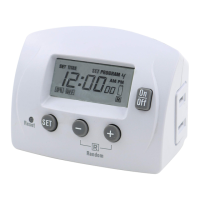
• Using a small non-metallic object, such as a tooth
pick or pencil press and hold the reset button for
5 seconds.
• The display will flash “12:00am” when the timer is
reset.
Reviewing, Changing, and Deleting ON/OFF
Times
Review an ON/OFF Time
1. Press “SET” once.
2. Press “+” until the desired program is reached.
3. Press “SET” to enter the program, and continue
pressing “SET” to review the program one setting
at a time.
Change an ON/OFF Time
1. Press “SET” once.
2. Press “+” until the desired program is reached.
3. Use instructions Step 3: 3-13 to change the
ON/OFF time.
4. Press “+” or ”-” to set the hour you would like the
timer to turn on.
-Pay attention to AM and PM
5. Press “SET” once.
6. Press “+” or “-” to set the current minute.
7. Press “DAY” until you reach the desired day or
block of days that you want the timer to turn on.
Choose any individual day or blocks of days
including MO-FR, SA-SU, or MO-SU
8. Press “SET” to save the ON time and begin
setting the OFF time.
9. Press “+” or ”-” to set the hour you would like the
timer to turn OFF.
-Pay attention to AM and PM
10. Press “SET” once.
11. Press “+” or “-” to set the current minute.
12. Press “DAY” until you reach the desired day or
block of days that you want the timer to turn on.
Choose any individual day or blocks of days
including MO-FR, SA-SU, or MO-SU
13. Press “SET” to save your ON/OFF Time.
7-DAY
HEAVY
DUTY
DIGITAL
TIMER
DAY
On
Off
+
-
Random
+/- 1hr
R
12
:
0000
OFFON
AM
PM
R
TU WE TH FR SA SU
COUNTDOWN
SET
DAY
+
-
Random
+/- 1hr
Countdown
R
12
:
0000
16
OFFON
SET
TIME
SET
PROG
AM
PM
R
MO TU WE TH FR SA SU
COUNTDOWN
SET
DAY
On
Off
+
-
Reset
Random
+/- 1hr
Countdown
R
12
:
0000
16
OFFON
SET
TIME
SET
PROG
AM
PM
R
MO TU WE TH FR SA SU
COUNTDOWN

 Need help?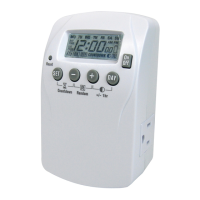

 To Next Page
 General