Chapter 5 Operation 63
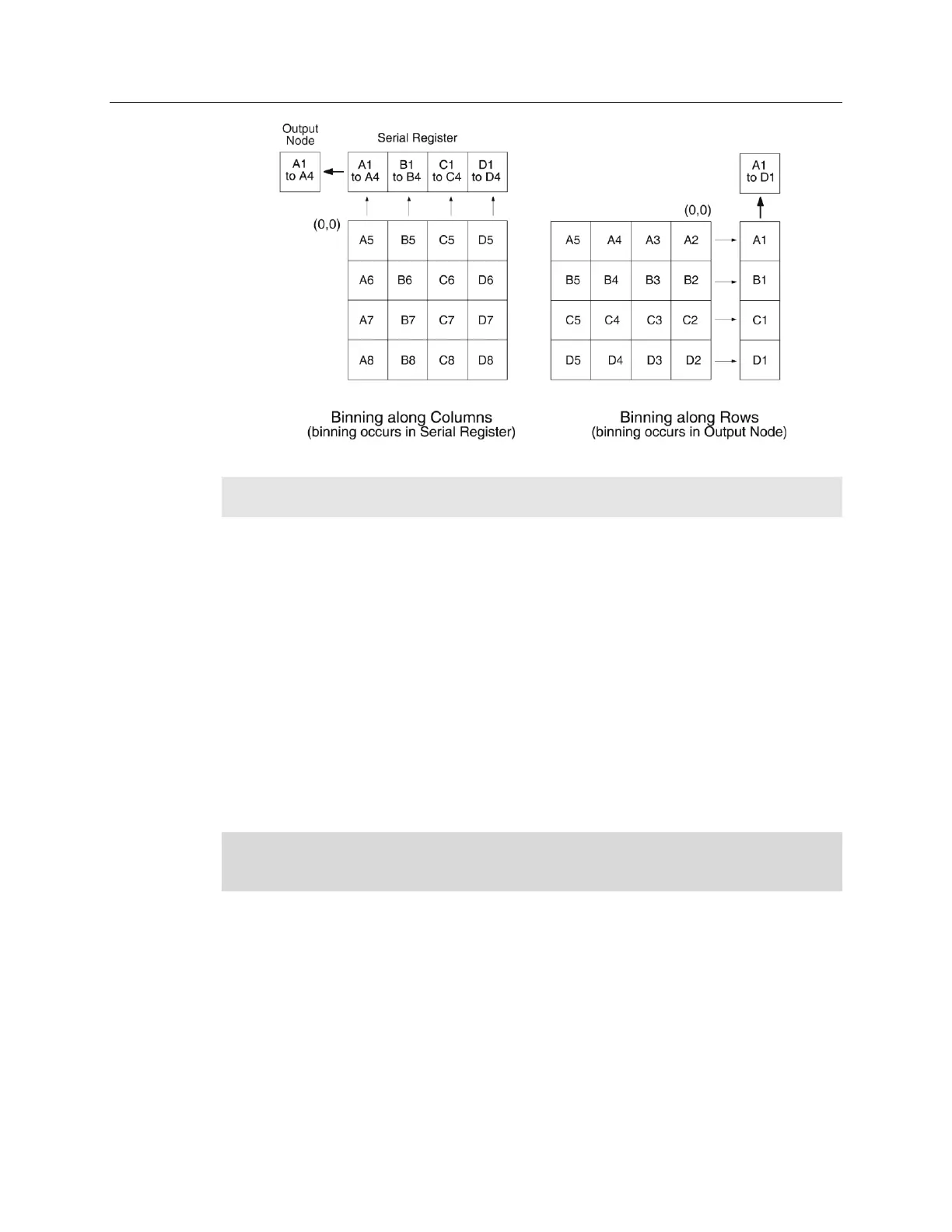
Figure 27. Binning and Array Orientation
Note: You can easily switch between these orientations by rotating the camera 90° and
changing the binning parameters in the application software.
Output Amplifier {Quality} Selection
The output amplifier amplifies the collected charge from the output node and outputs it as
electrons/count. Although Figure 24 shows an array with dual output nodes and
amplifiers (one set at each end of the shift register), some PIXIS systems are available
with a single output node and amplifier. If your system has dual output amplifiers, you
can choose the output amplifier to be used (High Capacity or Low Noise) via the
Acquisition|Experiment Setup…|ADC tab {Quality on the Analog to Digital
Conversion expander}:
High Capacity amplifier: Provides a spectrometric well capacity that is
approximately 3 times the well capacity for the Low Noise amplifier selection.
High Capacity is suitable when you have intense light signals or signals with
high dynamic range.
Low Noise amplifier: Provides the highest sensitivity performance and is
suitable when you have weak signals.
Note: The choice of output amplifier {Quality} and controller gain {Analog Gain}
setting should be considered together for the best signal capture. Examples of the
interaction of output amplifier and controller gain selections are shown in Table 2.


 To Next Page