WINDOWS 7/8 instruction guide for your Printrbot printer and computer software
Setting of the Slicer - CuraEngine
Repetier is installed with two slicing engines – CuraEngine and Slic3r. CuraEngine is more suited to
a new user whereas Slic3r is aimed at the professional user. The author of this document uses
CuraEngine so this installation guide focuses on this version.
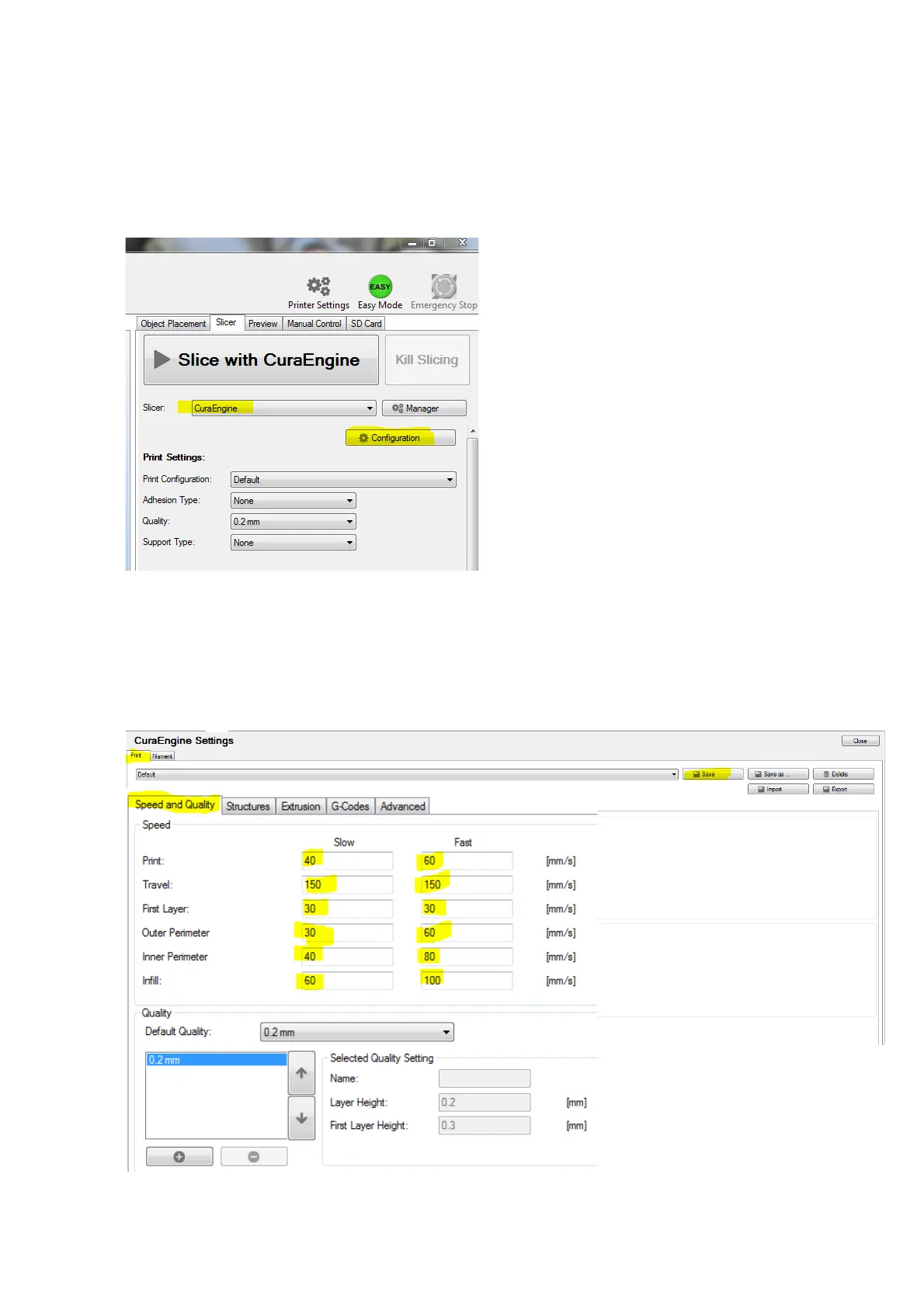
Select the Slicer tab on the main screen.
Select CuraEngine as the slicer choice and
select Configuration.
The CuraEngine settings window will open …. Select the Print tab in this window and then the
Speed and Quality tab. The settings shown below are a good starting point. With experience and
depending on the requirements of your 3D print model, you may change this later to suit. For
now, they are good for most “normal” models. It is good practice to save the settings as you
complete each tab. Some of the highlighted settings are already set as default but I have shown
them as reference
Page 13 of 23



 To Next Page