EasyManua.ls Logo

Printrbot Simple - Printer Configuration in Repetier; Set Connection Parameters; Configure Printer Movement Settings

Default Icon
23 pages
Print Icon
To Next Page IconTo Next Page
To Previous Page IconTo Previous Page
Loading...
WINDOWS 7/8 instruction guide for your Printrbot printer and computer software
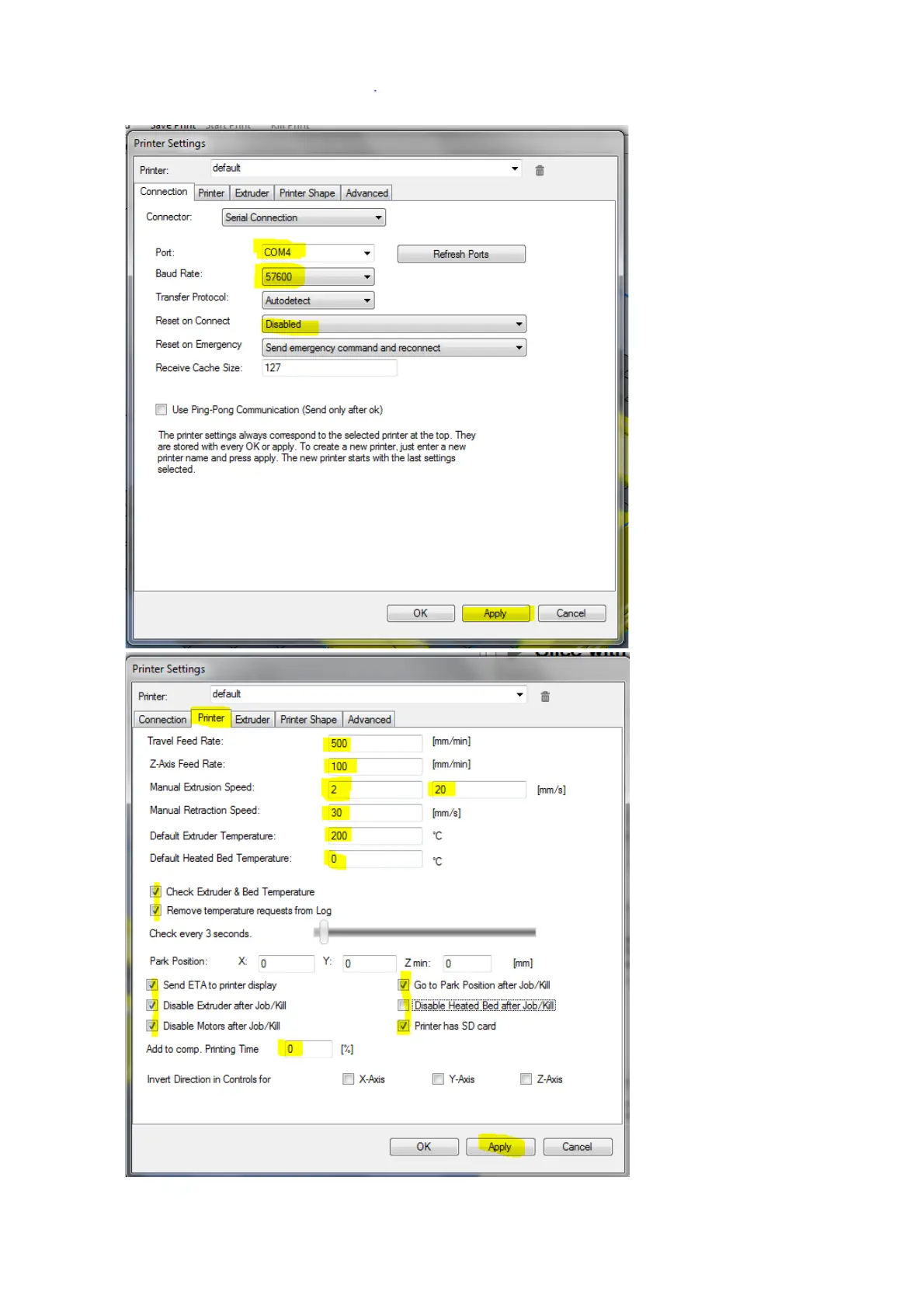
Select the Connection
tab in the Printer
Settings Dialogue box.
Set the Port to the
com port number of
your recently installed
Printrbot serial port.
Set your Baud Rate to
57600
Set Reset on Connect
to Disabled
YOU MUST CLICK ON
APPLY otherwise your
settings will NOT be
saved.
Select the Printer tab
of the Printer Settings
dialogue box and set
the settings as per the
values on highlighted
in yellow.
Click on Apply
Page 9 of 23

Other manuals for Printrbot Simple

Related product manuals