pilot’s perspective side view
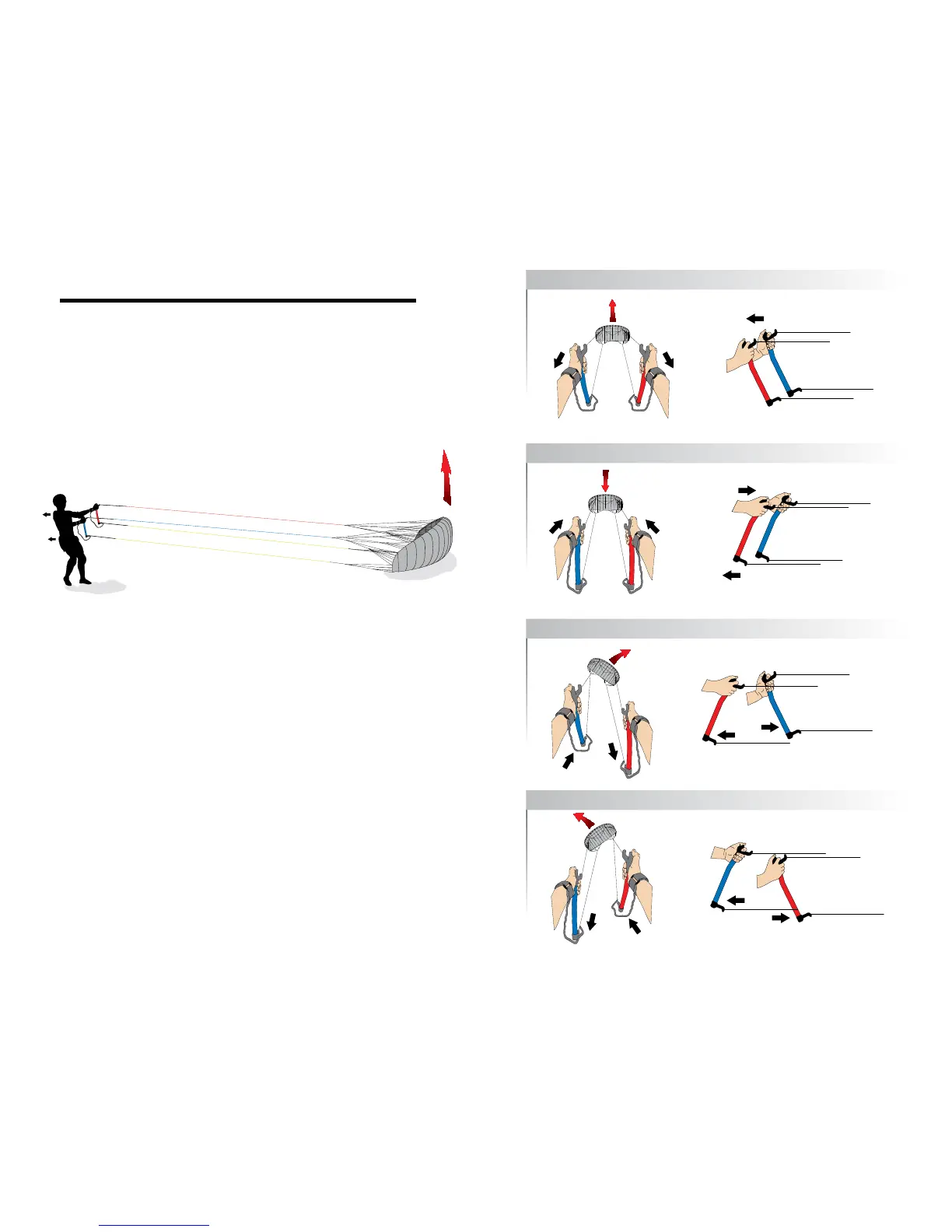
Position the kite downwind, weight the trailing edge down, and unwind your
lines as described in launching with the control bar
(see Fig. 11.a).
Before launch, attach the handle safety straps to each wrist. The handles should
be held at their upper ends as shown in the illustration. The brake lines should
be slack with the lower ends of the handles pointing forward.
To launch, pull on back both handles simultaneously and if necessary take a
few steps backwards at the same time. As the kite inflates and lifts off, hold
the handles evenly in front of you and steer the kite straight up to the top of the
wind window.
Steering with Handles
To make a basic turn simply pull on one handle to turn in one direction. Pulling on
the left handle turns the kite left and pulling right turns it right. Hold the handles
evenly in front of you and the kite will continue straight in the direct it’s pointed
until it reaches the edge of the wind window.
With handles you can make a tighter turn by pulling the handle and pivoting the
lower handle end toward you at the same time to activate the brake line
(see Fig.
11.b)
. By combining pulling and pivoting movements with the handles, the kite
can be controlled quite precisely and turned within its wingspan if desired.
The brake lines should always be returned to their initial (slack) position after a
steering maneuver to maintain forward drive. Hold both handles close together
in front of you to ensure full control.
When both brake lines are pulled simultaneously by tilting both handles toward
the pilot, the lift of the kite will be interrupted and it will begin to fly backwards.
In light to moderate winds you can land the kite this way, using the brakes as
necessary to ensure a steady backwards flight down to the ground.
Fig. 11.a: Launching with Handles
Fig. 11.b: Steering with Handles
launch/up
landing
/down
right
turn
left
turn
HANDlES lAUNCH
pilot’s perspective side view
pilot’s perspective side view
pilot’s perspective side view
20 21



 To Next Page