BARS vERSUS HANDlES
The Tensor is uniquely designed to be flown either on two lines with a control
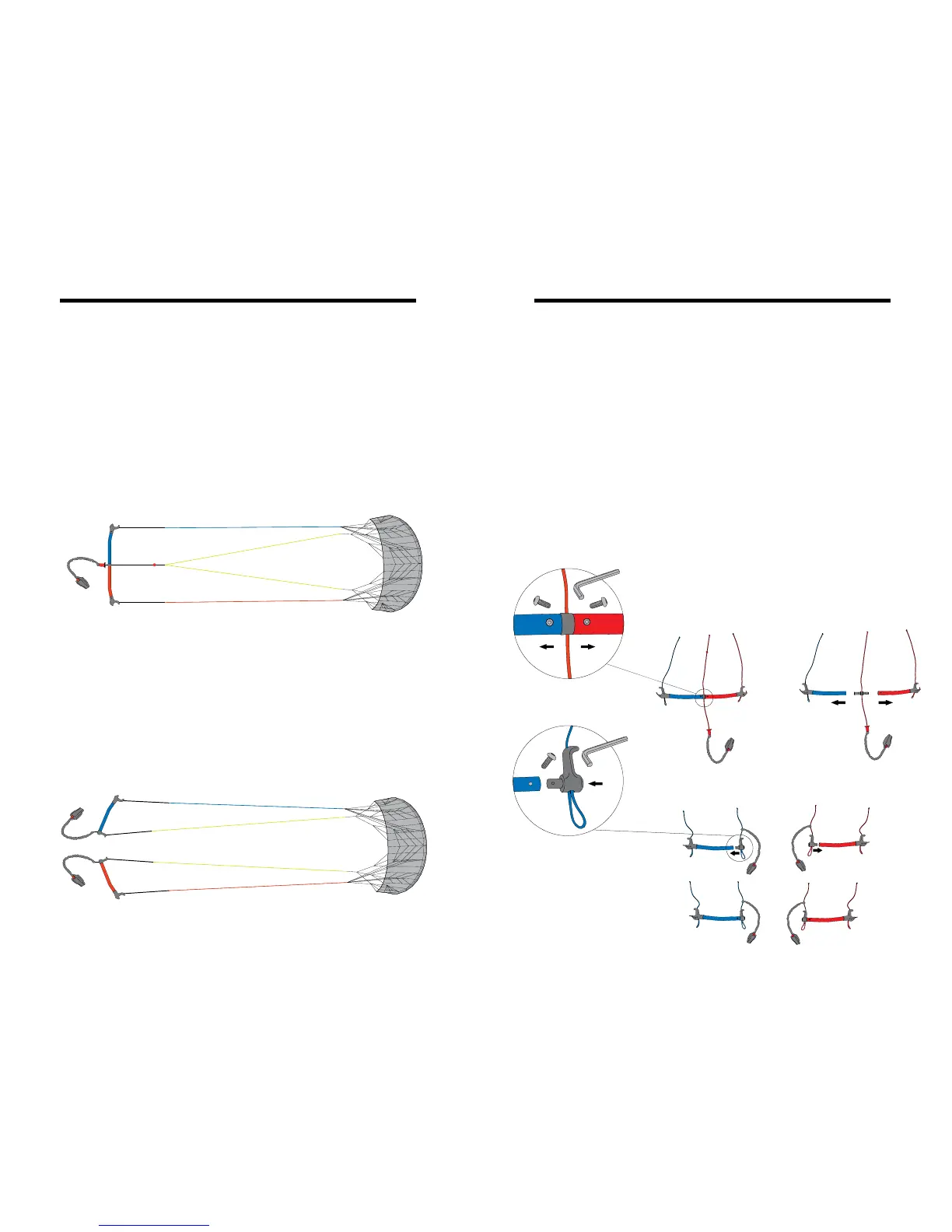
bar, or on four lines with independent quadline handles. The special control
bar has a machined aircraft alloy center ferrule which when disconnected al-
lows easy conversion into two quad-line handles without need for a separate
line winder.
Control Bar Mode:
Allows comfortable left-right two-line steering for less experienced pilots. Cen-
ter safety line connects to brakelines on the kite, allowing easy reverse launch
and instant de-power to kill the kite for landing and emergencies
(see Fig. 5.a).
Handle Mode:
Independent braking with each hand allows greater maneuverability and tighter
turns, allowing you to stay in the power zone for more continuous power. Brake
line control also allows subtle changes to the curvature of the wing to maximize
pull in all parts of the wind window
(see Fig. 5.b).
Converting from Bars to Handles
To convert from bar mode to handle mode (see Fig. 6):
1) Use the supplied Allen wrench to remove the two screws at the middle of
the bar from the machined center joiner. Slide the two halves of the bar off
the joiner.
2) Insert the two molded handle ends into the open ends of the handles, line up
the screw holes, and secure with the Allen wrench and two set screws.
3) Next, untie the two yellow brake lines from the center line and use a Lark’s
Head knot to tie each one to the tail on its corresponding handle. Check that
none of the lines are tangled or twisted. IMPORTANT: Be sure that the Right
brake line leads to the Red handle, and the Left line leads to the Blue handle.
Fig. 5.b: Handles
Fig. 6: Bar to Handle Conversion
Fig. 5.a: Control Bars
14 15



 To Next Page