5
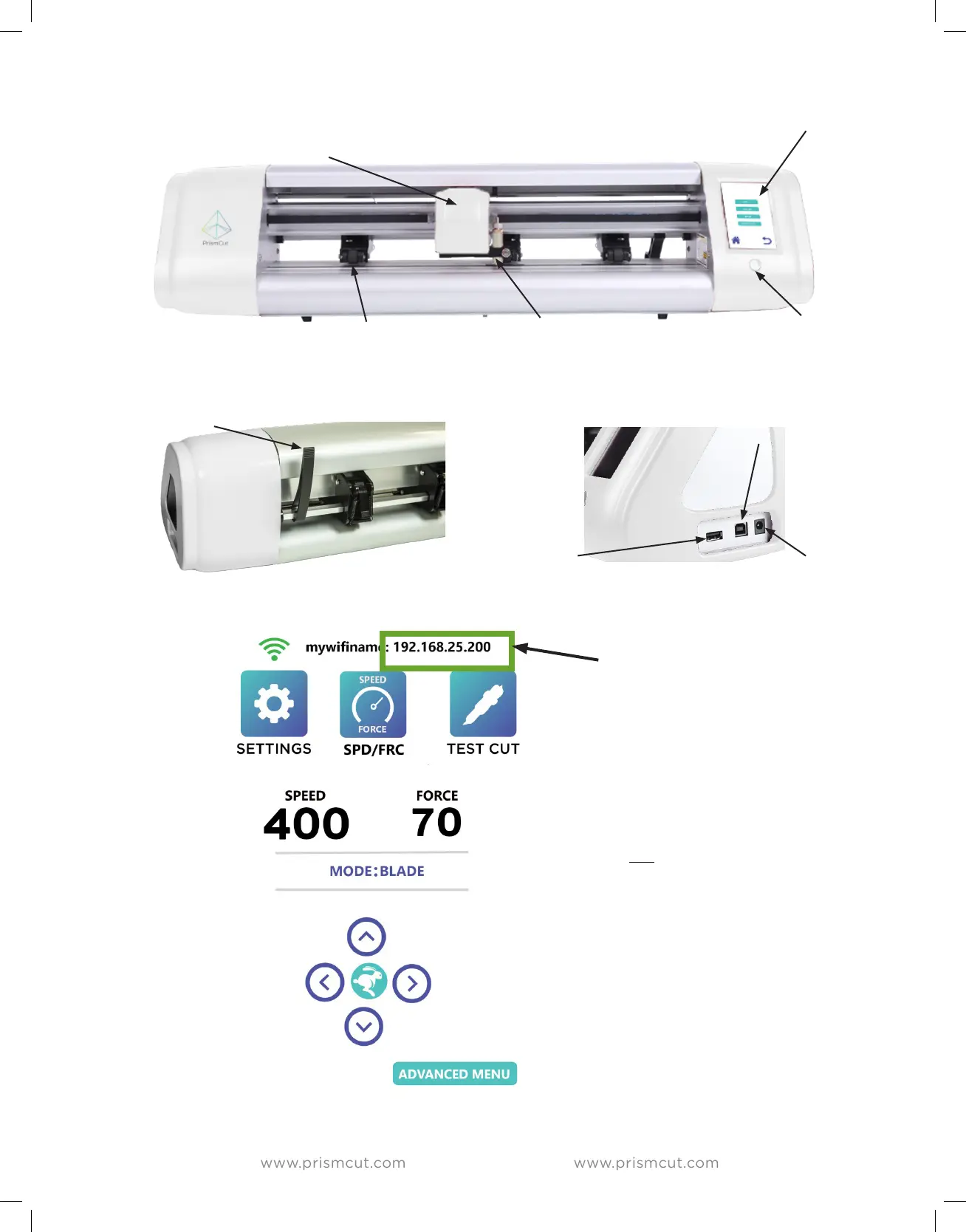
POWER SWITCH
CONTROL PANEL
touch screen
BLADE HOLDER
(silver, bronze ring)
CARRIAGE HEAD (white)
moves the blade across cutting area
PINCH ROLLERS (black)
position pinch rollers under arrows
USB CABLE PORT
connect to PC only if
not using WiFi
POWER PLUG
U-DISK SLOT
cut files without PC
PINCH ROLLER LEVER
Up/Down pinch rollers
The IP address will display at the
top of the cutter’s screen after
you have connected to your home
WiFi (see Section 1.4).
The IP address must match on
your cutter and your computer for
wireless communications to work.
If the top line of your cutter
screen shows “HI-LINK_xxx” you
are not yet connected to your
home WiFi. Click on the SETTINGS
icon and then go to the WIFI
menu to connect the cutter to
your home WiFi.


 To Next Page