14
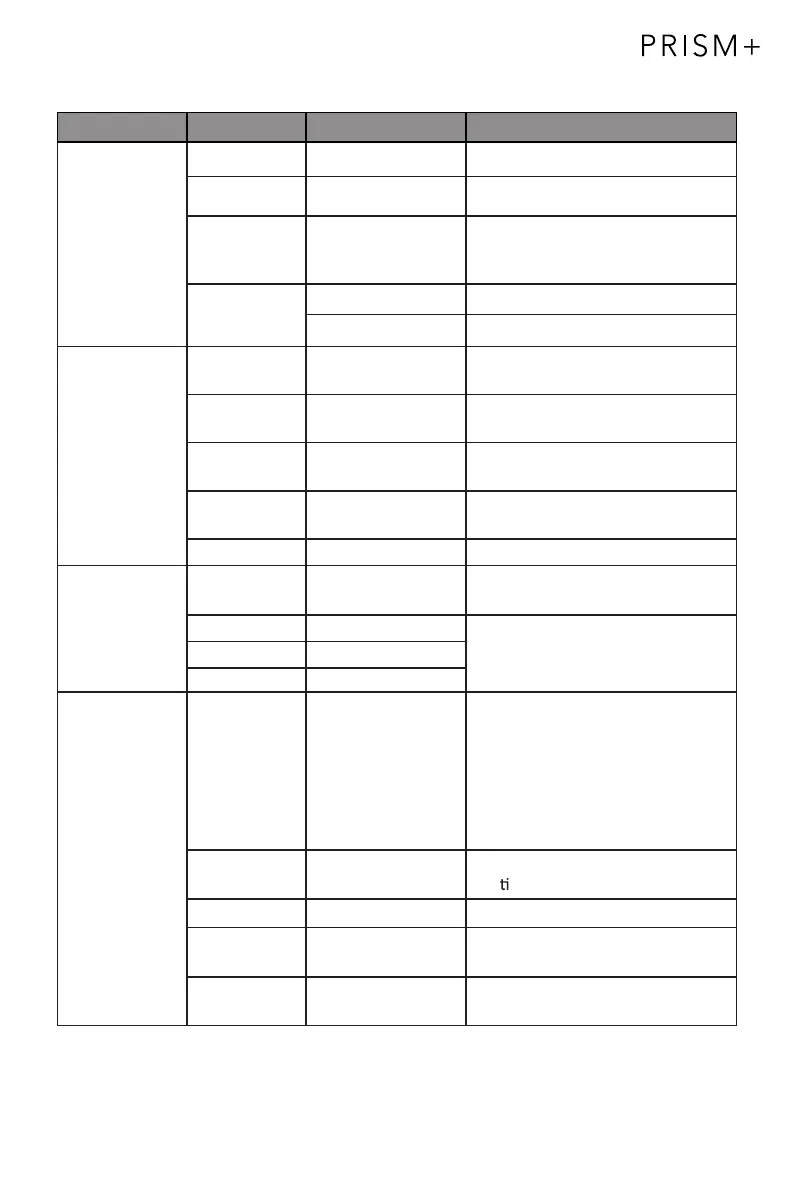
9.1 – OSD Menu Functions
English , Español ,
Русский, Français,
한국 , Português ,
Deutsch, Türkçe ,
简体中文 ,
Polski, Italiano ,
Nederlands
Standard , Game ,
RTS , FPS , Movie,
Text
Main Menu Sub-Menu Options Description
0~100 Adjust display brightness
0~100 Adjust display contrast
ECO Set visual mode
DCR On Turn On DCR function
Off Turn Off DCR function
Set aspect ratio
Adjust color temperature
0~100
0~100
0~100
0~100
0~100
Customize RGB components
0~100
0~100
Set OSD language
0-100 Adjust the OSD horizontal
posi on
0-100 Adjust the OSD vertical position
0~60
0-100
H. POSITION
V. POSITION
Adiust horizontal position of the
picture of source.
Adiust picture clock to reduce the
vertical line noise.
Adiust picture phase to reduce
the level of noise.
Adiust vertical position of the
picture of source.
PHASE
Clock
BRIGHTNESS
COLOR TEMP.
IMAGE
OSD SETTING
Transparency
Brightness
Contrast
, 日语
Language
Blue
Green
Red
Color temp. Warm, User , Cool,
Wide , Auto , 4:3
Aspect
OSD H. POS.
OSD V .POS.
OSD Timer
Set how long the OSD remains
open after non-use
Set the OSD overall
transparency


 To Next Page