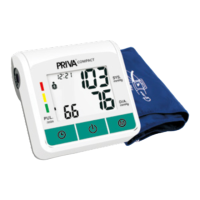
The PRIVA Compact Digital Blood Pressure Monitoring System, model BP-811, is a device designed for digital blood pressure monitoring. It utilizes the oscillometric method for measurement and features a digital LCD display.
Function Description:
This device measures both systolic and diastolic blood pressure, as well as pulse rate. It is intended for self-testing and provides readings in mmHg for blood pressure and beats per minute for pulse. The monitor allows for tracking blood pressure readings for two individuals independently, storing up to 120 measurement values per user. It also includes an irregular heart rate detection feature, indicated by a specific symbol on the LCD screen, which suggests a possible arrhythmia and advises consultation with a healthcare professional.
Important Technical Specifications:
- Measurement Principle: Oscillometric method.
- Display: Digital LCD.
- Measuring Range:
- Blood Pressure: 0 to 260 mmHg (in 1 mmHg increments).
- Pulse: 40 to 200 beats/minute.
- Accuracy:
- Blood Pressure: ±3mmHg.
- Pulse: ±5% of reading.
- Inflation: Automatic inflation by internal pump.
- Inflation Setting: Auto inflation (140-250 mmHg).
- Memory Function: 120 readings per user (2 Users), including SYS., DIA., and Pulse.
- Power: 4×1.5V AAA Batteries, DC 6V/1A.
- Battery Life: Approximately 400 times.
- Operating Temperature: 5~40 °C.
- Operating Humidity: 15-80% RH.
- Storage Temperature: -20~50 °C.
- Storage Humidity: 10-93% RH.
- Dimensions: 93 x 91 x 43 ± 0.5 mm.
- LCD Display Size: 55 x 40 mm.
- Weight: ± 356g (including batteries and cuff).
- Cuff Pressure Display Range: 0~260 mmHg.
- Mode of Operation: Continuous operation.
- Protection against ingress of water: IPX0.
- Accessories: 1 cuff, 4x 1.5V AAA batteries, instruction manual.
- Device Standard Compliance: EN 60601-1:2006/A1:2013/AC:2014, EN 60601-1-2:2014, EN 60601-1-11:2015, IEC 80601-2-30:2018.
- Electromagnetic Compatibility: Fulfills stipulations of European standard EN 60601-1-2.
- EU-Guidelines Compliance: 93/42/EEC for Medical Products Class IIa.
Usage Features:
- Battery Insertion: Requires 4x 1.5V AAA batteries, inserted by removing the battery cover on the bottom of the monitor and observing polarity.
- User Selection: Before each measurement, users can select between User 1 or User 2 by pressing and holding the "TIME" button for at least 3 seconds, then using the "MEMORY" button to change the user and "TIME" to confirm.
- Time and Date Setting: The device allows for setting the YEAR, MONTH, DAY, HOUR, and MINUTES. This is initiated by pressing and holding the "TIME" button for at least 3 seconds, then using the "MEMORY" button to change values and "TIME" to confirm.
- Pre-Measurement Guidelines: Users are advised to avoid exercise, caffeine, eating, and drinking directly before measurement. It is recommended to relax in a quiet environment for about ten minutes prior to taking a reading.
- Cuff Positioning: The cuff (medium size: 22-32cm) should be secured firmly but not too tightly, with the arm laid on a flat surface (palm upwards) so the cuff is at the same height as the heart. A 2-3cm gap from the elbow joint is recommended. Users should sit quietly for 2 minutes before starting.
- Taking a Measurement:
- Ensure the correct user is selected.
- Press the "POWER" button to inflate the cuff.
- The device slowly diminishes pump pressure after reaching inflation. Cuff pressure is displayed during measurement.
- A flashing heart symbol and beep tone indicate pulse detection.
- A long beep tone signals the conclusion of the measurement, displaying blood pressure and pulse rate.
- The device automatically switches off after 150 seconds of inactivity.
- Interrupting a Measurement: The "POWER" button can be pressed at any time to stop the measurement and lower cuff pressure.
- Memory Recall: Pressing the "MEMORY" button displays the "MR" symbol and the average of the last three measurements. Subsequent presses cycle through individual stored measurements with their date and time. The screen alternates between TIME and DATE for each entry.
- Deleting Measurements: To delete all stored readings, press and hold the "MEMORY" button for at least 5 seconds until "O" is displayed, then release.
- Date and Time Display (Device Off): With the device off, pressing the "TIME" button briefly displays the current date and time before the device switches off again after 150 seconds.
Maintenance Features:
- General Care: Use the device according to the manual. Avoid extreme temperatures, humidity, dust, or direct sunlight.
- Cuff Handling: Handle the sensitive air-tight cuff bubble with care, avoiding twisting or buckling of the cuff and/or tubing.
- Cleaning: Clean the device with a soft, dry cloth. Do not use alcohol, thinners, or similar solvents. Dirt on the cuff can be removed with a damp cloth, but the cuff must never be washed.
- Durability: Do not drop, shake, or treat the device roughly.
- Servicing: Never open the device, as this will void the manufacturer's guarantee. For repairing, if an "Err E" code is displayed, the monitor should be returned.
- Battery Replacement: A low battery warning symbol indicates that batteries are almost depleted and need replacement. If the warning symbol appears, the device will not work until new batteries are inserted. If the display is blank or unclear, reinsert or replace batteries.


 To Next Page
 General