6 | English
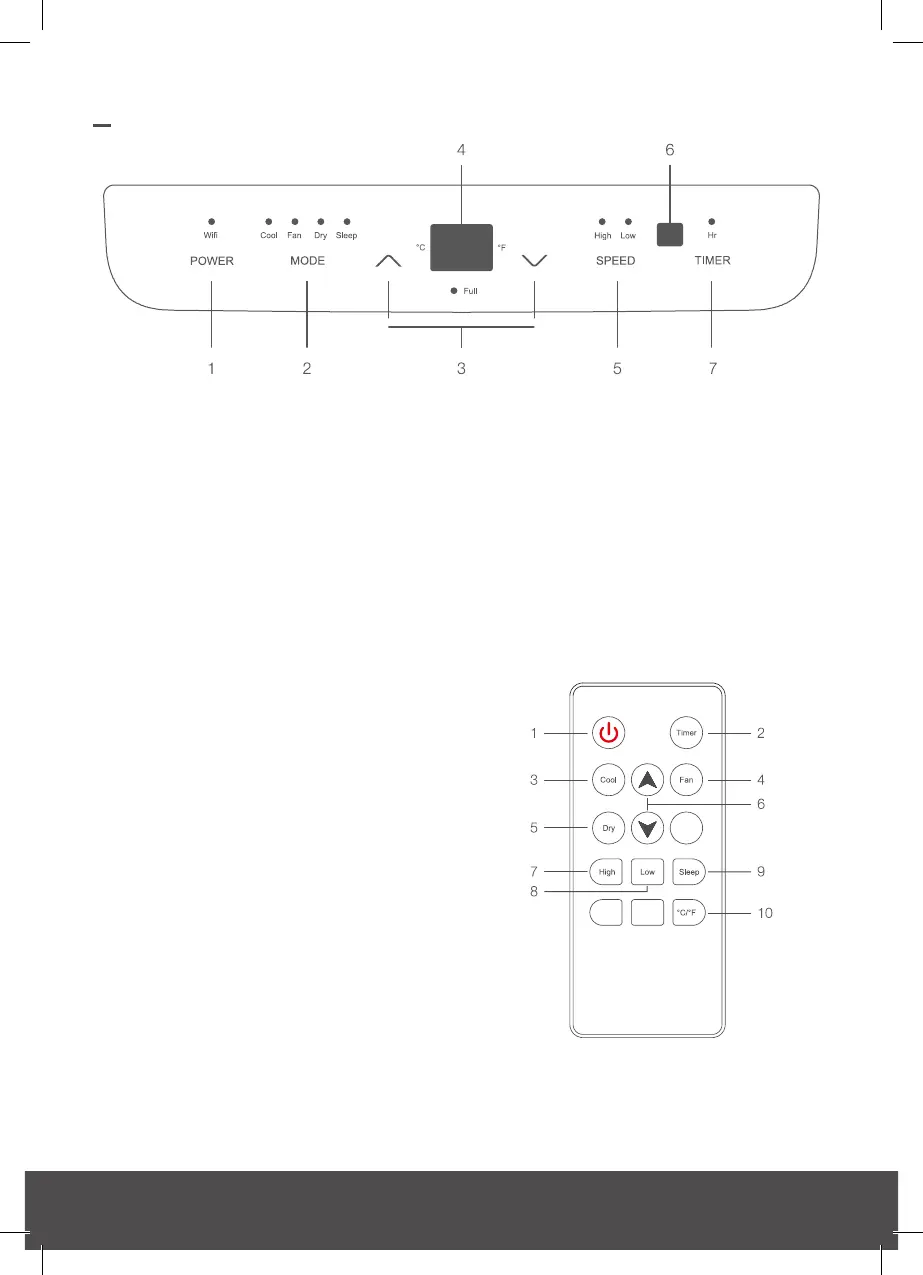
CONTROL PANEL
1. Power button
2. Change mode button
3. Up/Down buttons
4. Display
5. Fan speed button
6. Remote Sensor
7. Timer button
Indicator light symbols moving from left to
right
• Wi-Fi indicator: Download the “Smart
Life” app, then follow the instructions
below to connect to Wi-Fi and to manage
the Wi-Fi settings.
• Cooling mode indicator light.
• Fan-only mode indicator light.
• Dry (Dehumidifying) mode indicator light.
• Sleep mode indicator light.
Digital display panel moving from right to
left
• Degrees fahrenheit indicator light
• Degrees celsius indicator light
• Water tank full indicator light
Fan speed Indicator lights
• High fan speed indicator light
• Low fan speed indicator light
• Timer mode indicator light
Remote control
1. Power button
2. Timer button
3. Cooling mode button
4. Fan-only mode button
5. Dry (Dehumidifying) mode button
6. Up/Down buttons
7. High fan speed button
8. Low fan speed button
9. Sleep mode button
10. Temperature unit button


 To Next Page