6 | English
CONTROLS
Power Button
Turn the appliance on and o.
Oscillation Button
Activates the oscillating vertical louvres
ensuring continuous air circulation.
To further alter the wind ow manually position
the horizontal louvres to the desired angle.
Note: When adjusting the horizontal louvres
do so gently so as not to cause damage.
Fan Speed Button
Select between high, medium, and low fan
speeds.
Note: Option not available in night mode.
Mode Button
Select between natural and night modes.
Natural Mode - The fan speed transitions
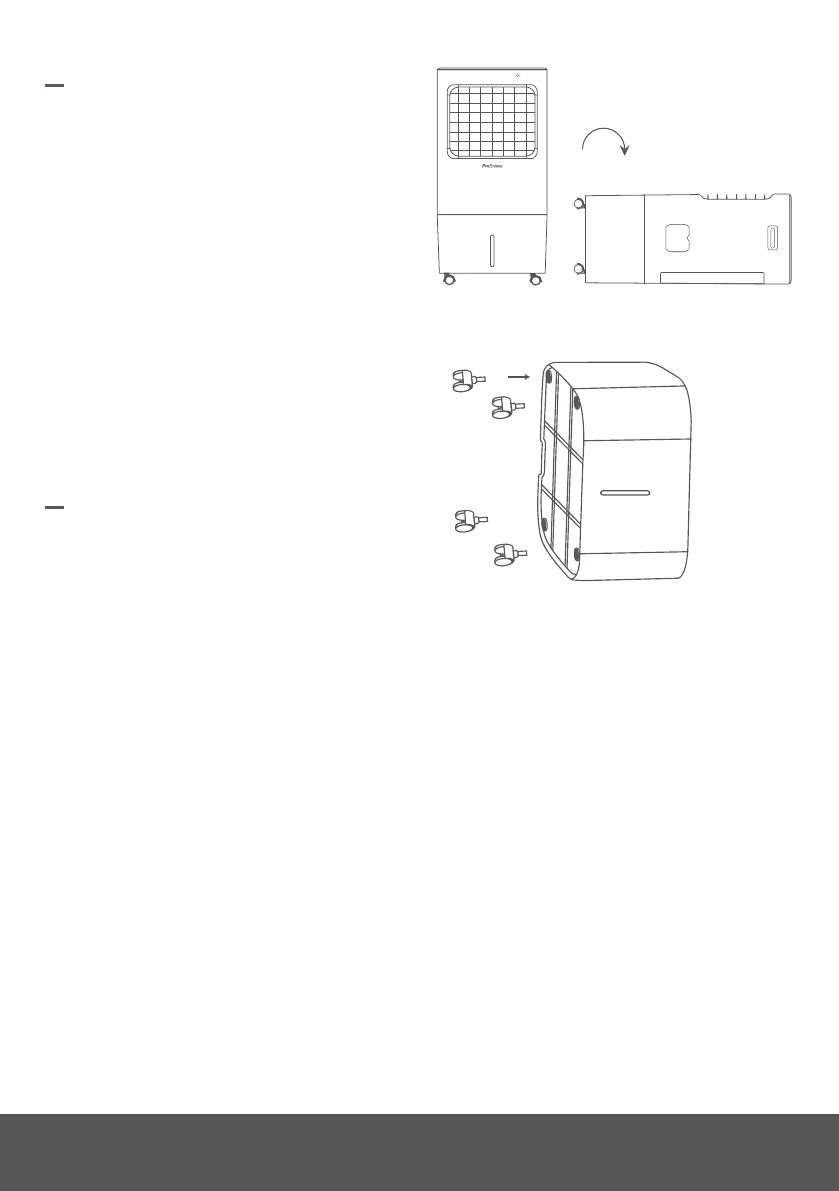
WHEEL ASSEMBLY
Prior to use, ensure that the wheels are axed
to the appliance for ease of maneuverability.
To ax the wheels to the appliance:
1. Lay the appliance sideways on a clean,
at, and stable surface.
2. Take one of the four provided wheels
and insert the metal rod atop the wheel
into one of the four wheel locking points,
applying force until the metal rod locks
into position.
3. Repeat step 2 for the remaining three
wheels.
4. Turn the appliance upright.
2 & 3.
1.
automatically through the available speeds
and o to create a natural air ow.
Night Mode - The fan speed is set to medium
and after a period of 15 minutes it reduces to
low fan speed to reduce energy consumption.
Note: Fan speed cannot be manually set
whilst in night mode.
Timer Button
Set a turn-on and turn-o timer between one
to seven hours.
Setting a turn-on timer:
1. Ensure the appliance is plugged in and
the power socket turned on.
2. Press the timer button to set the desired
time (one to seven hours) until turn-on.


 To Next Page