5
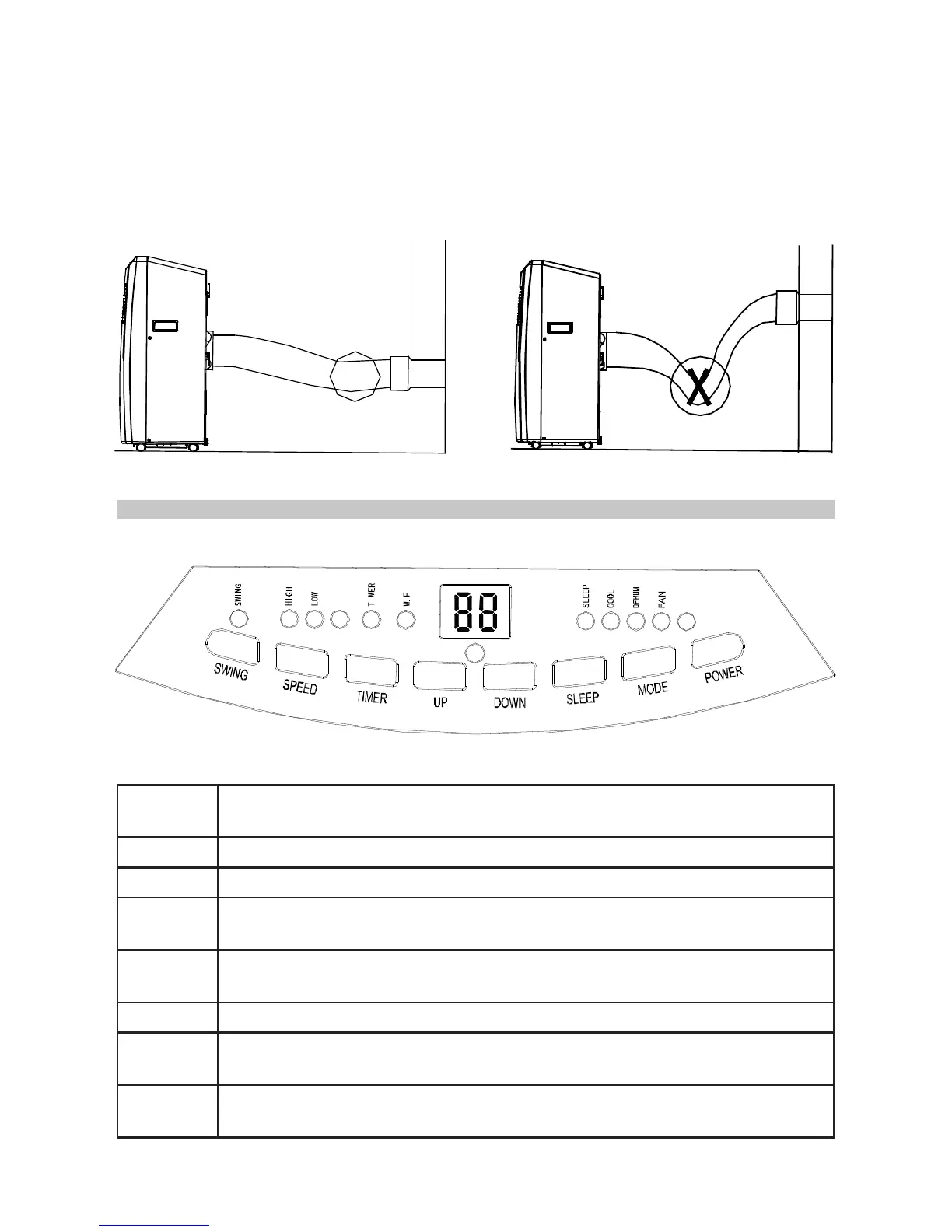
Installation Errors
• In order to operate efficiently, the air must be able to flow freely in the exhaust
pipe.
• Avoid any sharp bends in the exhaust pipe (Fig.3).
• Keep it as level as possible.
• Keep its length as short as possible. The maximum extension length of the
exhaust pipe is 1.5m. Do not try to lengthen it.
CONTROL PANEL
POWER
Press to turn the air conditioner on or off. When it turns on, it will do so in
the default mode of cooling with low fan speed.
MODE Press to select cooling, dehumidifying and fan mode.
SPEED Press to select fan speed (high or low).
DOWN
In cooling mode, press to reduce the temperature. Note: Temperature
range is 16°C to 31°C.
UP
In cooling mode, press to increase temperature. Note: Temperature
range is 16°C to 31°C.
SLEEP In cooling mode, press to turn on/off the sleep mode function.
TIMER
In power-on or standby mode, press to set up on/off delay time from 1 to
24 hours.
SWING
Press once and the louvre will swing continuously left and right. Press
the button again and the louvre will stop moving.
Fig.
3


 To Next Page