12 in. Professional SAE/Metric Digital
Surveyor's Wheel
Visit www.princessauto.com for more information 5
8424400 V 3.05
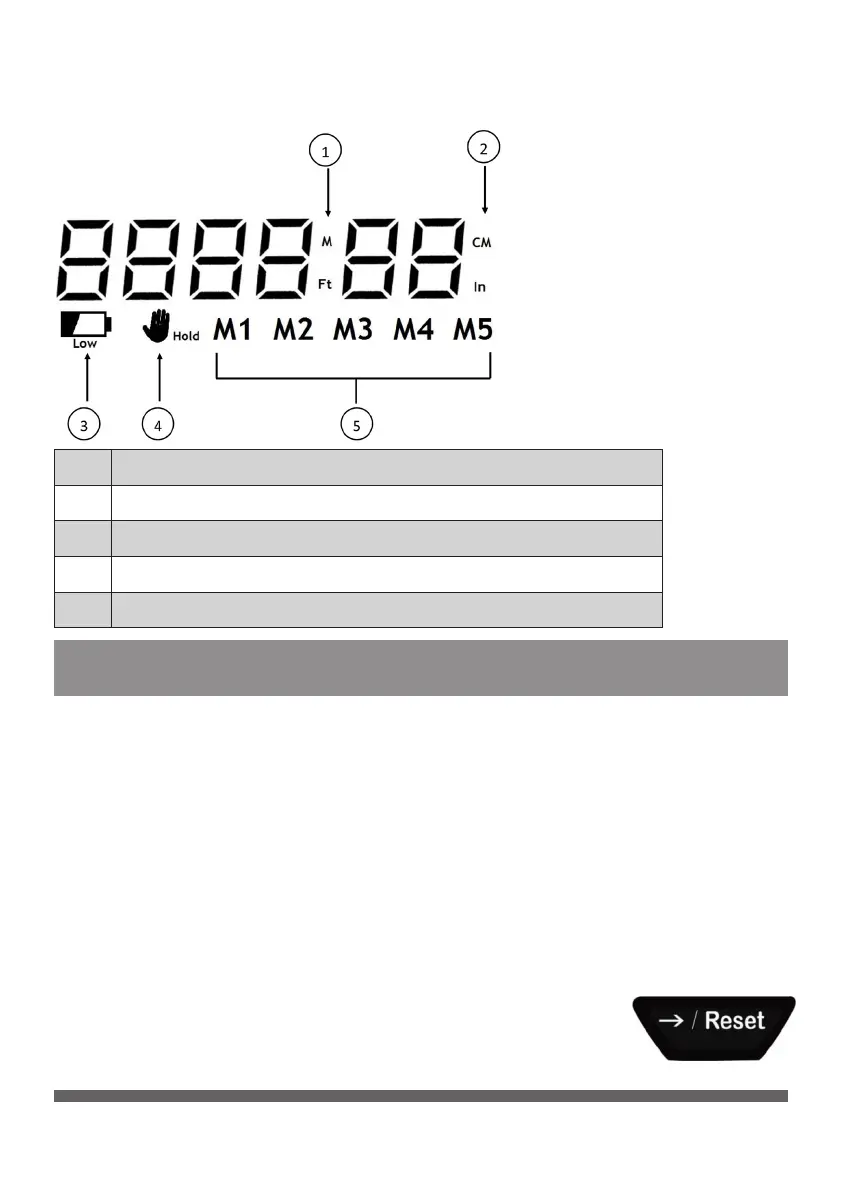
DISPLAY
1 Metric / SAE Unit Symbol (Meter / Feet)
2 Metric / SAE Unit Symbol (Centimeter / Inches)
3 Low Power Symbol
4 Hold Symbol
5 Memory Symbol
OPERATION
POWER ON/OFF
Turn the tool On by pressing the On/O button and holding the
button for two seconds. Press the button again to turn the tool O.
UNIT CHANGE
Press the M/Ft button to switch the unit of measurement from
Metric to SAE.
SET TO ZERO
Press and hold the Reset and Memory Selection
Right button for two seconds to set the number
to zero.


 To Next Page