INSTALLATION
AA
AA
AA
AAA
AAA
AA
REMOTE
OFF
ON
LEARN
INSTALLING BATTERIES
CAUTION: Do not mix old and
new batteries. Do not mix alka-
line, standard (carbon - zinc), or
rechargeable (nickel - cadmium)
batteries. Do not dispose of
batteries in re, batteries may
explode or leak.
• Batteries are included.
• Remove batteries when depleted.
• Install/replace the batteries according to the
type and quantity stated in table below.
• Be sure to observe proper polarity (+/-)
when installing or replacing the batteries.
Damage due to improper battery installation
may void the warranty on the product.
• For remote control systems, maximize bat-
tery life by turning off the receiver when it
is not in use.
• For long periods of non-operation, remove
batteries from all components for safety.
Component Type of Battery Qty.
Ignitor AAA 1
Remote Control AAA 2 or 3*
Remote Receiver AA 4
*Note: Quantity depends on model of remote
Control.
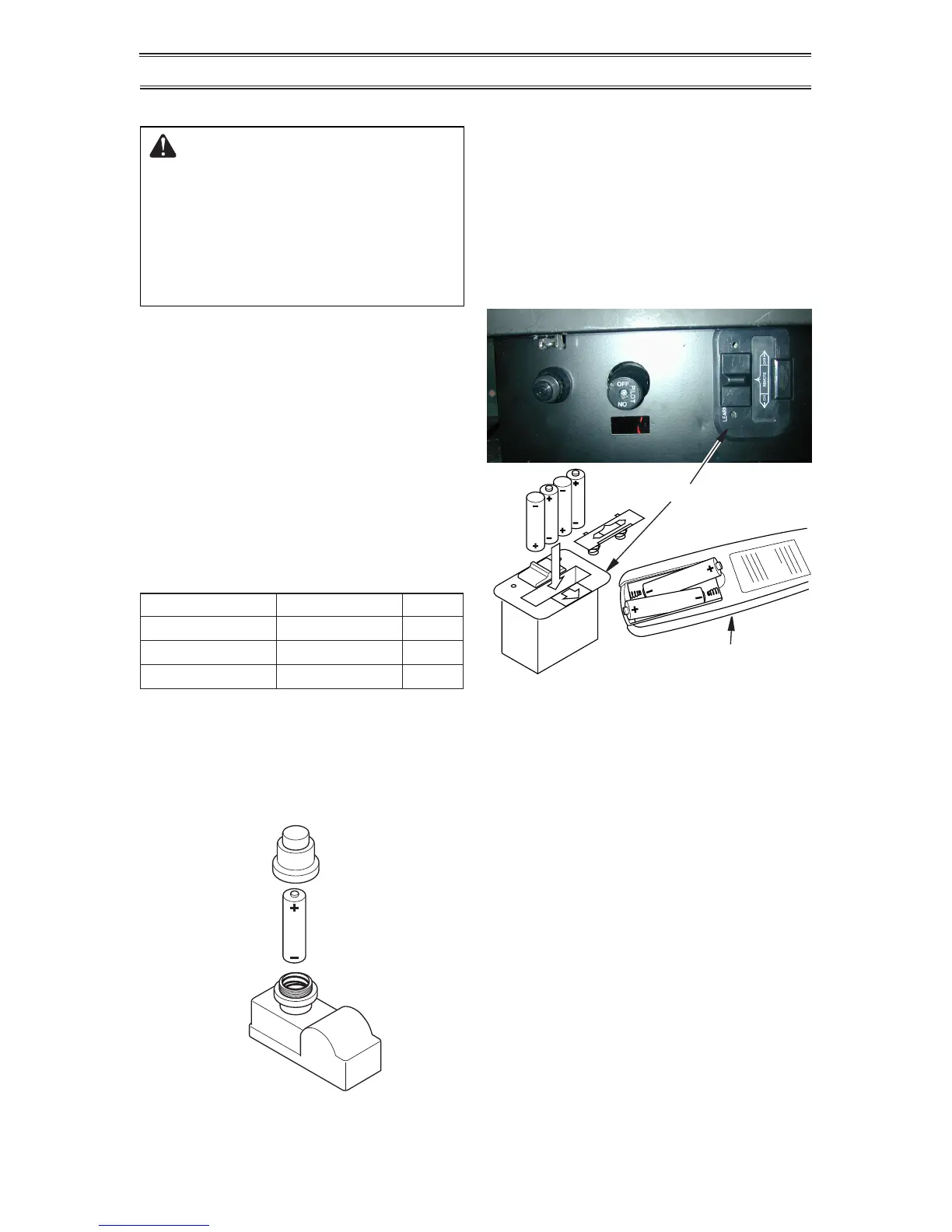
Ignitor
Unscrew ignitor cap and install a AAA battery
with the + pointing out. Replace cap.
Figure 23 - Installing Batteries in Remote
Control and Receiver
Receiver
Remote Control
(Transmitter)
Receiver and Remote Control
Batteries are required in both the Remote
Control (Transmitter) (2 AAA size) and Re-
ceiver (4 AA size) (see Figure 23).
Note: Be sure batteries are placed correctly.
Reversing the batteries can cause damage to
the receiver and remote. Replace all batteries
on a yearly basis or sooner.
Figure 22 - Installing Battery in Ignitor
AAA
Battery
Positive
UP


 To Next Page