EasyManua.ls Logo

Procon MelcoBEMS MINI - User Manual

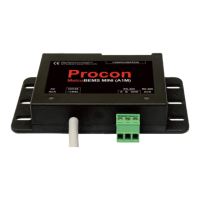
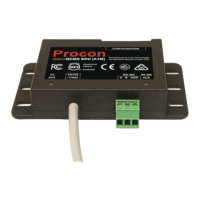
Procon MelcoBEMS MINI
96 pages
Print Icon
To Next Page IconTo Next Page
Loading...
• i •
Procon
MelcoBEMS MINI (A1M)
FOR INSTALLERS
INSTALLATION MANUAL
Manual version 1.0.16
Firmware version 3.0.15
For safe and correct use, please read this installation manual thoroughly before installing the PROCON
MelcoBEMS MINI (A1M).
Question and Answer IconNeed help?

Do you have a question about the Procon MelcoBEMS MINI and is the answer not in the manual?

Summary

Preface

Safety warnings

General safety guidance for installation and operation of the MelcoBEMS MINI (A1M).

Disclaimer

Information regarding warranty, liability, and manual updates for the product.

Amendment Register

Firmware revision history

1. Safety precautions

2. Overview

3. DIP switch settings

3.1. RS-485 Node address

Setting the unique RS-485 network address for the MelcoBEMS MINI (A1M) unit.

3.2. RS-485 communication settings

Configuring baud rate and parity for RS-485 communication via software or DIP switch.

3.3. Protocol selection

Selecting between BACnet MS/TP and Modbus RTU protocols using DIP switch 7.

4. Deadband Mode

4.1. Settings

Configuration of heating and cooling setpoints for the deadband mode.

4.2. Operation

How the deadband mode controls unit operation based on room temperature.

5. Setpoint Offset

5.1. Settings

Configuration of BMS Room Temperature and BMS Virtual Setpoint for offset calculation.

6. RS-485 termination

7. Installation

7.1. Physical connection

Connecting the flying lead to the CN105/CN92 connector on the controller PCB.

7.3. Modbus connections

Details on the 3-way screw terminal for Modbus RTU communication via RS-485.

7.5. Using Twin;Triple;Quad systems

Guidelines for using MelcoBEMS MINI with twin, triple, or quad indoor unit systems.

8. Status LEDs

8.1. AC ACK

Indicates power status and communication with the indoor unit.

9. BACnet

9.1. BACnet MS;TP

Connecting the MelcoBEMS MINI (A1M) to a BACnet MS/TP network via RS-485.

9.3. Object types supported

Table detailing the BACnet object types supported by the device.

10. Modbus connection

10.1. Modbus background

Explanation of Modbus master-slave architecture and RS-485 communication.

10.2. Modbus registers

Summary of the four Modbus register types: Discrete Input, Coil, Input Register, Holding Register.

11. Modbus tables - Air-To-Air systems

11.1. Holding registers

List of holding registers for Air-To-Air systems with addresses and details.

11.2. Input registers

List of input registers for Air-To-Air systems, including fault codes and firmware version.

12. Modbus tables - Air-To-Water systems

12.1. Holding registers

Comprehensive list of holding registers for various Air-To-Water unit types.

12.2. Input registers

List of input registers for Air-To-Water systems, covering error codes and system types.

13. Modbus tables - Lossnay systems

13.1. Holding registers

Holding registers for Lossnay systems, including Slave ID, Baud Rate, and Parity Type.

13.1. Input registers

Input registers for Lossnay systems, covering firmware version, error codes, and operational modes.

Appendix A - Compatible Air-To-Air units

Appendix B - Compatible Air-To-Water units

Appendix C - Compatible Lossnay units

Summary

Preface

Safety warnings

General safety guidance for installation and operation of the MelcoBEMS MINI (A1M).

Disclaimer

Information regarding warranty, liability, and manual updates for the product.

Amendment Register

Firmware revision history

1. Safety precautions

2. Overview

3. DIP switch settings

3.1. RS-485 Node address

Setting the unique RS-485 network address for the MelcoBEMS MINI (A1M) unit.

3.2. RS-485 communication settings

Configuring baud rate and parity for RS-485 communication via software or DIP switch.

3.3. Protocol selection

Selecting between BACnet MS/TP and Modbus RTU protocols using DIP switch 7.

4. Deadband Mode

4.1. Settings

Configuration of heating and cooling setpoints for the deadband mode.

4.2. Operation

How the deadband mode controls unit operation based on room temperature.

5. Setpoint Offset

5.1. Settings

Configuration of BMS Room Temperature and BMS Virtual Setpoint for offset calculation.

6. RS-485 termination

7. Installation

7.1. Physical connection

Connecting the flying lead to the CN105/CN92 connector on the controller PCB.

7.3. Modbus connections

Details on the 3-way screw terminal for Modbus RTU communication via RS-485.

7.5. Using Twin;Triple;Quad systems

Guidelines for using MelcoBEMS MINI with twin, triple, or quad indoor unit systems.

8. Status LEDs

8.1. AC ACK

Indicates power status and communication with the indoor unit.

9. BACnet

9.1. BACnet MS;TP

Connecting the MelcoBEMS MINI (A1M) to a BACnet MS/TP network via RS-485.

9.3. Object types supported

Table detailing the BACnet object types supported by the device.

10. Modbus connection

10.1. Modbus background

Explanation of Modbus master-slave architecture and RS-485 communication.

10.2. Modbus registers

Summary of the four Modbus register types: Discrete Input, Coil, Input Register, Holding Register.

11. Modbus tables - Air-To-Air systems

11.1. Holding registers

List of holding registers for Air-To-Air systems with addresses and details.

11.2. Input registers

List of input registers for Air-To-Air systems, including fault codes and firmware version.

12. Modbus tables - Air-To-Water systems

12.1. Holding registers

Comprehensive list of holding registers for various Air-To-Water unit types.

12.2. Input registers

List of input registers for Air-To-Water systems, covering error codes and system types.

13. Modbus tables - Lossnay systems

13.1. Holding registers

Holding registers for Lossnay systems, including Slave ID, Baud Rate, and Parity Type.

13.1. Input registers

Input registers for Lossnay systems, covering firmware version, error codes, and operational modes.

Appendix A - Compatible Air-To-Air units

Appendix B - Compatible Air-To-Water units

Appendix C - Compatible Lossnay units

Procon MelcoBEMS MINI Specifications

General IconGeneral
BrandProcon
ModelMelcoBEMS MINI
CategoryMedia Converter
LanguageEnglish

Related product manuals