Illustrations et photos non contractuelles
Copyright © 2015 IPE Music
2 – Connections
To ensure the proper implementation of your monitor system, please adhere to the following
procedures at all times:
1. Check your audio lead.
2. Switch on the other equipment you intend to use (audio mixer, PC, audio source, etc.)
3. Check your monitor settings and the settings of your audio sources (lowest volume).
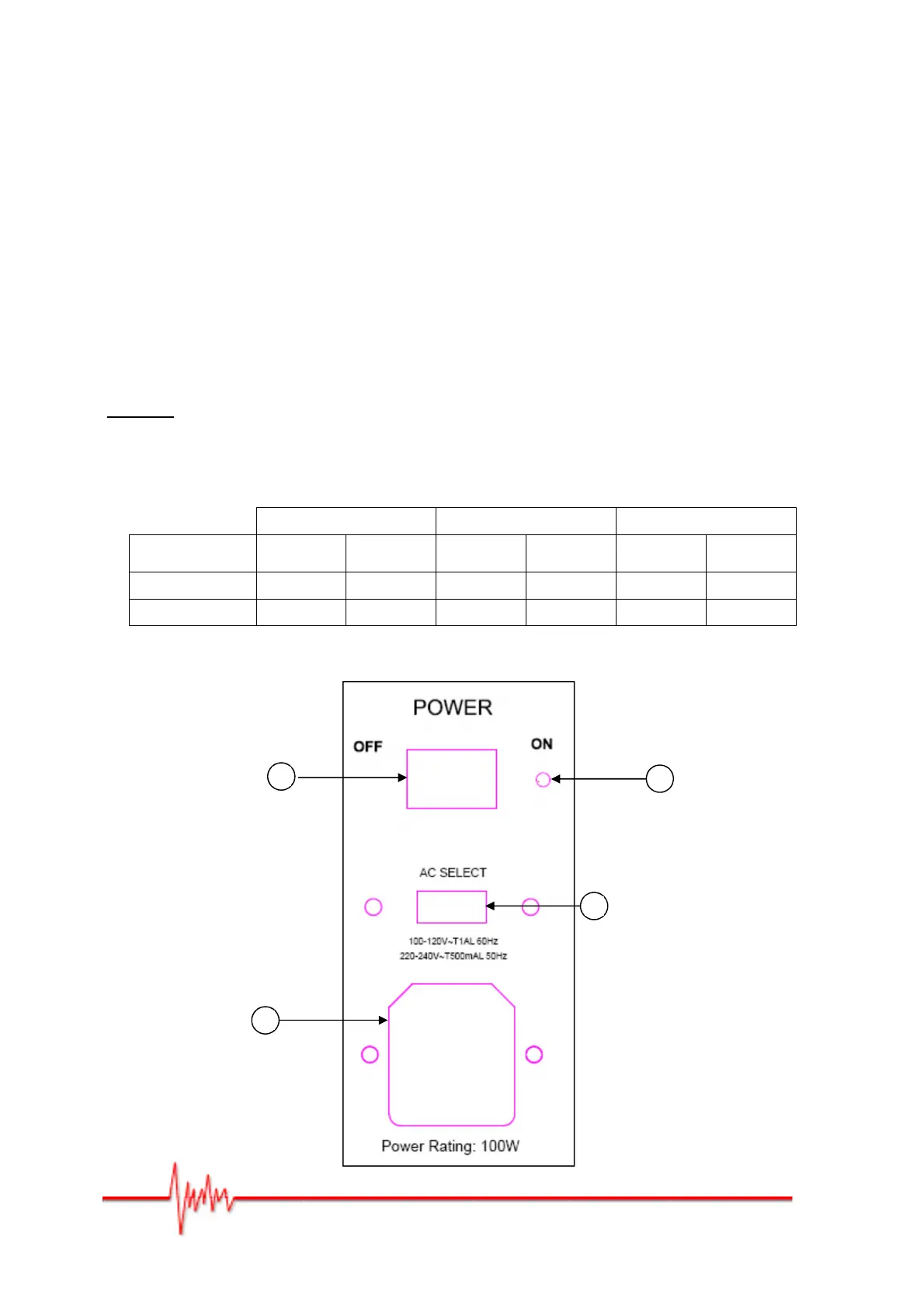
4. Check the voltage (2), switch on the Prodipe monitors by putting switch (1) in the ON
position and the blue LED will light up.
Note that: when you want to shut everything down, the Prodipe monitors must be switched
off first, switch (1) in the OFF position and the blue LED (3) off.
Careful: choosing the "AC Select" (2) voltage depends on your power supply. You should
make any changes when the system has been switched off, switch (1) in the OFF position
and the power supply lead unplugged.
Pro 5 V3 Pro 8 V3 Pro 10s V3
SOURCE
100V –
120V
220V –
240V
100V –
120V
220V –
240V
100V –
120V
220V –
240V
AC SELECT (2)
115V 230V 115V 230V 115V 230V
FUSIBLE (4)
1A 500mA 2A 1A 3.15A 1.6A
Figure 2


 To Next Page