Setting the transmission channel
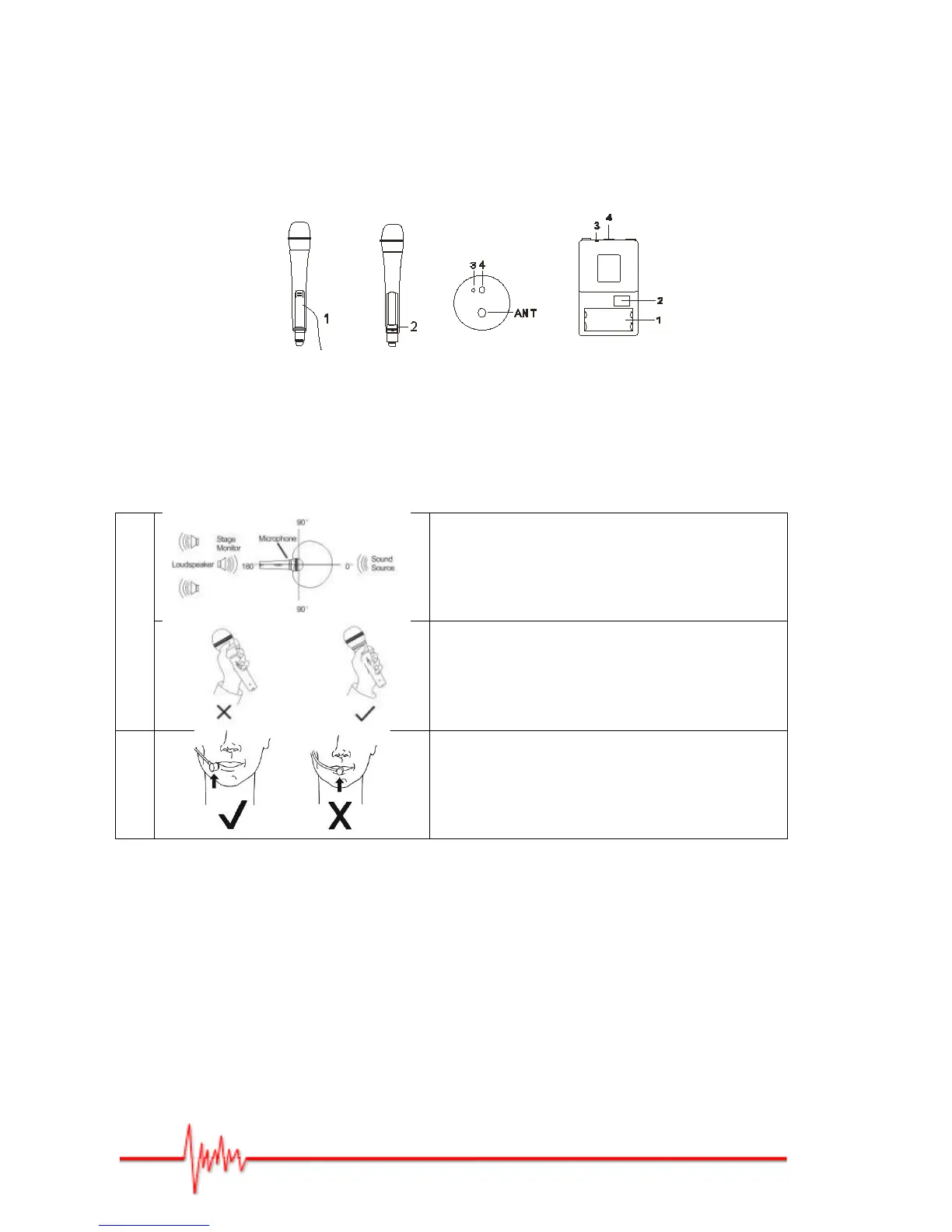
Transmission channel setting is automatic. Position the handheld mic/body pack mic (battery
compartment open) in such a way that the diaphragm [IR] is facing the receiver (2). Set the
handheld mic/body back mic switch to ‘ON’ and press the receiver button [IR]. Synchronisation
between transmitter and receiver occurs automatically. When the receiver light (green) comes
on, automatic synchronisation is complete.
When synchronising the TT100 Duo UHF Lanen ‘dual UHF mic’ system or several UHF100 mics
(max 8 mics at any one time), follow the above synchronisation steps for EACH mic.
IMPORTANT: Before synchronising an additional mic, you must switch off the already
‘synchronised’ mic(s).
Using the Equipment
handheld mic
For improved gain before feedback and elimination of
background noise, keep the mic pointed away from
unwanted noise and direct it towards the sound source.
Avoid covering any part of the mesh with your hand. This
can alter the sound and cause polarity problems, making
feedback more likely.
Headset mic
The Body Pack mic has a gain control to the left of the
switches underneath the battery cover on the left hand
side of the diaphragm [IR].
Use a small screwdriver to adjust the gain – clockwise to
increase; anti-clockwise to decrease.
UHF100 – General Characteristics
- 100 channel UHF receiver (PLL).
- IR synchronisation between transmitter and receiver.
- Hifi module.
- Super anti-jamming circuit design.
- Extremely low levels of background noise.
- Automatically finds and sets available frequencies.
- The UHF100 mic can be used with any UHF100 Prodipe receiver.
Illustrations et photos non contractuelles
Copyright © 2013 IPE Music


 To Next Page