9
23. RF
ThisgreenLEDshowswhentheradiofrequencysignalisreceived:
TheLEDisONiftheRM3000transmitterisswitchedonandsettothesamechannelasthereceiver.
TheLEDisOFFiftheRM3000transmitterisswitchedofforsettoadifferentchannel.
IftheRM3000transmitterisswitchedOFFandthisLEDisON,thereisprobablyanotherRFequipment
transmittingonthesameRFchannel:selectadifferentchannelfrequency.
24. LCDDISPLAY
TheLCDdisplayshowsvariousinformation:
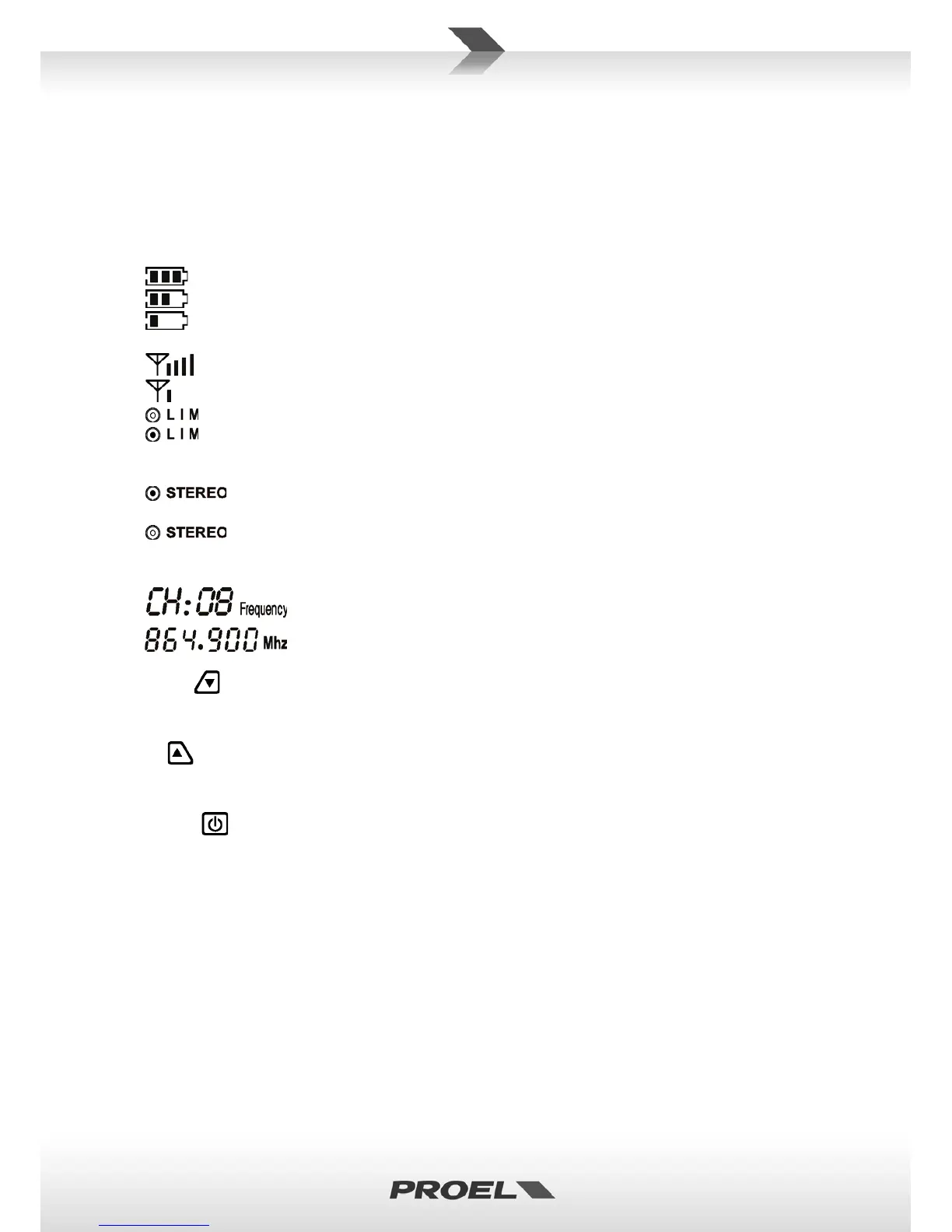
Thebatteriesarefullychargedandyouhave58hoursofworkingtimeusingalkalinebatteries.
Thebatteriesarehalfchargedandyouhave25hoursofworkingtimeusingalkalinebatteries.
Thebatteriesarealmostdischargedandyouhave02hoursofworkingtimeusingalkaline
batteries.Batteriesreplacementissuggestedassoonaspossible.
TheRFsignaliswellreceived.
TheRFsignalislow:placetheRM3000transmitterclosertothereceiver.
TheearphoneslimiterisOFF.
TheearphoneslimiterisON.Theearphoneslimiteravoidsthesignalpeaksandreducesthe
distortionforamorecomfortableuseoftheearphones.Pleasenotethatthelimiterdoesn’tprotectyour
earsfromhighsoundlevelsthatcoulddamageyourears.
ThesignalsenttotheearphonesisSTEREO,withdifferentsignalfortheleftandtheright
ear.
ThesignalsenttotheearphonesisMONOanditisthesameforleftandtherightears.The
monosignalisobtainedcombiningLandRsignalsatthereceiver(insteadofusingtheMONO/STEREO
(11)switch,whereLandRsignalsarecombinedatthetransmitterinputs).
Channelnumberanditscorrespondingfrequency:usethesamechannelas
intheRM3000TRtransmitter.Youcanchooseanyofthe8channelsavailable
inthe863865MHzband.
25. DOWN
Pressandholdthisbuttontoaccessthedisplayfunction(LIMisflashing).Whenafunctionisflashinguse
thisbuttontodeactivatethefunction(LIMorSTEREO)ortochoosethepreviouschannel.
26. UP
Pressandholdthisbuttontoaccessthedisplayfunction(LIMisflashing).Whenafunctionisflashinguse
ittoactivatethefunction(LIMorSTEREO)ortochoosethenextchannel.
27. ON/OFF
PressandholdthisbuttontoturnonandturnofftheRM3000Rreceiver.WhentheLIMfunctionis
flashing(seeabove),pressittochoosethenextfunction.
28. EARPHONEOUT
Connecttheearphonetothisminijackoutput.Theearphoneimpedancemustbe16ohmorbigger.
29. LINEOUT
Ifyouneedtoconnectanotheraudioequipmentyoucanusethislineoutput.Thisisaminijackoutput
terminatedinthisway:Shield–GND,Ring–RIGHT,Tip–LEFT.DONOTconnectaearphonetothis
output.
30. Thisisthespringforwearingthebodypack:fixittoabelt,strapordressinverticalposition.


 To Next Page